Etiqueta: digital certificate foreign nationals Spain

  • How to obtain your digital certificate in Spain: a step-by-step guide

    How to obtain your digital certificate in Spain: a step-by-step guide

    This tutorial is also available in: English | Español | العربية | Français

    Updated on 25 March 2026 | intercultural.info

    For whom this tutorial is intended

    This tutorial guides you step by step in order to obtain the FNMT digital certificate, issued by the Fábrica Nacional de Moneda y Timbre (FNMT, the Spanish National Mint and Stamp Factory). It is free of charge and enables you to manage immigration procedures and many other procedures with the Spanish administration online.

    If you wish to understand better what the digital certificate is, what it is for, and what relation it has with the extraordinary regularisation 2026, we recommend that you read our full article: Digital certificate for foreign nationals in Spain.

    ⚠️ Are you awaiting the extraordinary regularisation 2026?

    If the online submission route is confirmed in the BOE, you will need a digital certificate or an electronic signature system in order to submit your application through Mercurio — or for somebody to do so in your name. We explain the connection further below, in the section «And the extraordinary regularisation 2026?«.

    If you have an NIE (Número de Identidad de Extranjero/a, Foreigner Identification Number) — even if you do not have a valid residence permit or a TIE — you may obtain this certificate. Further below we explain which documents the FNMT accepts.

    And if you do not have an NIE? This tutorial also matters to you. If you have a family member, a close friend, or any trusted person with a residence permit or Spanish nationality, that person may obtain their own digital certificate and submit certain applications in your name as representative if the procedure permits it. Knowing how the process functions will help you to prepare.

    This tutorial follows the same steps explained by the Tax Agency (AEAT / Hacienda) in its official video on how to obtain an FNMT electronic certificate. Some of our screenshots are taken from that video. Administrative procedures may change over time; we have verified that this is the procedure in force on the publication date of this tutorial.

    What you need before you begin

    Before beginning the process, make sure that you have:

    • Your NIE and a document proving it (see further below the documents accepted by the FNMT), together with your passport.
    • A computer, whether PC, Mac or Linux. The complete process must be conducted from the same device, the same user account, and the same browser.
    • An email address to which you have access.
    • An updated browser: Mozilla Firefox, Google Chrome, Microsoft Edge, Opera or Safari.
    Important: do not format the computer and do not change browser or operating system user during the process. Everything must be done from the same device from beginning to end.

    The appearance of some windows may differ from the screenshots shown in this tutorial, depending on the operating system installed on your computer.

    Step 1 — Install the FNMT software

    Before applying for the certificate, you need to install a small program called Configurador FNMT-RCM. This software generates the security keys necessary for your certificate. It functions on Windows, Mac and Linux.

    Download it from the FNMT electronic office: sede.fnmt.gob.es › Certificados › Persona Física › Obtener Certificado Software › Configuración previa.
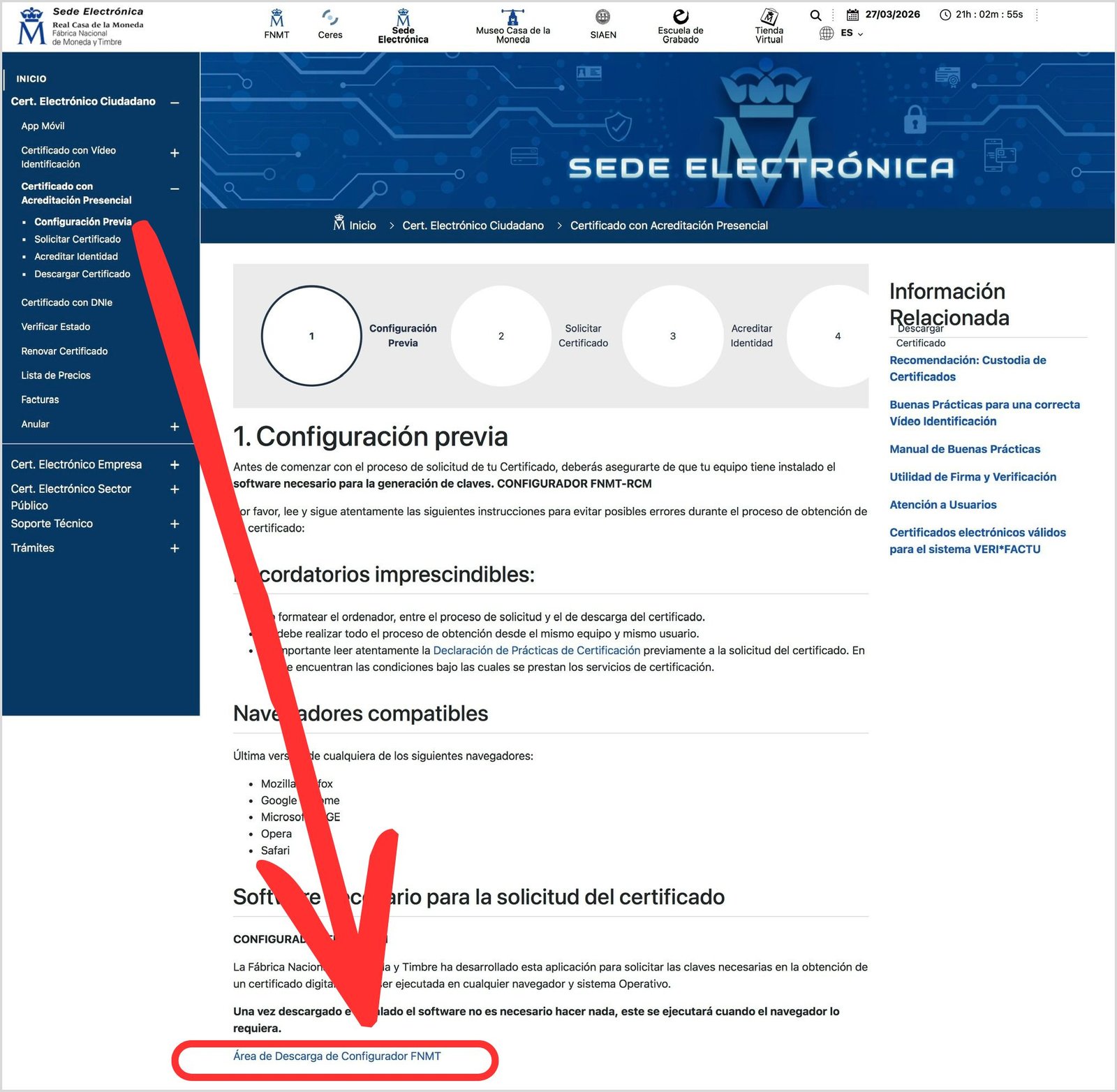
    FNMT preliminary configuration page on sede.fnmt.gob.es
    FNMT preliminary configuration page | Source: sede.fnmt.gob.es

    Select the download link corresponding to your operating system — Windows, Mac or Linux — and follow the steps of the installation assistant.
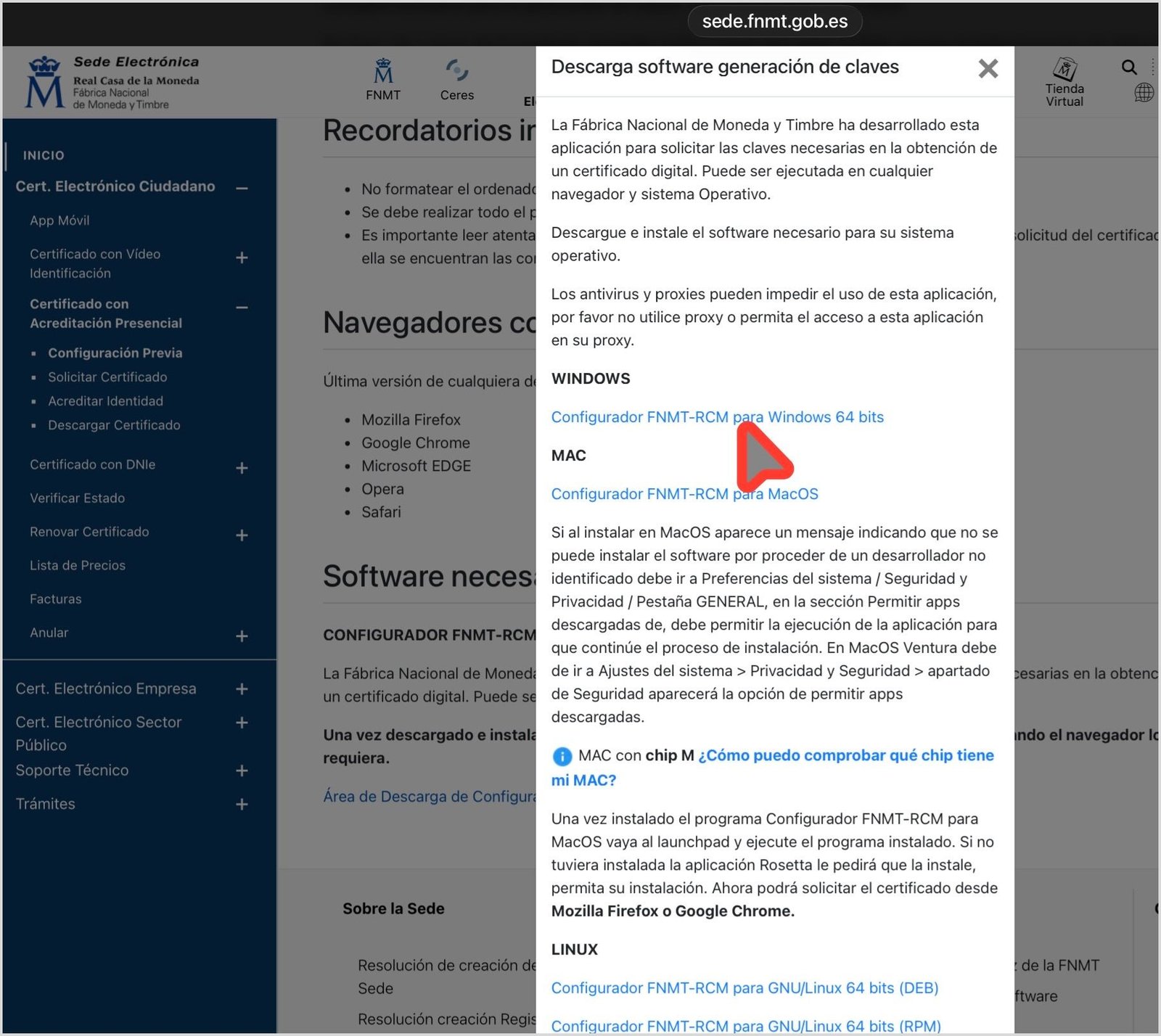
    Screen for selecting the operating system to download the Configurador FNMT-RCM
    Selection of operating system for downloading the Configurador FNMT-RCM | Source: sede.fnmt.gob.es

    On Mac, you may need to authorise the installation from System Settings › Privacy and Security. Once installed, you do not need to open it manually: it will run automatically when the browser requires it.
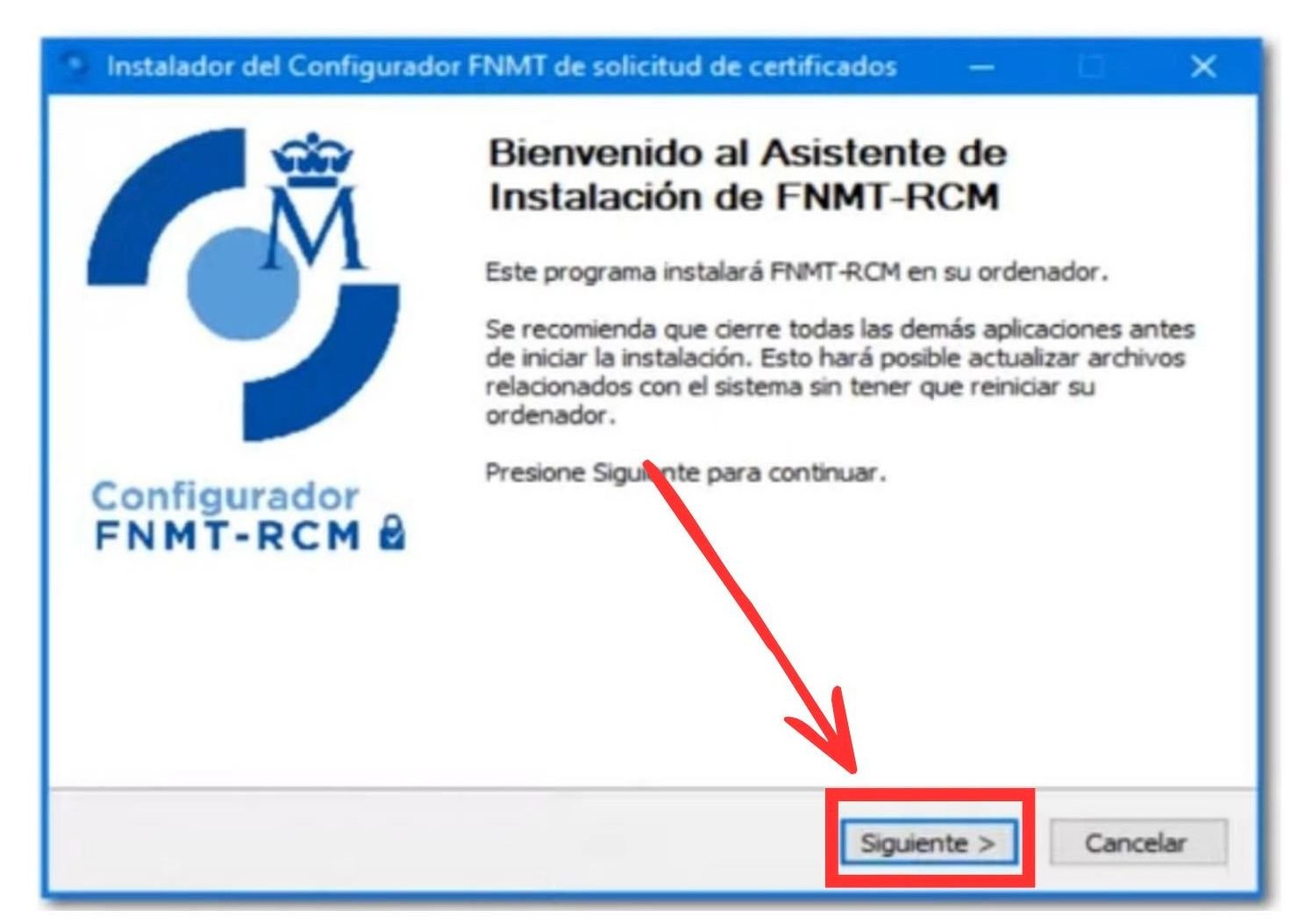
    Installation assistant for the Configurador FNMT-RCM on Windows
    Installation assistant for the Configurador FNMT-RCM (Windows) | Source: sede.fnmt.gob.es (screenshot from the AEAT tutorial video)

    We also recommend that you install the AutoFirma application, which many administration websites require in order to function with the certificate, as is the case with the Mercurio platform through which many online immigration applications are submitted. You may download it from firmaelectronica.gob.es.

    Step 2 — Apply for the certificate on the website

    Go to: sede.fnmt.gob.es › Certificados › Persona Física › Obtener Certificado Software › Solicitar Certificado.

    Complete the form with:

    • Your NIE, with 9 characters, adding zeros on the left if necessary.
    • Your first surname, exactly as it appears on your identity document.
    • Your email address.
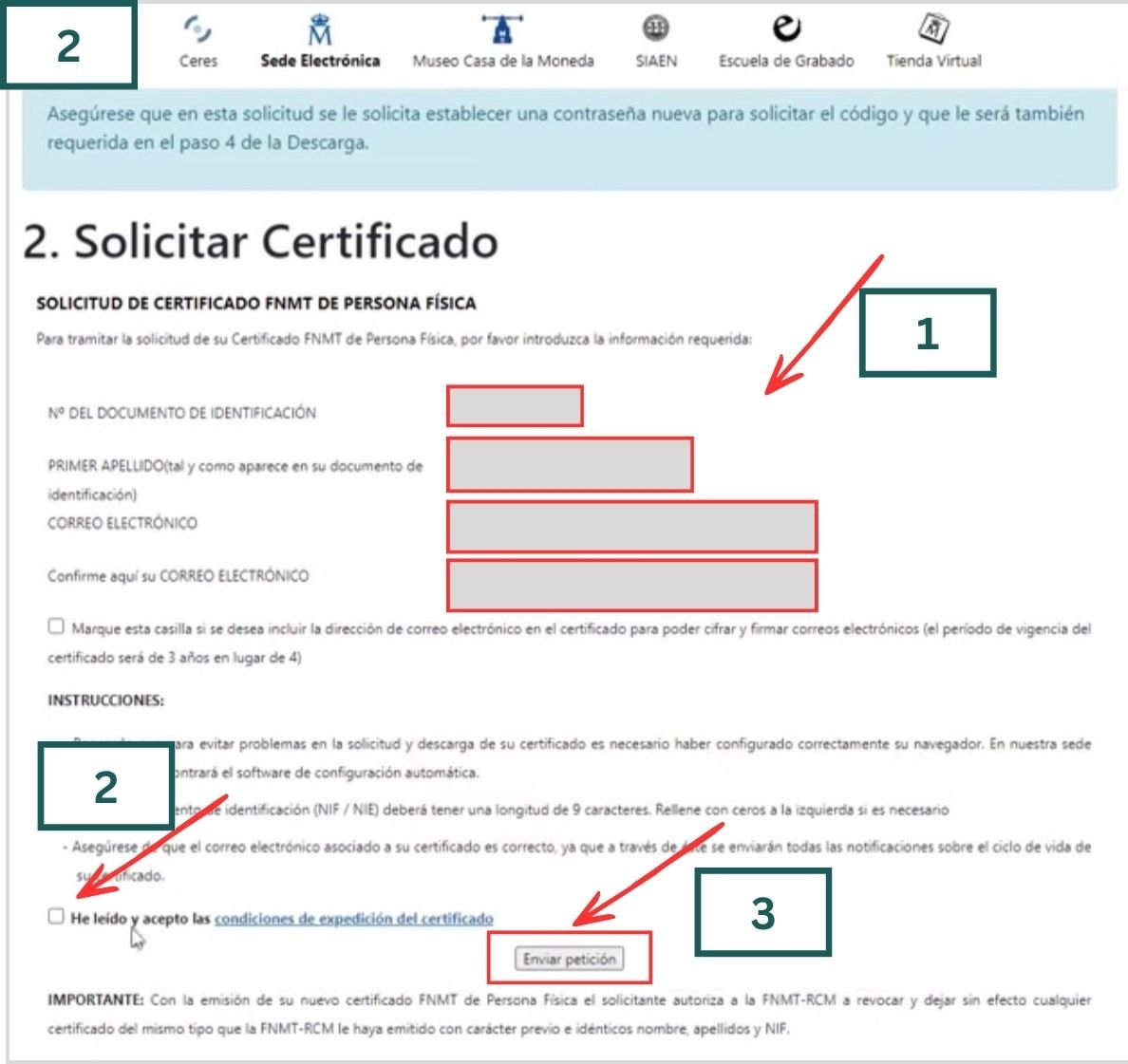
    Digital certificate application form on the FNMT electronic office
    Digital certificate application form | Source: sede.fnmt.gob.es (screenshot from the AEAT tutorial video)

    Complete the four fields in the form:

    • Field 1: identification document number — the NIE in the case of foreign nationals without Spanish nationality
    • Field 2: first surname
    • Field 3: email address
    • Field 4: repeat the same email address

    Read and accept the conditions of use. When you click on «Enviar petición», the browser will request permission to open the Configurador FNMT-RCM. In the window that appears, click on «Abrir». If it offers you the option of always permitting access, select it.
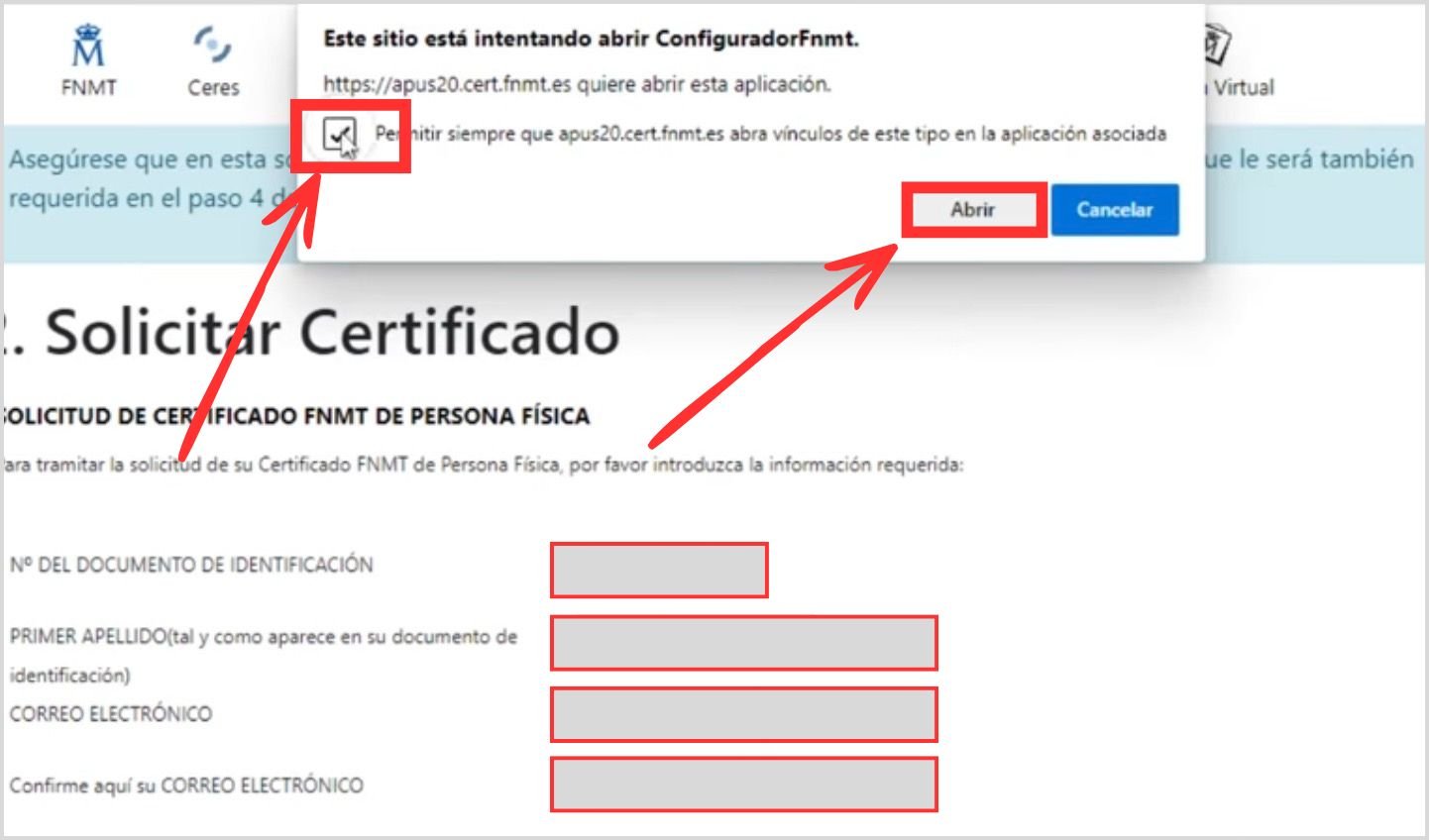
    Browser permission dialogue to open the Configurador FNMT-RCM
    Browser permission to open the Configurador FNMT-RCM | Source: sede.fnmt.gob.es (screenshot from the AEAT tutorial video)

    Next, the system will ask you to create a password in order to protect the keys of your certificate. Keep it carefully: you will need it to download the certificate and it cannot be recovered. The same password will also be used for the backup copy.
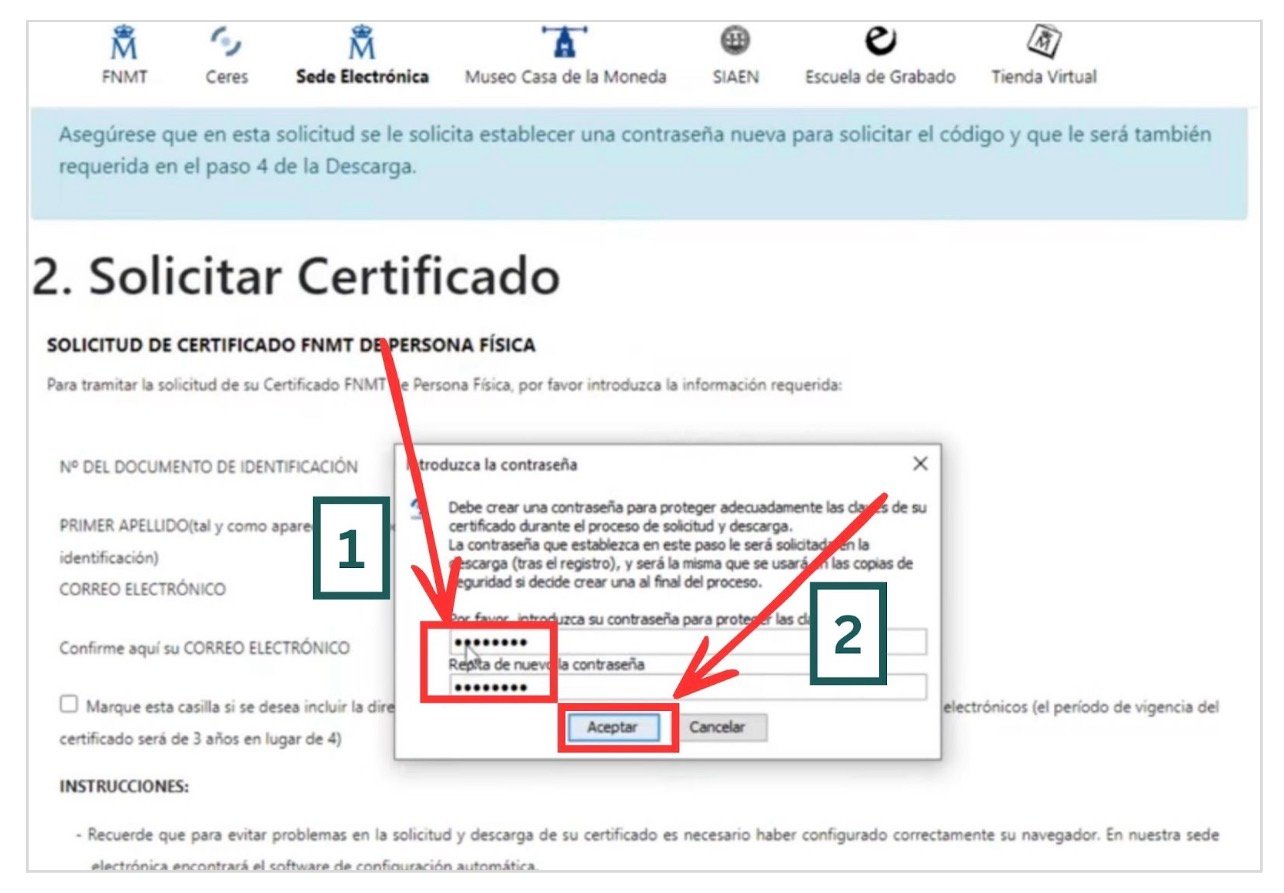
    Password creation dialogue for the certificate keys
    Password creation dialogue | Source: sede.fnmt.gob.es (screenshot from the AEAT tutorial video)

    If everything has gone well, you will see a confirmation message with your details.
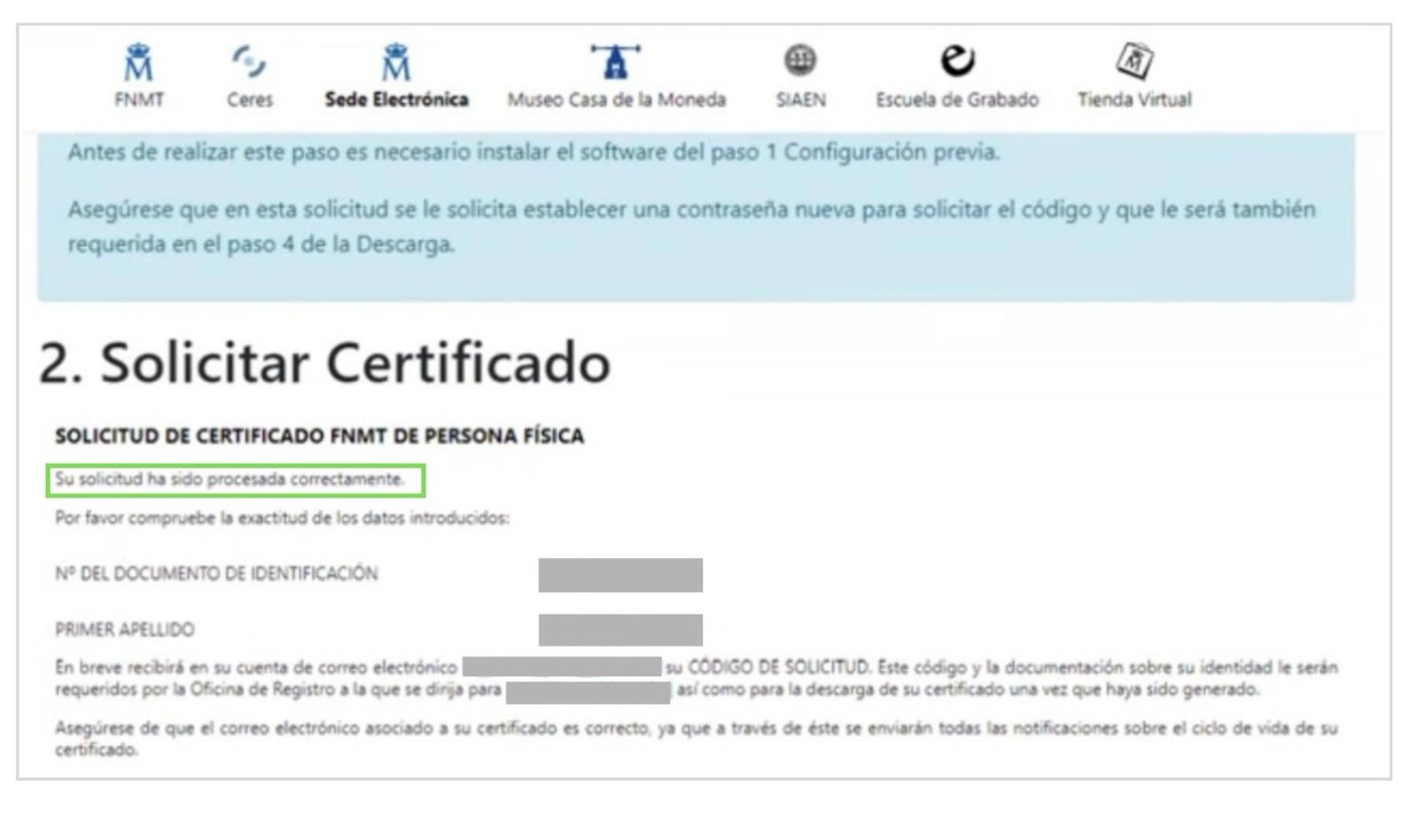
    Confirmation that the application has been processed correctly
    Confirmation that the application has been processed correctly | Source: sede.fnmt.gob.es (screenshot from the AEAT tutorial video)

    You will receive an email with your application code. Note it or print it: you need it at the office and for the download.
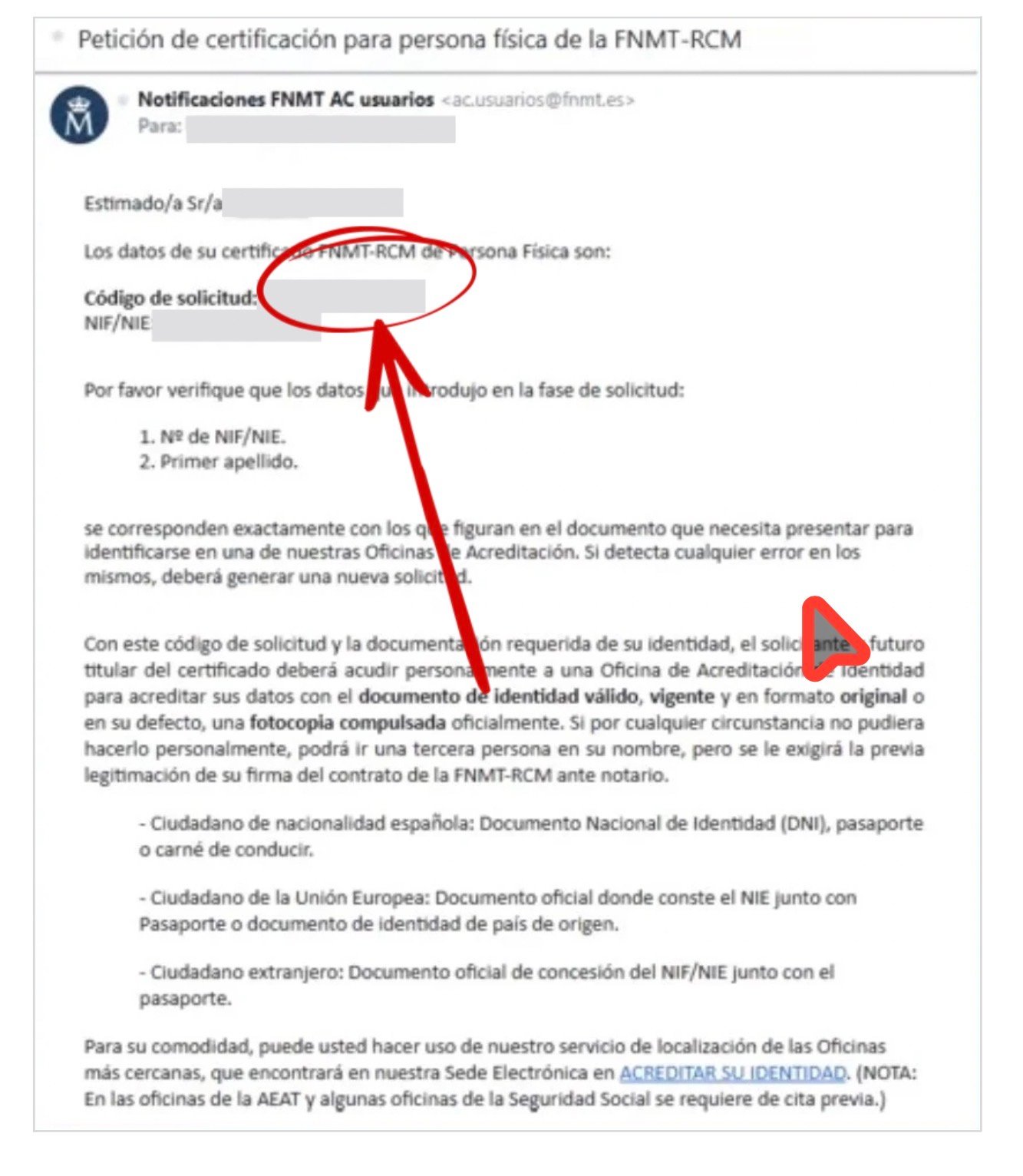
    FNMT email containing the application code
    FNMT email containing the application code | Source: sede.fnmt.gob.es (screenshot from the AEAT tutorial video)

    Step 3 — Verify your identity at an office

    You must now go in person to an Oficina de Acreditación de Identidad (Identity Accreditation Office) in order to verify that you are the person who submitted the application. The FNMT has more than 2,400 offices throughout Spain, including Social Security offices, Tax Agency (AEAT / Hacienda) offices, municipalities and other bodies.
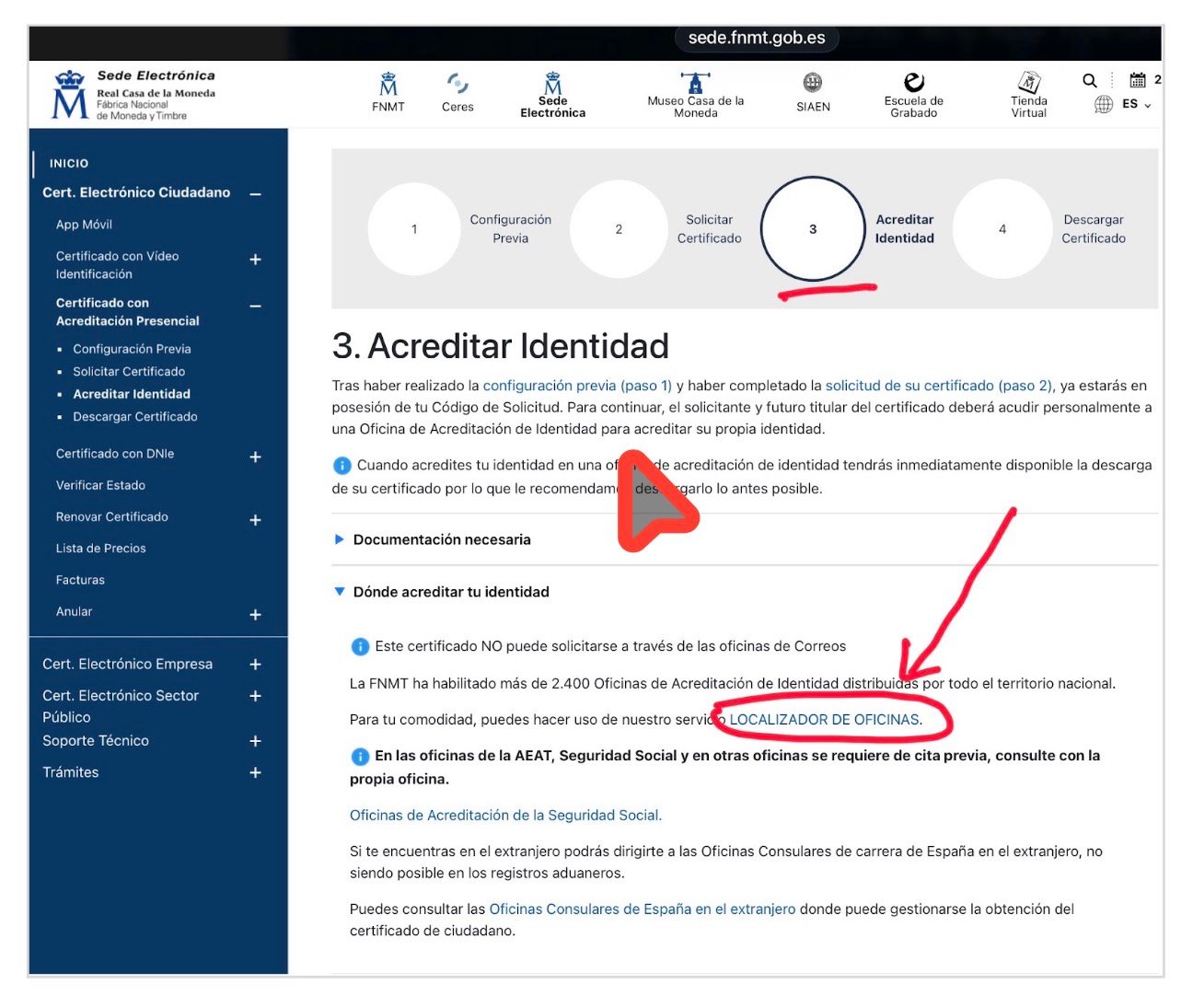
    Page 3. Acreditar Identidad on the FNMT electronic office
    Page «3. Acreditar Identidad» of the FNMT electronic office | Source: sede.fnmt.gob.es

    Using the office locator, you may locate the nearest office. Enter your locality in the search field.
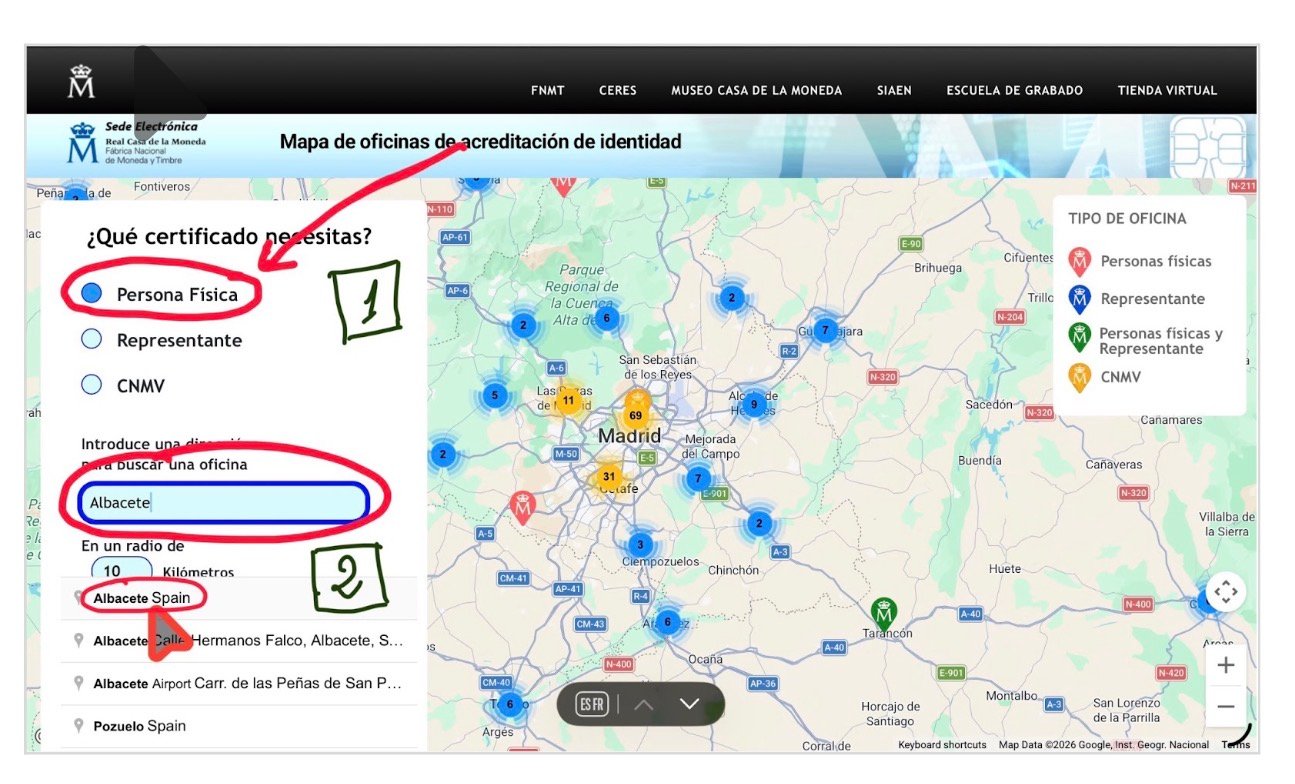
    FNMT identity accreditation office locator map
    Map of identity accreditation offices | Source: sede.fnmt.gob.es

    Once the locality has been selected, the map will show the available offices. In the case of Albacete, for example, four accreditation offices appear in different locations. By clicking on each one, the specific body, its exact address, and directions are shown. Bear in mind that a prior appointment is required at AEAT and Social Security offices. Consult the office before going.
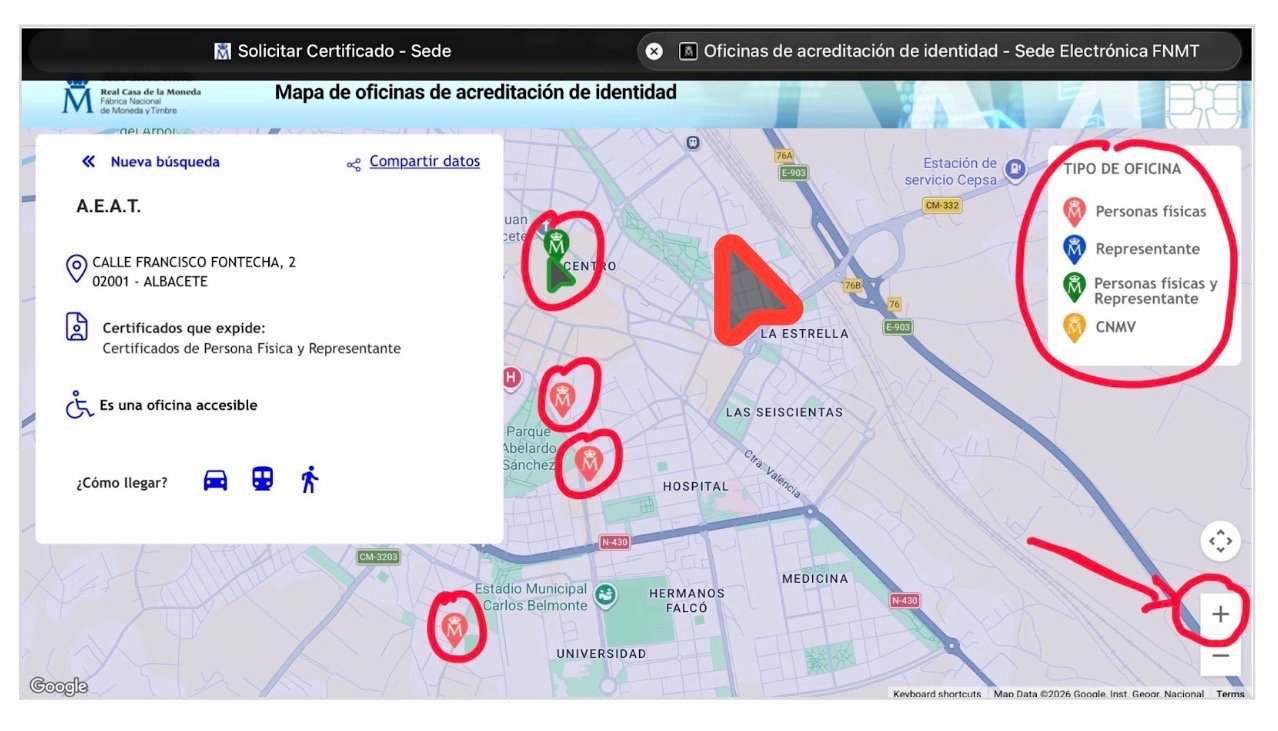
    Map of identity accreditation offices — example of the city of Albacete
    Map of identity accreditation offices — example of the city of Albacete | Source: sede.fnmt.gob.es

    Present the following at the office:

    • Your application code (the one received by email).
    • Your passport.

    And one of these documents containing your NIE:

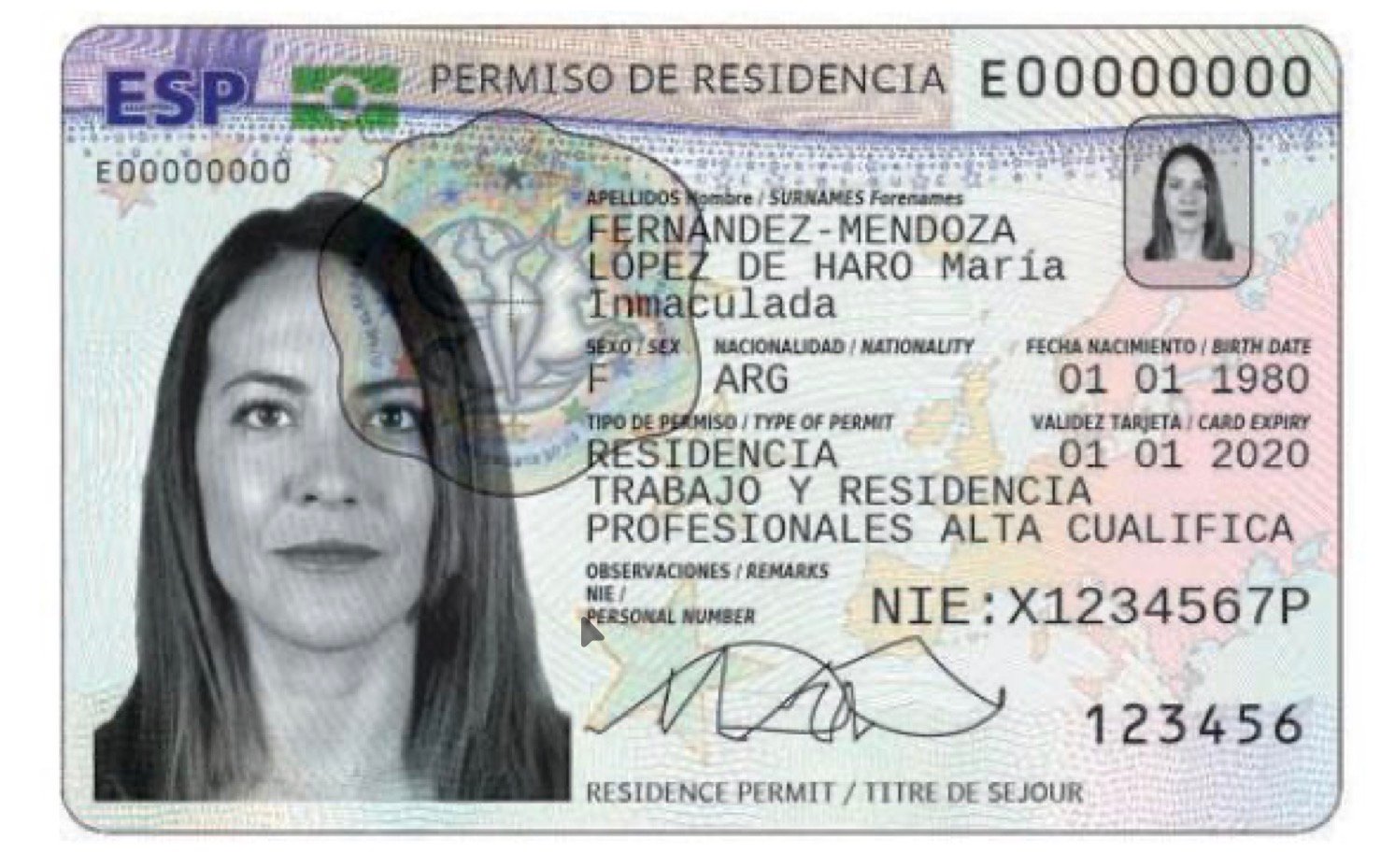
    TIE (Tarjeta de Identidad de Extranjero/a, Foreigner Identity Card).
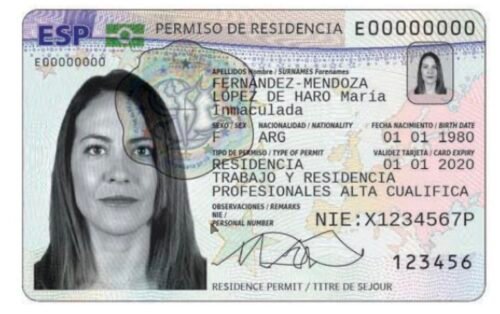
    Example of a Tarjeta de Identidad de Extranjero/a (TIE)
    Example of TIE | Source: policia.es

    Certificado de Ciudadano de la Unión in which your NIE appears (in the case of the British population, for example).
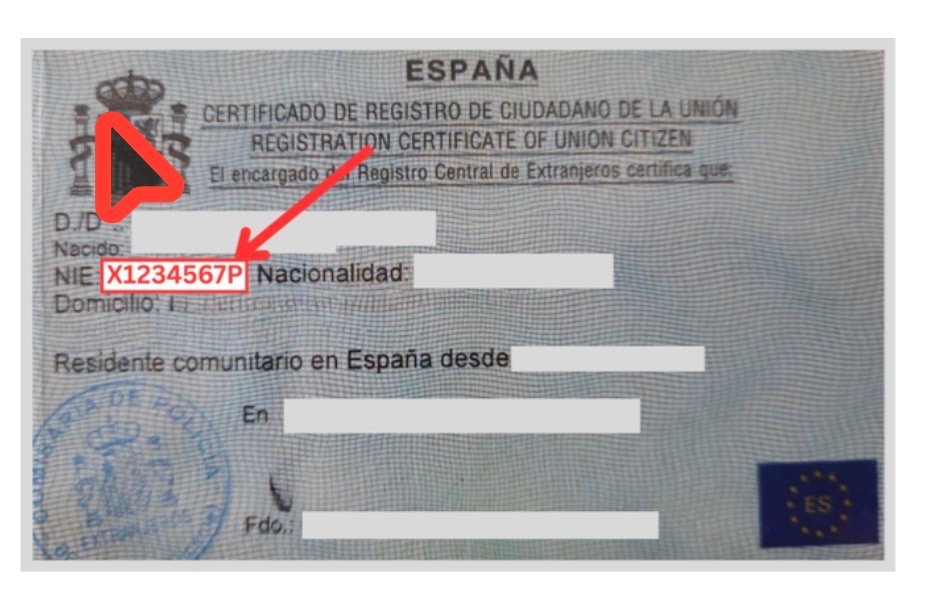
    Example of the NIE grant document (personal data anonymised)
    Example of the NIE grant document | Source: Real document, personal data anonymised by intercultural.info

    Red, Green or White foreign-national identification card.
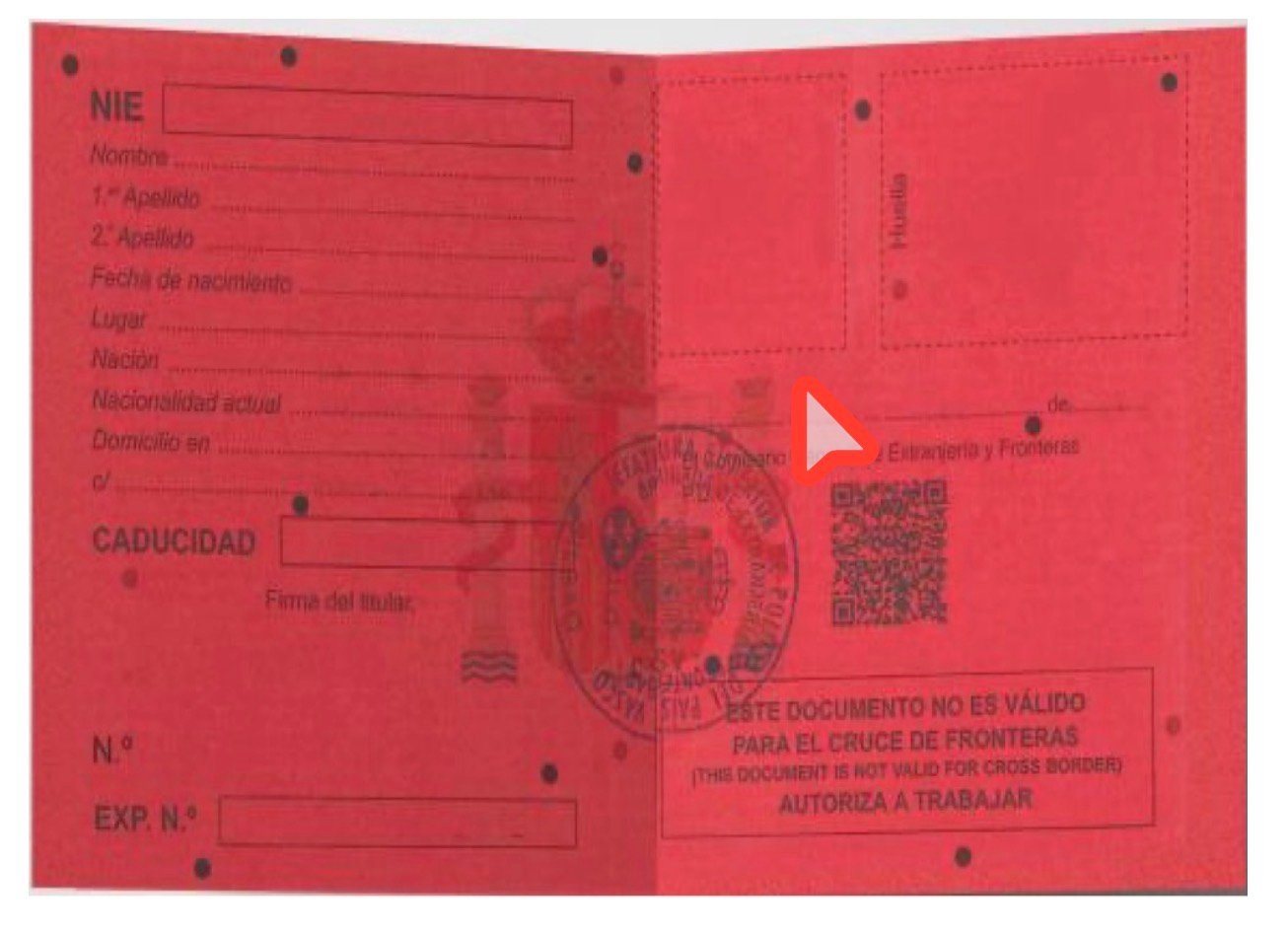
    Example of Red Card
    Example of Red Card | Source: Euskadi.eus (Basque Government)

    Official document granting the NIE — and in the absence of that document or any of the previous ones, it may be possible to try another alternative containing the NIE, for example an Immigration Office decision, whether favourable or a refusal.
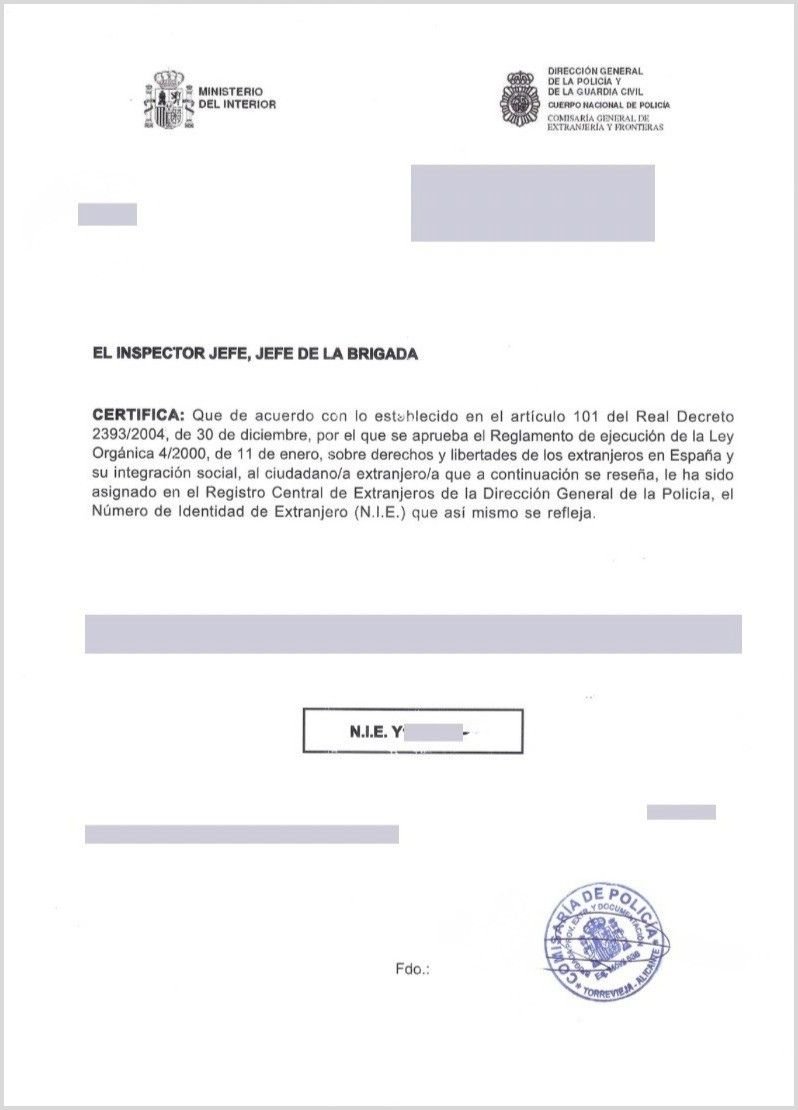
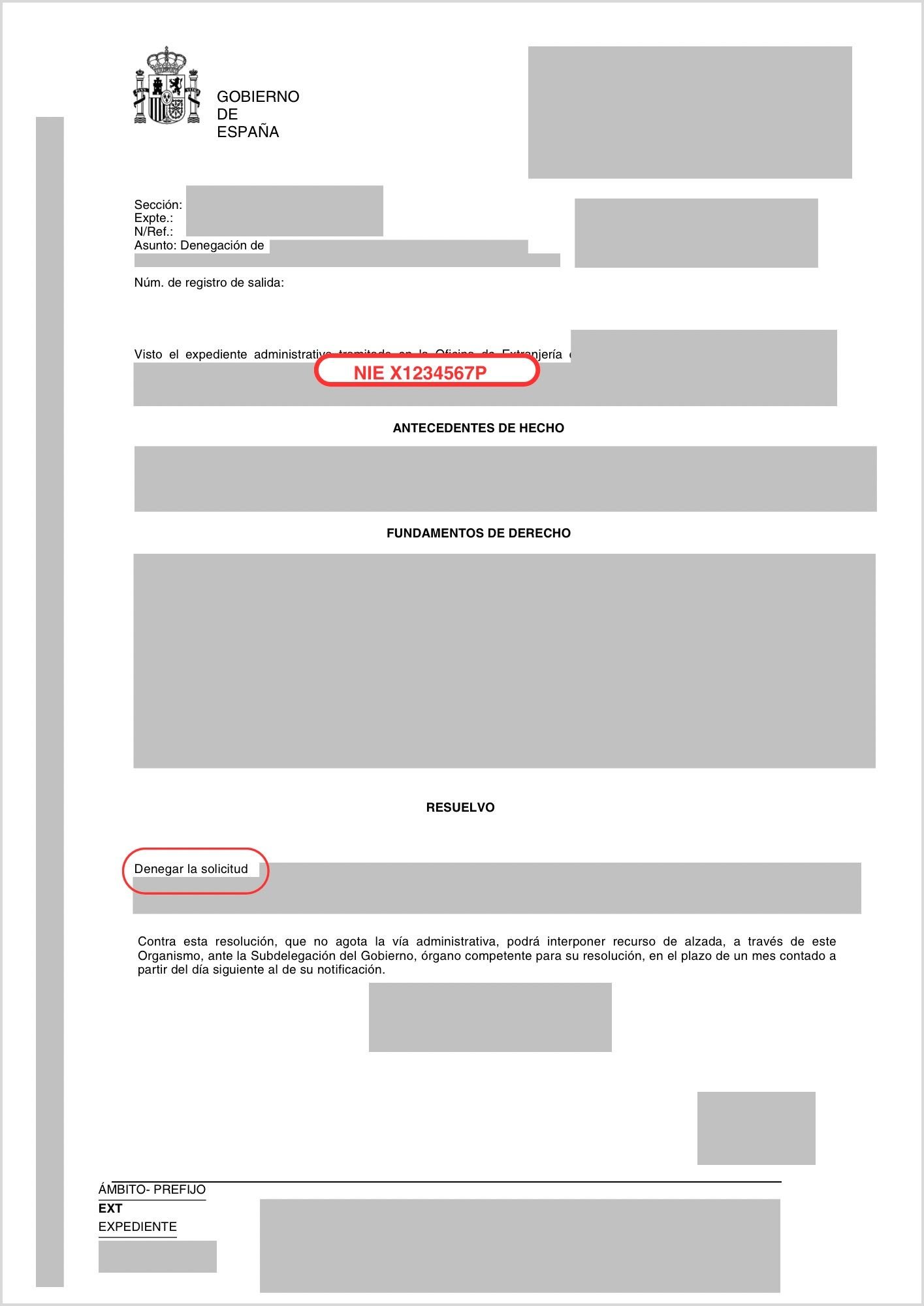
    Example of the official NIE grant document (personal data anonymised)
    Example of the official NIE grant document | Source: Real document, personal data anonymised by intercultural.info
    Example of a refusal decision with an NIE assigned (personal data anonymised)
    Example of a refusal decision with an NIE assigned | Source: Real document, personal data anonymised by intercultural.info
    Documentation required by type of applicant — FNMT page
    Documentation required by type of applicant | Source: sede.fnmt.gob.es

    Key point: the FNMT specifies on its electronic office that it accepts an «official document granting the NIF/NIE which makes it possible to verify that the person is in possession of the NIE, irrespective of the validity of the document», together with the passport.

    What happens if you do not have that NIE grant document? In that case, it may be possible to try another document containing the NIE — such as an Immigration Office decision, whether favourable or a refusal. In practice, the experience may vary depending on the Accreditation Office. Some may accept that document; others may be more strict. We recommend that you consult the office before travelling there.
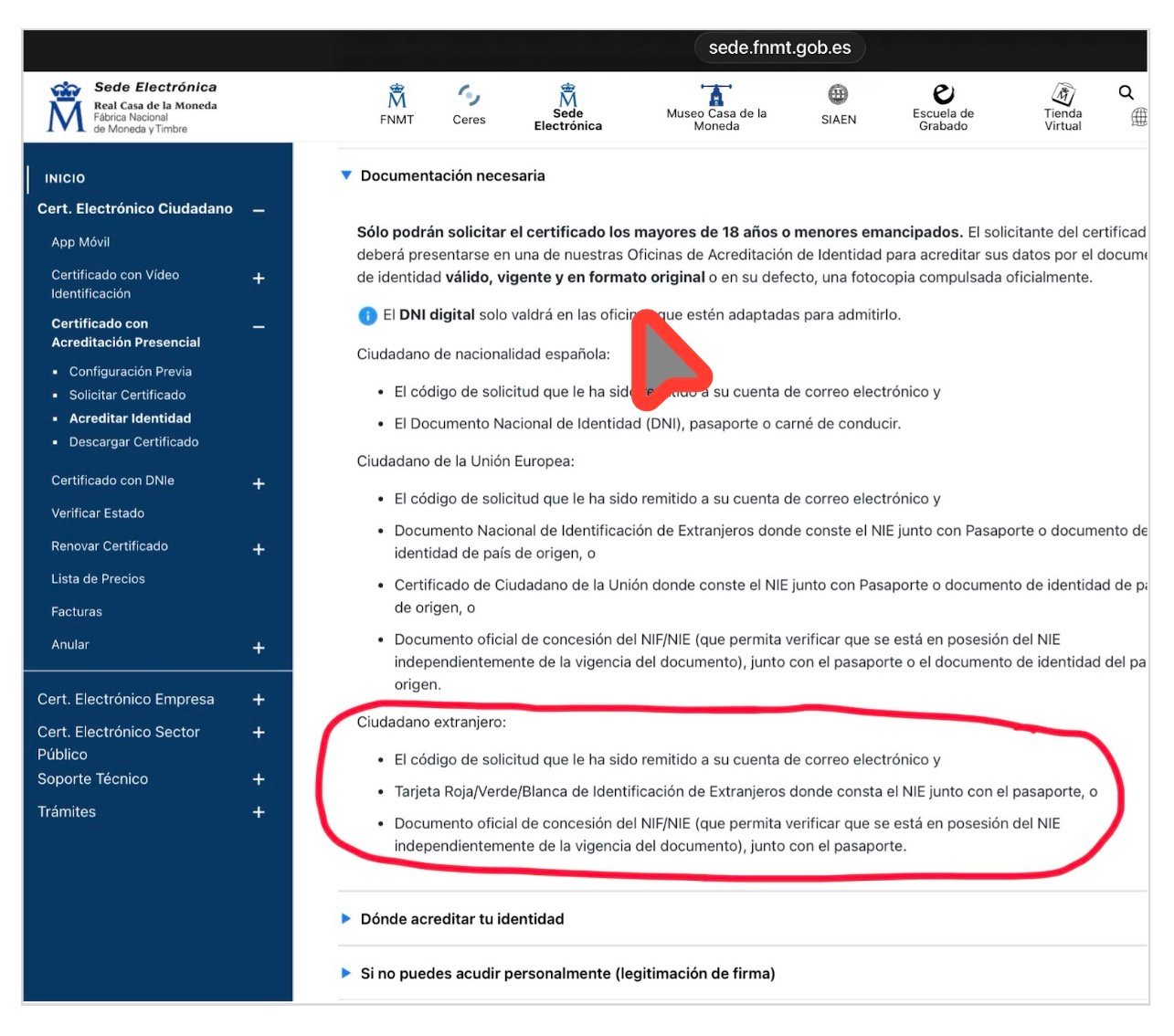
    FNMT video identification is NOT available for persons with NIE. It may only be conducted with the electronic DNI (DNIe). If you have an NIE, identity accreditation must be in person.

    Step 4 — Download, install and create a backup copy

    After verifying your identity at the office, your certificate will be available for download. The waiting time may vary depending on the accreditation office you attend.

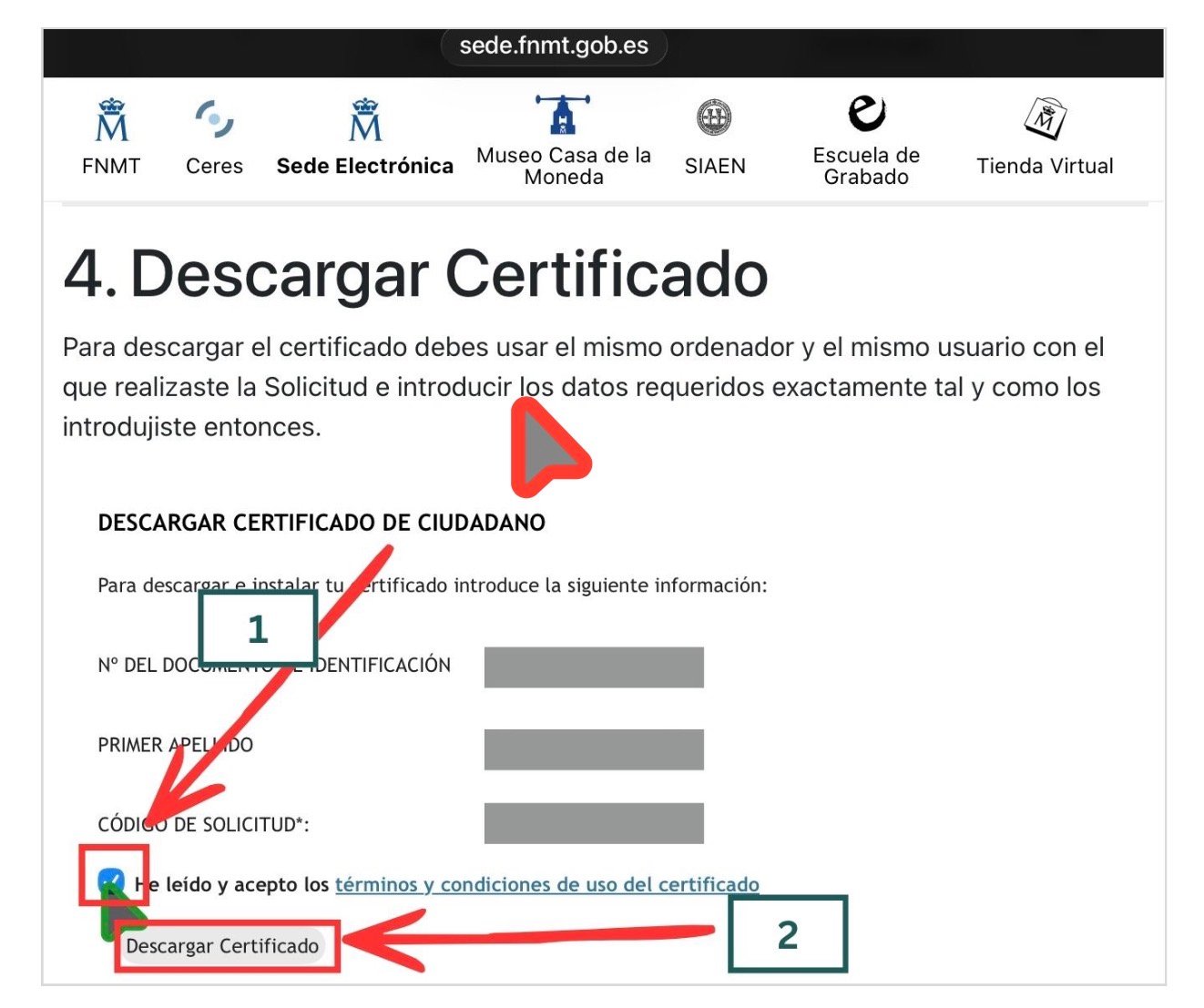
    Go to: sede.fnmt.gob.es › Certificados › Persona Física › Obtener Certificado Software › Descargar Certificado.

    Enter your NIE, your first surname and the application code. Read and accept the conditions of use, then click on «Descargar Certificado». Remember: you must do this from the same computer, the same browser and the same user account that you used for the application.
    Certificate download form on the FNMT electronic office
    Certificate download form | Source: sede.fnmt.gob.es

    When downloading, you will be asked for the password that you created in Step 2.
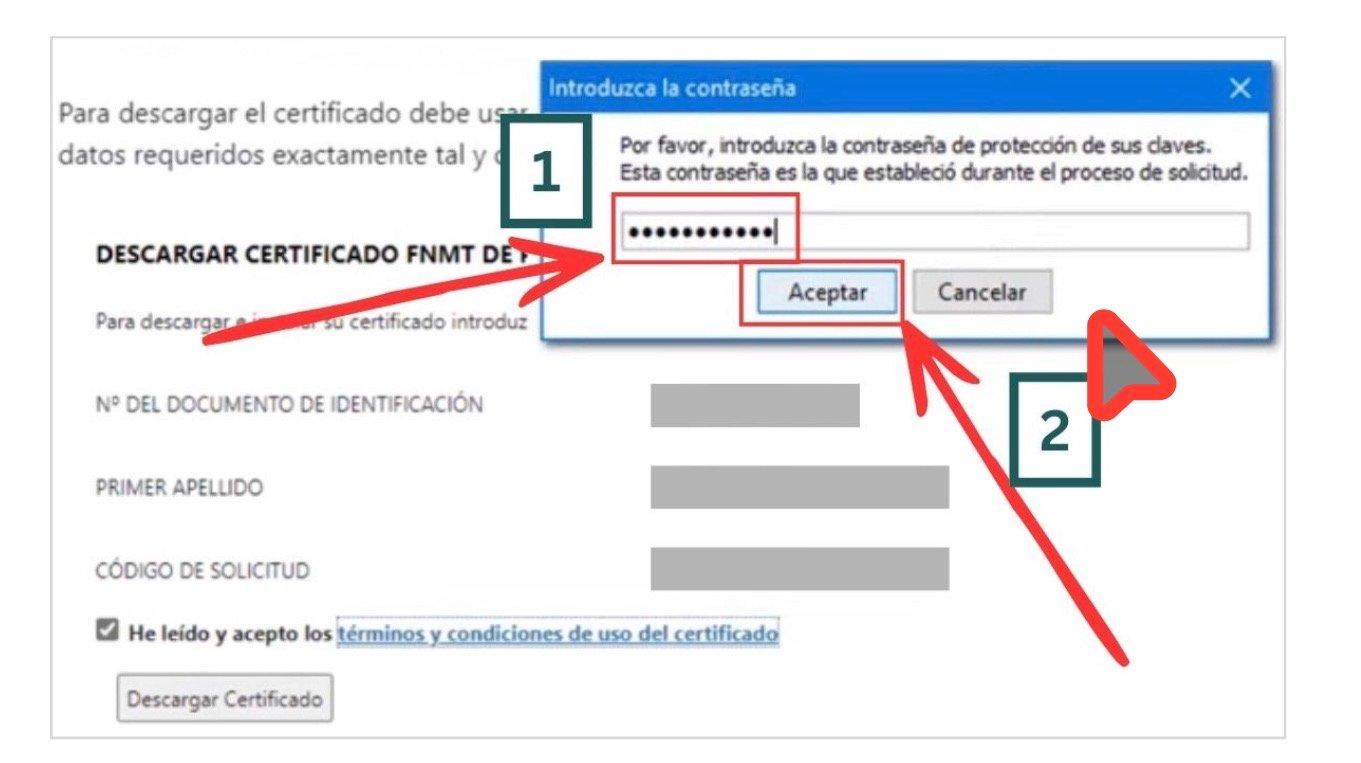
    Password dialogue during the certificate download
    Password dialogue during download | Source: sede.fnmt.gob.es (screenshot from the AEAT tutorial video)

    During the download, the system will offer you the possibility of creating a backup copy of the certificate. Accept. This step is important: if you format the computer, change device, or the browser updates and loses the certificates, without a backup copy you would have to repeat the entire process from the beginning.
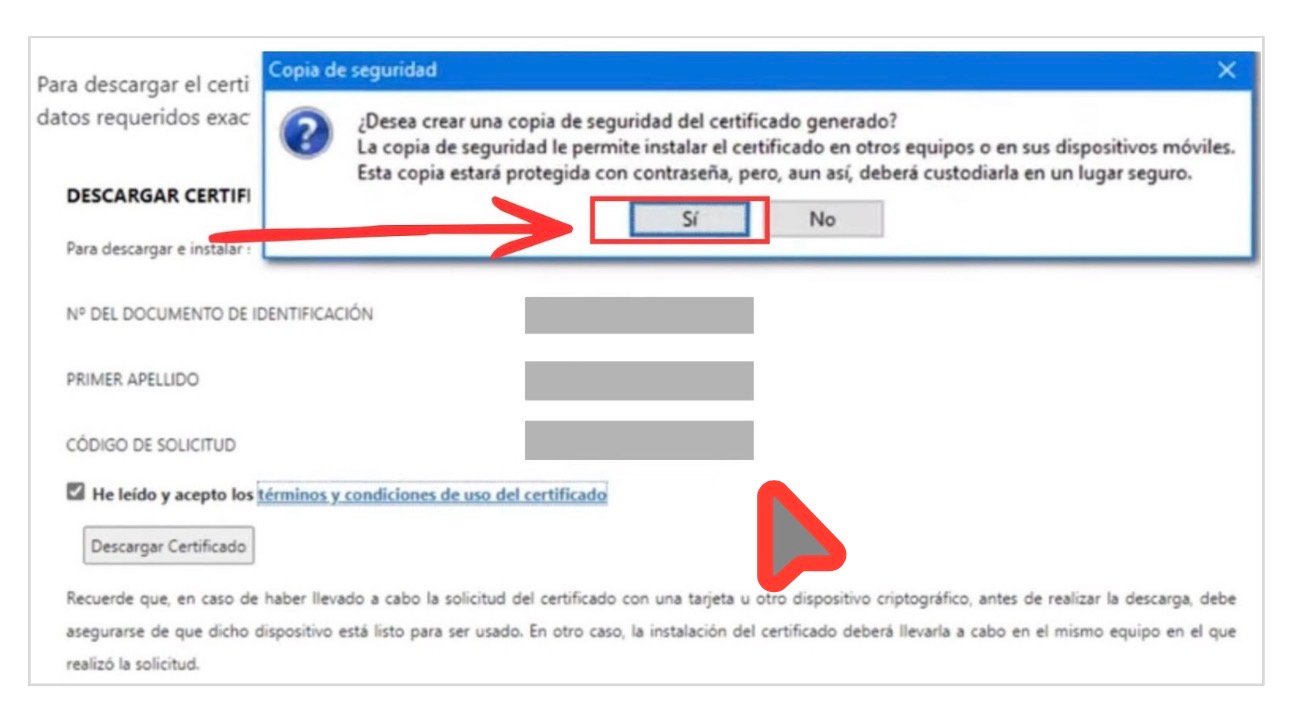
    Certificate backup dialogue
    Certificate backup dialogue | Source: sede.fnmt.gob.es (screenshot from the AEAT tutorial video)

    Click «Sí» to create the backup copy. Save the file in a secure place: a USB device, an external disk, or a password-protected cloud service.

    If that dialogue does not appear, you may also export the certificate manually:

    • In Chrome or Edge: go to Settings › Privacy and security › Security › Manage certificates. Select your certificate and export it with the private key.
    • In Firefox: go to Settings › Privacy and security › Certificates › View certificates. In the «Your Certificates» tab, select yours and click on «Back Up».

    Once the process has been completed, you will see a message confirming the correct installation of the certificate.
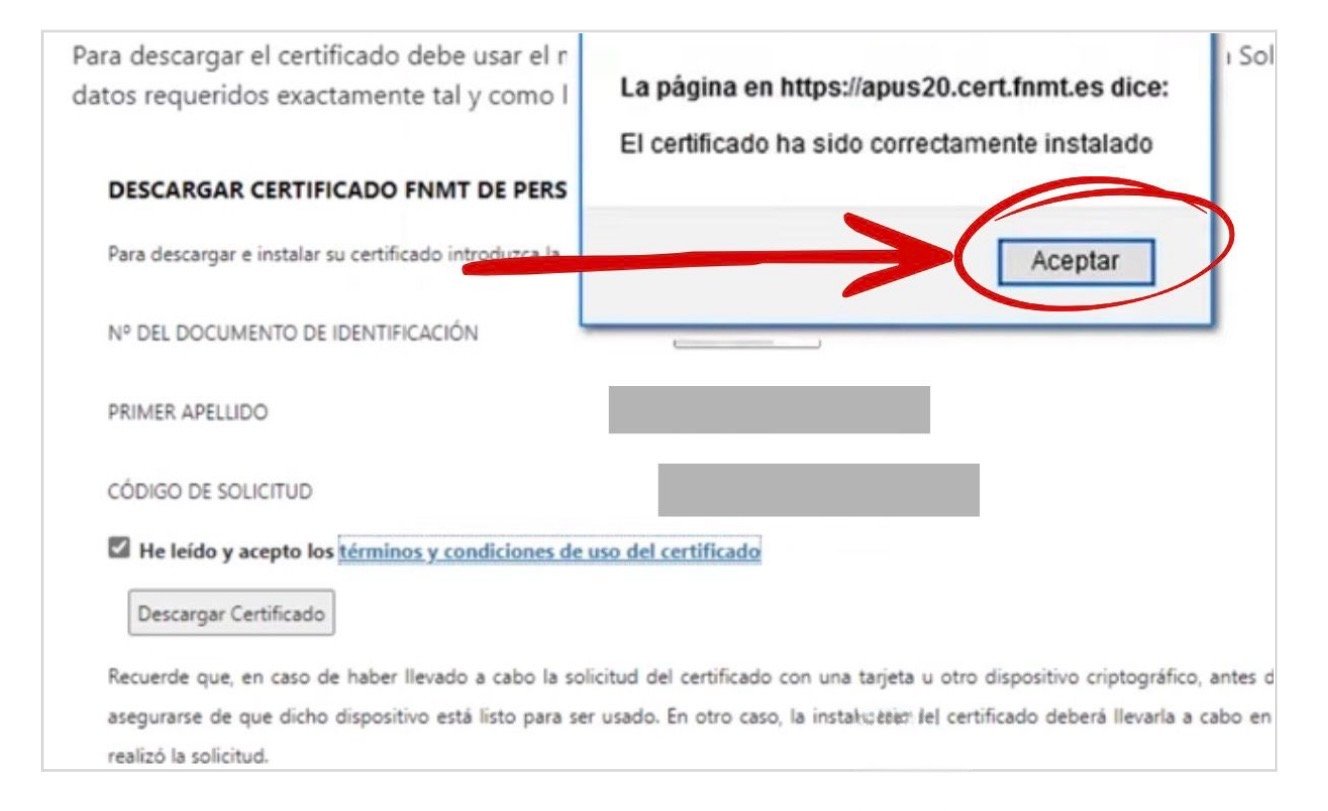
    Confirmation: the certificate has been correctly installed
    Confirmation: «The certificate has been correctly installed» | Source: sede.fnmt.gob.es (screenshot from the AEAT tutorial video)

    Step 5 — Check that it works

    To verify that your certificate has been correctly installed, access Mi Carpeta Ciudadana at sede.administracion.gob.es/carpeta/clave.htm. Select the access option with electronic certificate. If you enter correctly and see your data, the certificate is functioning.

    And the extraordinary regularisation 2026?

    If you are awaiting the extraordinary regularisation 2026, the digital certificate may be especially important. The drafts that have circulated indicate that one route for submitting applications may be online, through the Mercurio platform. If that route is confirmed, having a digital certificate or a valid electronic signature system could make a real practical difference.

    ⚠️ Pending confirmation in the BOE

    As of 25 March 2026, the Real Decreto that will regulate the extraordinary regularisation has still not been published in the BOE. The details concerning the submission channel for applications will be confirmed when the definitive text is published.

    When the Real Decreto is published, we shall generate a specific tutorial on how to submit the application through Mercurio. In the meantime, the most prudent course is to have the digital certificate ready.

    If you wish to know more about the extraordinary regularisation 2026, which documents to prepare and when the period will open, read our article: Extraordinary regularisation 2026 in Spain: what is known, who is eligible, and what you should do now.

    Frequent problems

    «It does not allow me to apply for the certificate on the website.» Check that you have installed the Configurador FNMT-RCM and that you are using a compatible and updated browser. Some antivirus programs or proxies may block the application: deactivate them temporarily if necessary.

    «It asks me for a password and I do not remember it.» The password is created during the application stage in Step 2 and cannot be recovered. If you have forgotten it, you will have to begin a new application from the start.

    «At the office they do not accept my document.» The experience may vary depending on the office. If they do not accept your alternative to the official NIE grant document, try another Accreditation Office (see alternatives in Step 3). You may also consult your municipality, since some collaborate with certification entities and may orient you.

    «I have downloaded the certificate but it does not function.» Make sure that you have used the same computer, the same browser and the same user account as in the application stage. If you changed something in the meantime, it is possible that you may need to repeat the process.

    If you have reached this point and completed all the steps: congratulations. You now have a tool that gives you direct access to the Spanish administration from your home, without queues and with much greater autonomy. Use it. And if you know somebody who may need it, share this tutorial.
  • Digital certificate for foreign nationals in Spain: the free tool that could change everything, whether or not your papers are in order

    Digital certificate for foreign nationals in Spain: the free tool that could change everything, whether or not your papers are in order

    This article is also available in: English | Español | العربية | Français

    Including why it may be important for the extraordinary regularisation 2026, if the online submission channel is confirmed in the BOE

    Updated on 25 March 2026 | intercultural.info

    There is a very useful tool that many foreign nationals in Spain can obtain free of charge, which enables them to manage their immigration procedures, among many other procedures, from home, without queues, without appointments that are impossible to obtain, and with much greater autonomy. It is called a digital certificate, and a large proportion of those who need it most do not know that it exists.

    In this article, we explain what it is, what problems it resolves, why so few professionals speak about it, and what it has to do with the extraordinary regularisation 2026.

    ▶ Step-by-step tutorial: How to obtain your digital certificate

    Complete guide with screenshots.

    → Go to the tutorial

    The problem you have without realising it

    Think of the last time you had to complete a procedure with the Spanish administration — and if you have never done so, ask any migrant person around you who has had that experience. Perhaps you requested an appointment and it took weeks to obtain one. Perhaps you paid somebody to do it for you. Perhaps the matter has remained unresolved for months because you do not know how to check the status of your file, nor how to provide a document that has been requested from you.

    This should not be the case. The Spanish administration has been digitalising its services for years. Today, a large part of procedures can already be completed online. The problem is that, in order to do so, one thing is necessary: to identify yourself digitally. And without that step, the person remains trapped in a system designed for those whose papers are already in order.

    The digital certificate may be that step. With it, a foreign national may access many services of the Spanish public administration without travelling and with much greater autonomy.

    Why almost nobody speaks about this

    If you search on YouTube for information about immigration procedures, you will find dozens of channels explaining arraigo procedures — arraigo social is a Spanish residence regularisation pathway based on social ties, with no direct English equivalent — renewals, or the extraordinary regularisation. But very few speak about the digital certificate for migrant persons. And those who do so rarely mention that it serves to submit immigration applications in one’s own name or on behalf of other persons.

    Without entering into speculation about the intentions of each professional, we may say that there are several reasons why this subject is explained so little. One of them is that many guides focus on the final procedure, but not on the tool that enables it to be completed online. Another is that electronic identification still appears complex to many persons, when with a clear explanation it is usually much more manageable than it seems. intercultural.info exists precisely to break that dynamic.

    What is the digital certificate for in the real life of a foreign national?

    With a digital certificate, a foreign national may, among other things:

    • Submit immigration applications online through Mercurio, including regularisation, arraigo social, family reunification, renewals, and others
    • Consult the status of their immigration file and download decisions and notifications
    • Provide documentation to an already opened file, without the need to attend in person
    • Request the empadronamiento certificate (certificate of municipal registration) in those municipalities that permit it online
    • Obtain the employment record report and other Social Security documents
    • Conduct tax procedures with the Tax Agency (Agencia Tributaria / Hacienda), including the income tax return and tax certificates
    • Apply for Spanish nationality
    • Request the homologation or recognition of qualifications obtained abroad
    • Access Mi Carpeta Ciudadana, the unified portal of the Spanish administration
    • Sign documents with full legal validity, without the need for a notary

    In summary, the digital certificate converts the person into an active subject before the administration, capable of managing their own affairs without dependence on intermediaries and without appointments that are in many cases very difficult to obtain.

    What is electronic identification and what are your options?

    Electronic identification is the way of demonstrating to the administration that it is you, online, in a secure manner. In Spain, several systems exist.

    Digital certificate (FNMT): the most complete one, and the one we recommend. It is free of charge, valid throughout the Spanish administration, and enables you not only to identify yourself, but also to sign documents with full legal validity. It is issued by the Fábrica Nacional de Moneda y Timbre (FNMT, the Spanish National Mint and Stamp Factory). In practice, it is the most useful system for many online immigration procedures, including the submission of applications in Mercurio when the procedure permits that route.

    Cl@ve Permanente with Cl@ve Firma: a valid alternative for identification and also for signing. It requires a registration procedure in person or through video identification. With Cl@ve Firma activated, it may be used to sign certain electronic procedures and may be a valid alternative depending on the procedure.

    Cl@ve PIN: a basic identification system. It permits consultation of files and identification before the administration, but does not permit the signing of applications. It is useful for consultations and serves to identify yourself in some services, but by itself it does not usually suffice when the procedure requires an electronic signature.

    Certificates from autonomous communities and other entities: in addition to the FNMT, other certification entities recognised by the Spanish State exist, including ACCV (Comunitat Valenciana), Izenpe (Basque Country), CATCert (Catalonia), or the Chambers of Commerce through Camerfirma, among others. All are valid for procedures with the administration. In some areas, obtaining one through the municipality itself or through these entities may be more accessible than doing so via the FNMT.

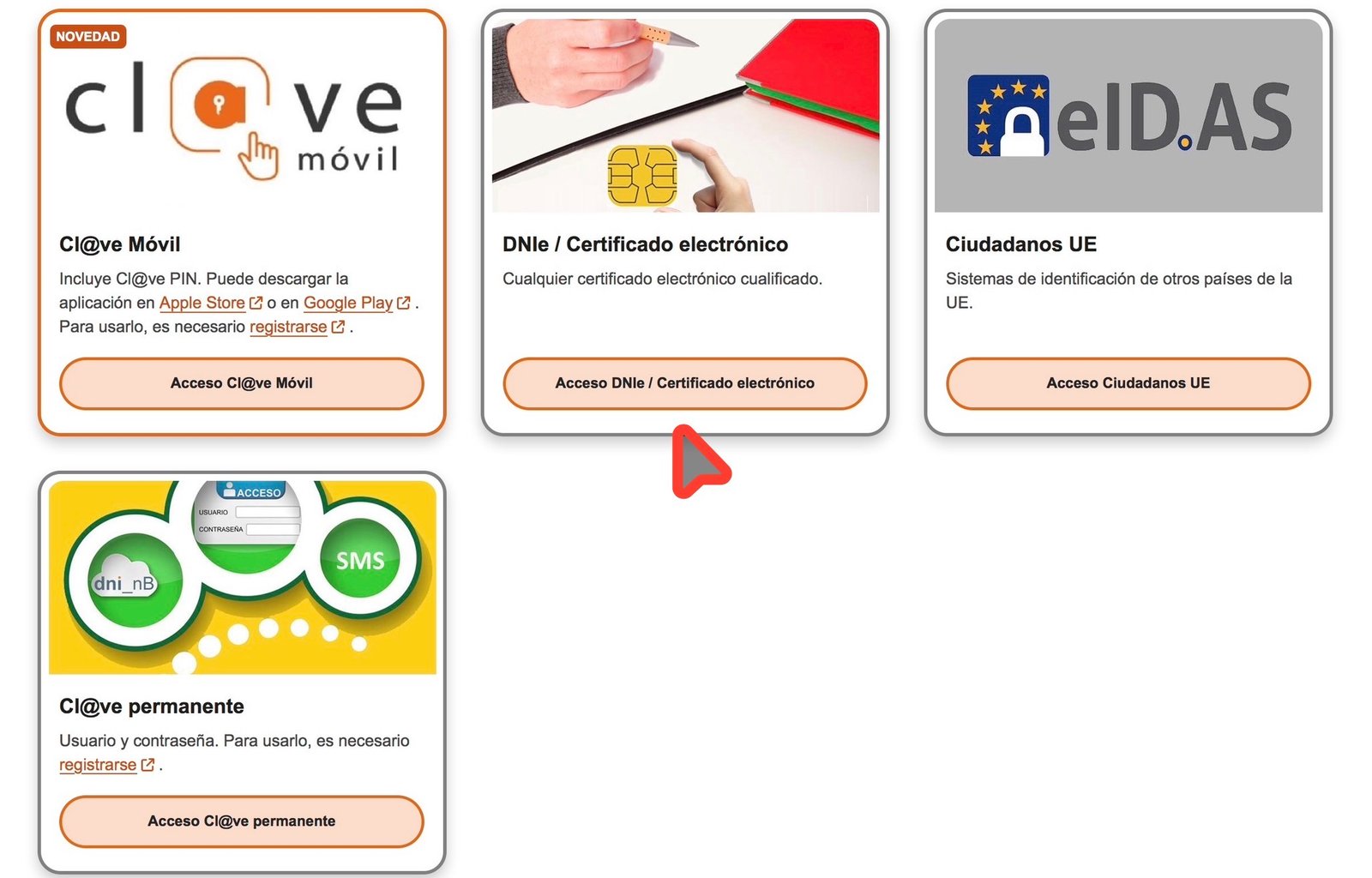
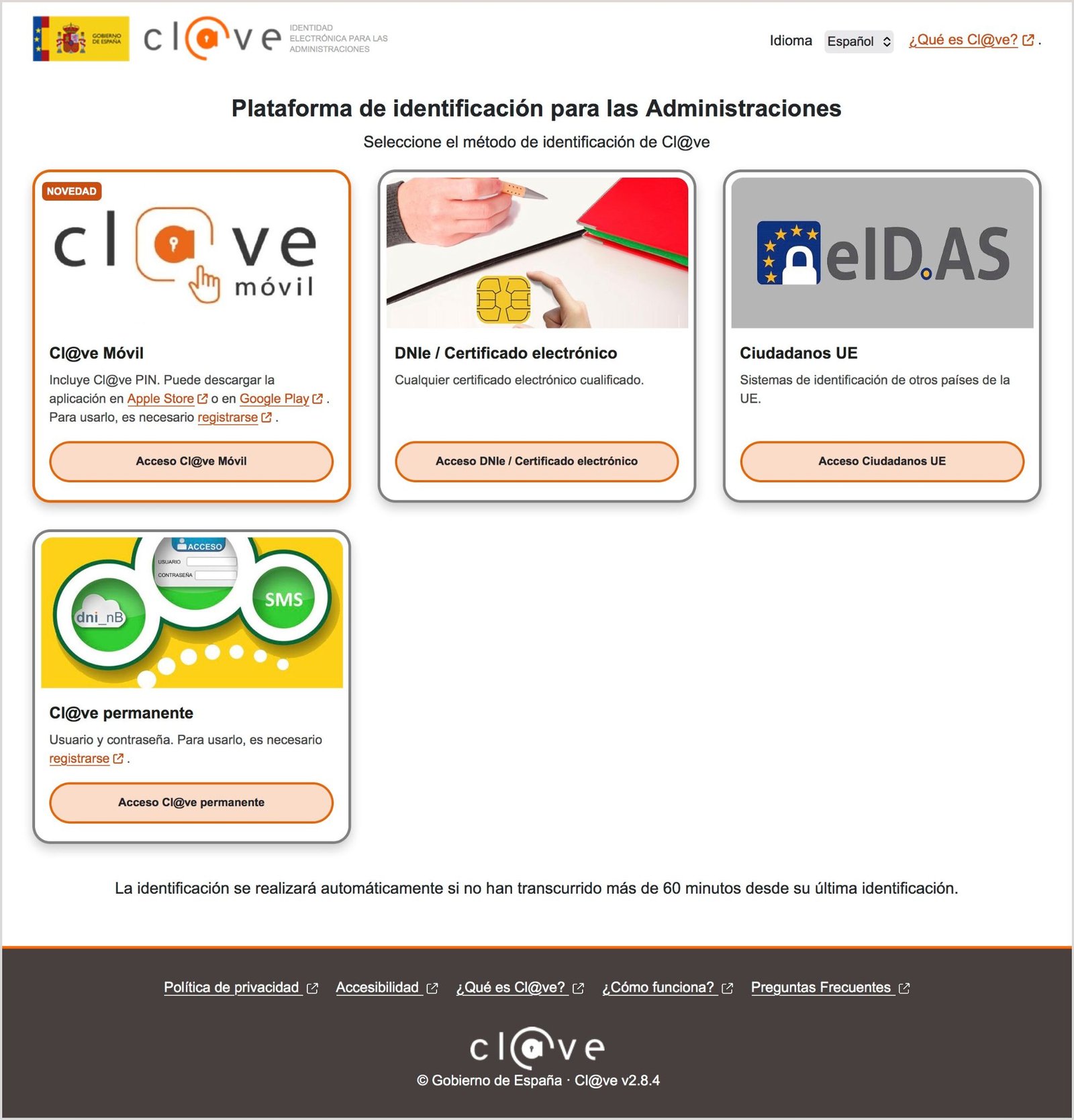
    Ways of identifying yourself before the Spanish administration: digital certificate, Cl@ve and electronic DNI
    Ways of identifying yourself before the Spanish administration: digital certificate, Cl@ve and electronic DNI | Source: carpetaciudadana.gob.es (access via the Cl@ve gateway)

    In this article, we focus on the FNMT digital certificate because it is the most universal, free of charge, and accessible throughout the national territory.

    NIE, residence authorisation and TIE: three different things — and why this article also matters to you even if your papers are not in order

    Before speaking about who may obtain the digital certificate, it is useful to clarify three concepts that generate much confusion.

    NIE (Número de Identidad de Extranjero/a, Foreigner Identification Number): it is an identification number, not a document and not a permit. It is assigned by the National Police when a foreign national initiates any formal procedure with the Spanish administration, or when it is expressly requested before that administration while demonstrating a legitimate interest, subject to certain conditions. A person may have an NIE even if they do not have a valid residence permit, and even if they have never had one.

    Example of the NIE grant document (personal data anonymised)
    Example of the NIE grant document | Source: Real document, personal data anonymised by intercultural.info

    Residence authorisation (or residence permit): this is the administrative authorisation that permits residence in Spain. It is different from the NIE and from the TIE.

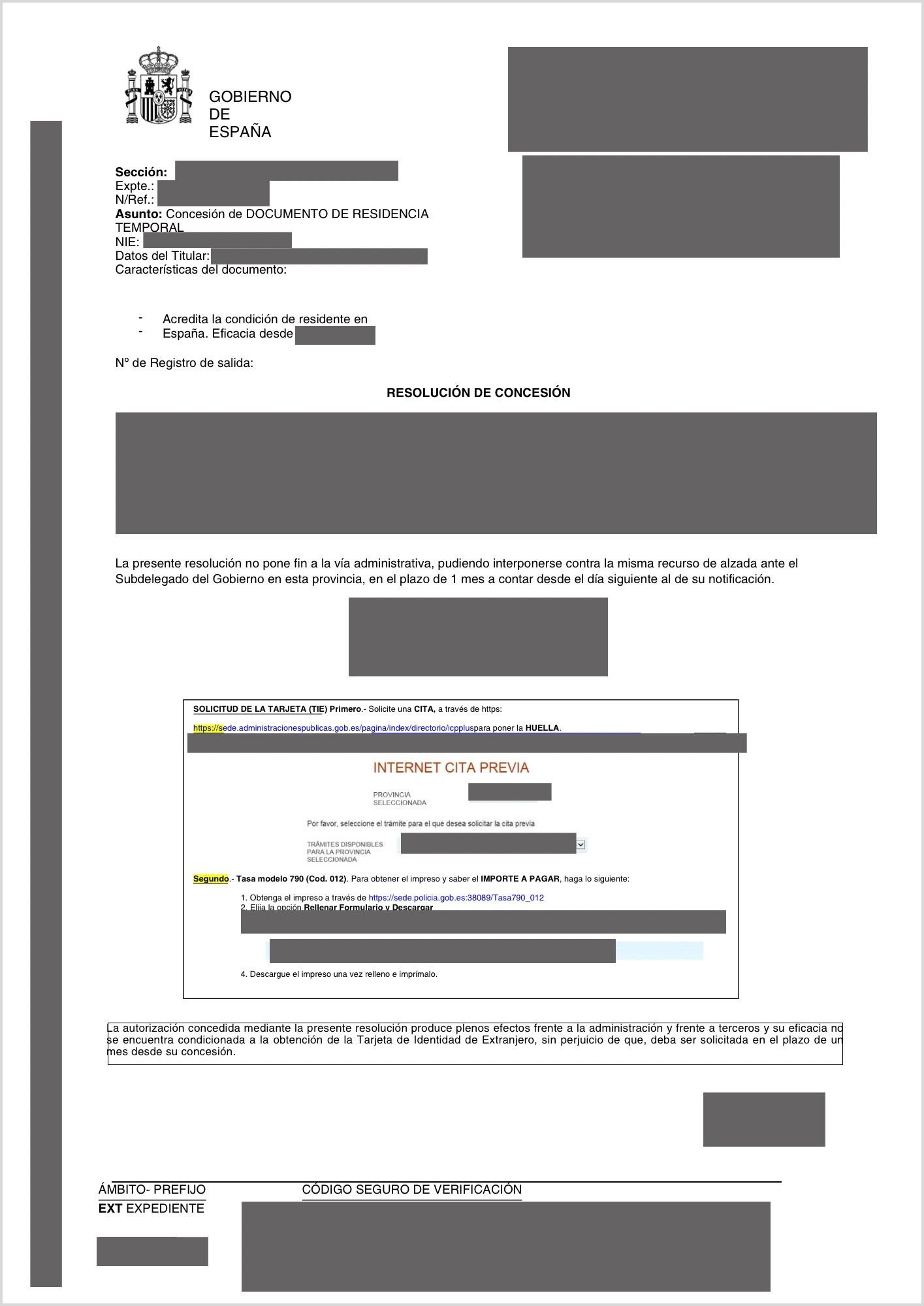
    Example of a decision granting residence authorisation (personal data anonymised)
    Example of a decision granting residence authorisation | Source: Real document, personal data anonymised by intercultural.info

    TIE (Tarjeta de Identidad de Extranjero/a, Foreigner Identity Card): this is the card-format expression of the residence authorisation. It contains the NIE, the photograph, and the type of permit granted.

    Example of a Tarjeta de Identidad de Extranjero/a (TIE)
    Example of a Tarjeta de Identidad de Extranjero/a (TIE) | Source: policia.es

    Why does this distinction matter? Because the FNMT digital certificate may be obtained with an NIE, even if you do not have a TIE or a valid residence permit. The FNMT itself specifies on its electronic office that the «official document granting the NIF/NIE which makes it possible to verify that the person is in possession of the NIE, irrespective of the validity of the document«, is valid, together with the passport.

    That said, in practice the experience may vary depending on the Accreditation Office. Some may accept a document containing your NIE — such as an Immigration Office decision, whether favourable or a refusal. Others may be more strict. We recommend that you consult the office before travelling there. If the FNMT route does not function in your case, in some areas municipalities collaborate with recognised certification entities and may orient you towards other alternatives.

    ⚠ Important: what if you think you do not have an NIE?

    Many persons who submitted applications to the Immigration Office in the past — even if they were refused — were assigned an NIE. That number appears on the decision they were sent. If you keep any Immigration document, look for it: it is possible that you already have an NIE without realising it.

    If you have never been assigned an NIE, that does not mean this article is of no use to you: understanding how electronic identification functions may be useful if the regularisation ultimately permits submission by representation.

    And if at this moment you do not have an NIE, continue reading all the same. In a scenario of online submission, it may be important to know not only how the digital certificate functions, but also whether the final Real Decreto permits another person to act in your name by way of representation.

    Example of a refusal decision with an NIE assigned (personal data anonymised)
    Example of a refusal decision with an NIE assigned | Source: Real document, personal data anonymised by intercultural.info

    The extraordinary regularisation 2026 and the digital certificate

    If you are awaiting the extraordinary regularisation 2026, the digital certificate acquires particular relevance. As of today, 25 March 2026, the Real Decreto has still not been published in the BOE (Boletín Oficial del Estado, Official State Gazette), but the drafts that have circulated indicate that one principal route for submitting applications will be online, through the Mercurio platform. If the principal submission channel ultimately proves to be online, having a digital certificate or a valid electronic signature system may make an important practical difference — unless one has recourse to a professional, to a registered collaborating organisation, or — and this is important although almost nobody explains it — to a trusted person who may act as representative, if the definitive Real Decreto confirms this, as we explain further below.

    ⚠ Information pending confirmation in the BOE

    Everything relating to the submission channel is provisional. The exact details — whether direct submission in Mercurio will be possible and in what manner, which documents will be admitted, whether an expired passport will be valid, whether other routes will be enabled — will be confirmed when the definitive text of the Real Decreto is published in the BOE.

    As regards the in-person route, everything indicates that it may be less agile than the online route, but the concrete details — offices, timetables, capacity and procedure — remain pending official confirmation. Several unofficial sources indicate that the offices enabled would function in the afternoon, with limited availability and a very high volume of applications.

    The key point, in any case, is to prepare now. Whoever arrives with the digital certificate ready on the day the period opens will have a real advantage over whoever does not.

    Can another person submit the online application on your behalf?

    This is perhaps one of the most important pieces of information that nobody explains. And the answer is: probably yes, if that person has a digital certificate and acts as your representative.

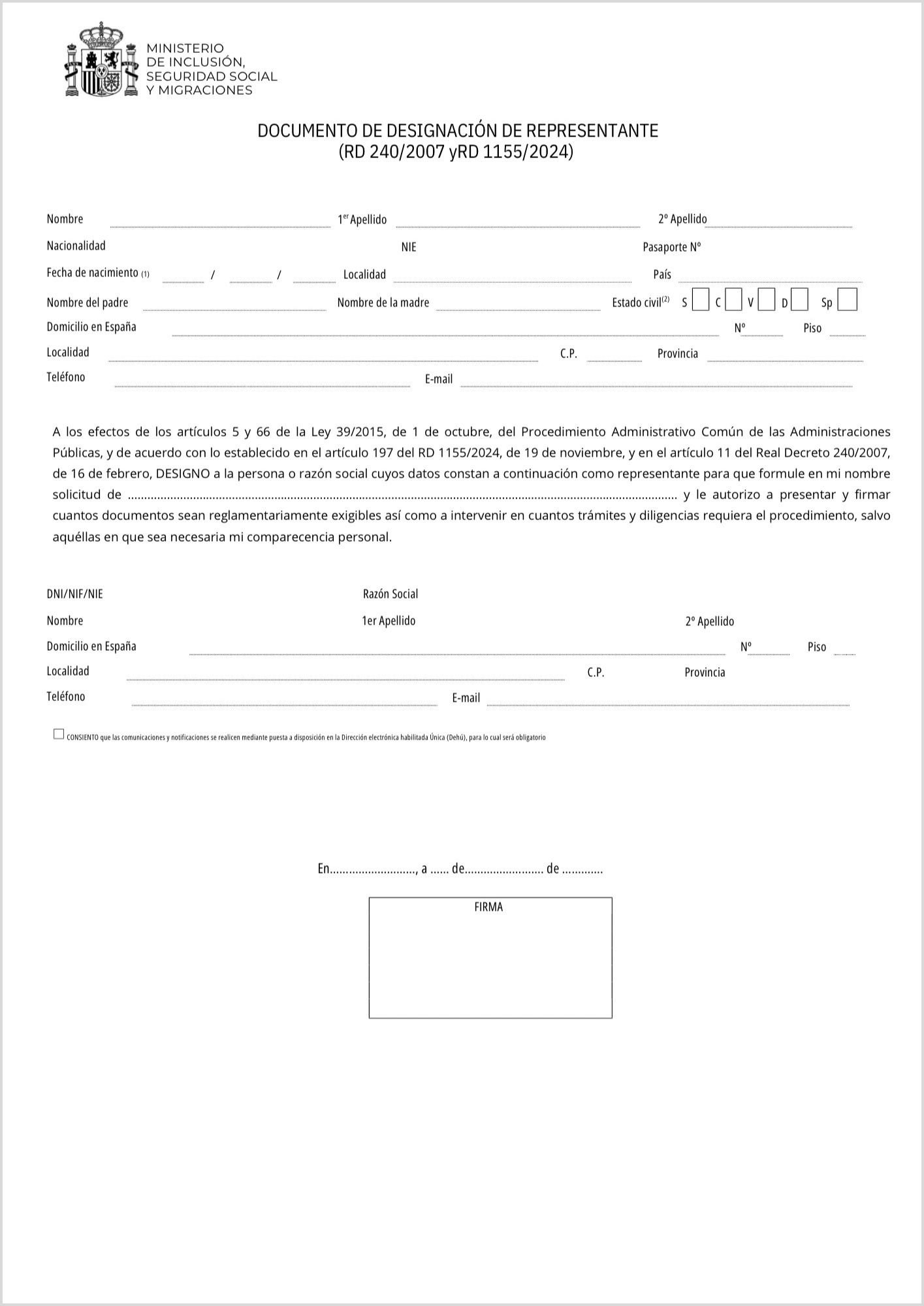
    Law 39/2015, in its Article 5, establishes that any person may act as representative of another before the Spanish public administration — it is not necessary to be a registered and authorised professional for these procedures. It is sufficient to complete and submit the document of «designación de representante» (appointment of representative), available in our Resources section, together with the remaining documents, and for the representative to possess the necessary electronic means, that is to say, a digital certificate.

    Download the designación de representante form at: intercultural.info/en/recursos/

    (Source: Ministry of Inclusion, Social Security and Migration — inclusion.gob.es. Verify that this is the current version before using it.)

    A concrete example:

    Between 2020 and 2022, thousands of UK nationals in Spain needed to regularise their situation after Brexit, in the middle of the pandemic. A significant proportion of applications were submitted online through Mercurio on behalf of those persons, without that representation being exercised by a registered professional — simply by means of the corresponding designación de representante document. This experience demonstrates that the mechanism exists, functions, and has been used on a large scale.

    Designación de representante form — Ministry of Inclusion, Social Security and Migration
    Designación de representante form | Source: Ministry of Inclusion, Social Security and Migration — inclusion.gob.es

    If you have a family member, a close friend, or any trusted person with a residence permit in Spain or Spanish nationality, and who has or may obtain a digital certificate, it may be worthwhile for that person to prepare in order to assist you when the time comes. Pending confirmation by the BOE for the extraordinary regularisation, this route could be key for many persons who do not have electronic identification of their own.

    What to do right now

    • If you have an NIE: obtain your digital certificate as soon as possible. Our tutorial explains the process step by step.
    • If you do not know whether you have an NIE: search among your documents for any Immigration Office decision. Your NIE may be there.
    • If you do not have an NIE: you may request the direct assignment of an NIE before the National Police or an Immigration Office, by means of form EX-15 and payment of the corresponding fee. Bear in mind that this procedure requires compliance with certain conditions, and that in an irregular administrative situation it may be difficult to obtain it. The legal period for a decision is five working days, although, as in any administrative matter, the real timeframes may vary. If the application is refused, that is not the end of the road: the following options also apply to you.
    • If you have family members or trusted persons whose documentation is in order: encourage them to obtain their digital certificate. If the BOE confirms it, they may be able to submit applications in your name as representatives.
    • If you have neither an NIE nor a personal representative, other routes exist: support organisations for migrant persons registered as collaborating entities — NGOs and trade unions entered in the Register published in the BOE on 5 March 2026 — may orient you and assist you free of charge. If you decide to consult professional firms, ensure that they are registered with the relevant professional body and authorised for these procedures. The in-person route is also available without a digital certificate.
    • If you already have the digital certificate: use it to prepare documentation that you may need for the regularisation, such as a historical empadronamiento certificate proving your arrival and presence in Spain since before January 2026, or the certificate of cohabitation (certificado de convivencia) proving direct family ties — one of the situations in the second regularisation pathway according to the drafts currently circulating, as we explain in our article Extraordinary regularisation 2026 in Spain: what is known, who is eligible, and what you should do now.

    ▶ Step-by-step tutorial: How to obtain your digital certificate

    Detailed steps, screenshots and explanations.

    → Go to the tutorial