Categoría: Trámites de Extranjería

Guías y tutoriales sobre procedimientos de inmigración y Extranjería en España

  • Extraordinary regularisation 2026 in Spain: what is known, who is eligible, and what you should do now

    Extraordinary regularisation 2026 in Spain: what is known, who is eligible, and what you should do now

    This article is also available in: Español العربية English Français

    Updated 15 April 2026 | intercultural.info

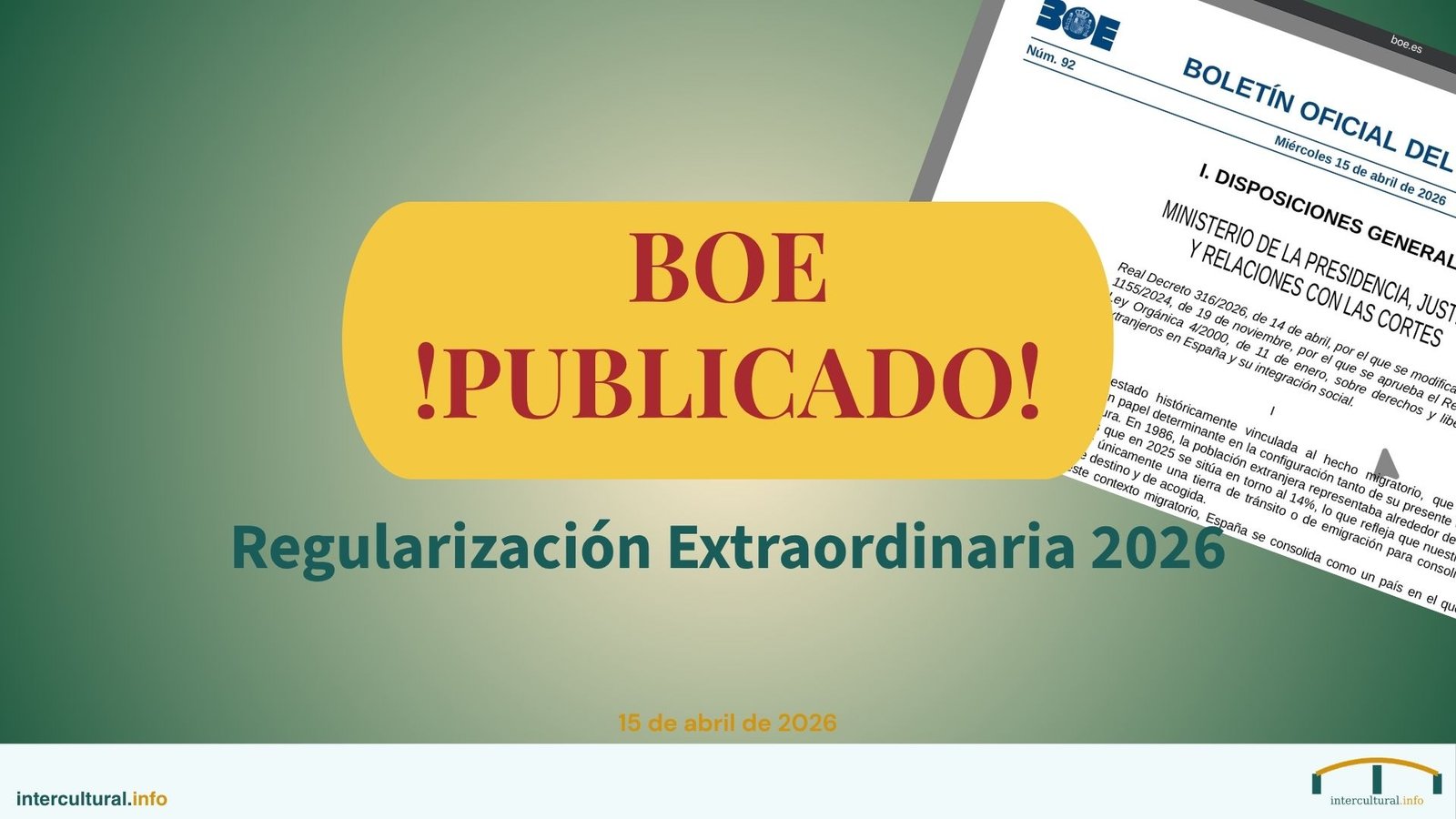
    Royal Decree 316/2026 on the extraordinary regularisation was published on 15 April 2026 in Spain’s Official Gazette (Boletín Oficial del Estado) and entered into force on 16 April. What had remained a draft for months is now an official regulation: foreign nationals residing in Spain without a valid residence permit, or who applied for asylum before 1 January 2026, may apply for a residence and work permit.

    In this article we explain the confirmed requirements, the key dates and what you need to do to submit your application.

    ✅ Published in the Official Gazette: Royal Decree 316/2026, dated 14 April, has been published in the BOE on 15 April 2026 (reference BOE-A-2026-8284). It enters into force on 16 April. The information in this article reflects the official published text.

    What is this regularisation?

    It is an exceptional, time-limited process that enables foreign nationals without a valid residence permit to obtain a residence and work permit in Spain. The Government estimates that approximately 500,000 people may benefit. It has been approved by Royal Decree — without requiring parliamentary approval — and modifies the Immigration Regulations (Royal Decree 1155/2024) by introducing two new additional provisions.

    Who is eligible?

    The Royal Decree establishes two pathways:

    Pathway 1: If you applied for asylum before 1 January 2026

    You may apply for this regularisation even if your asylum claim has been refused or remains pending. You are not required to withdraw from the asylum procedure in order to apply: you will only need to withdraw your asylum application or appeal if you receive a favourable decision on the regularisation. You are considered an international protection applicant from the moment you expressed your intention to apply.

    Pathway 2: If you are without a valid residence permit and did not apply for asylum

    In addition to the general requirements (see below), you must demonstrate at least one of the following three circumstances:

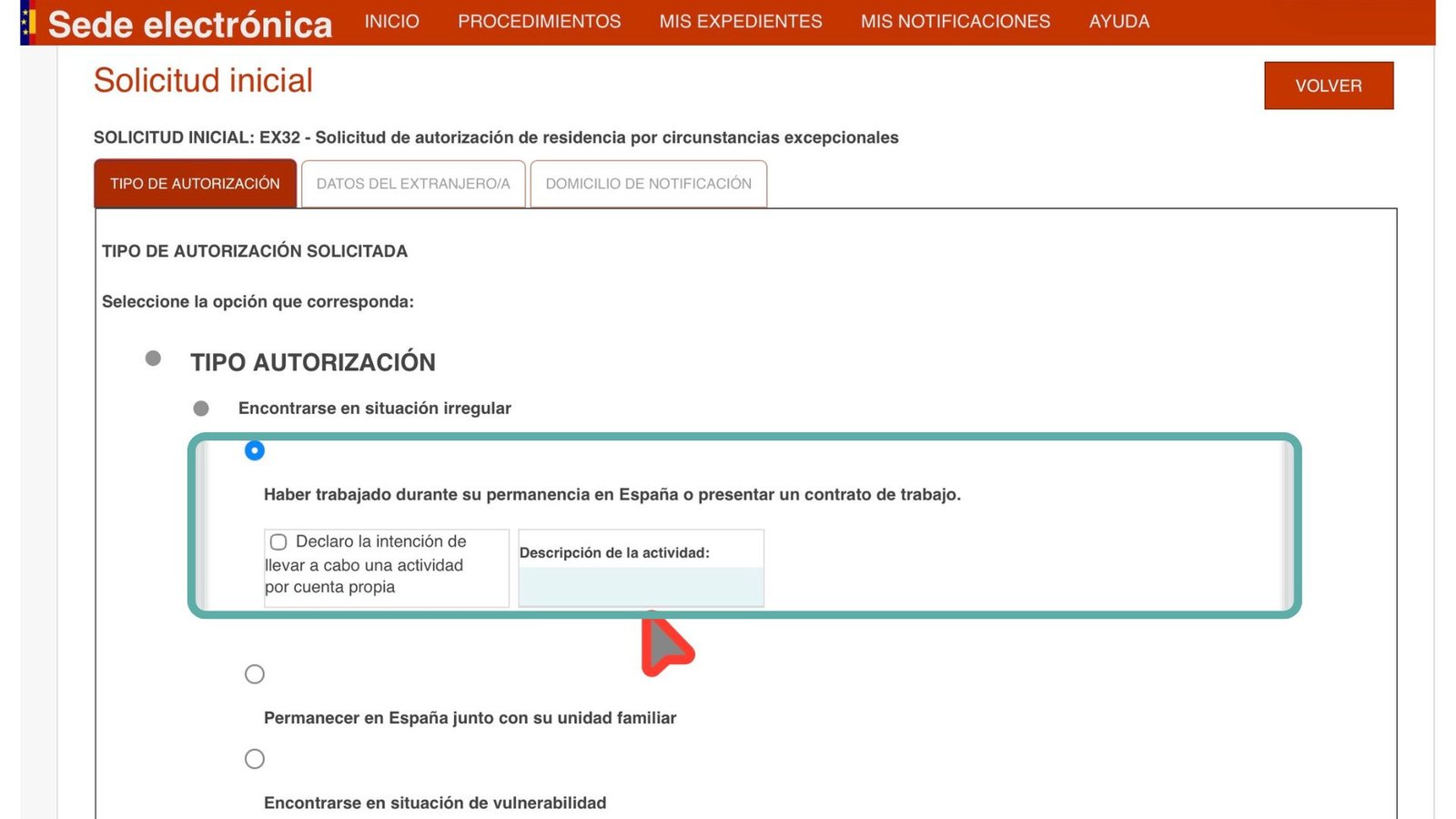
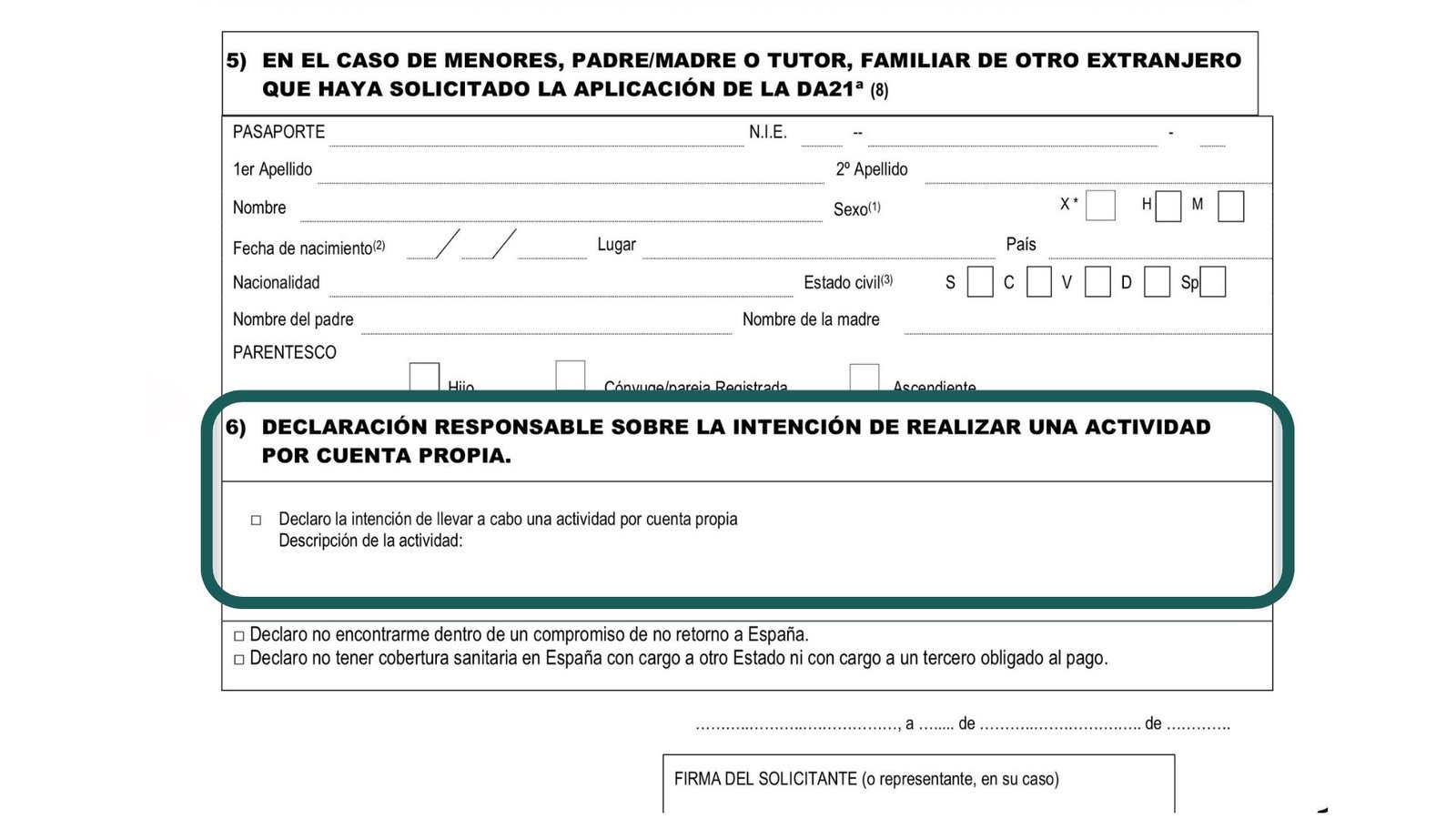
    • Employment: having been employed or self-employed during your time in Spain, or demonstrating the intention to work by presenting a job offer (a contract or combination of contracts exceeding 90 days in one year) or a responsible declaration of self-employed activity.
    • Family ties: residing in Spain with minor children, adult children with a disability requiring support, or direct ascendants of the first degree.
    • Vulnerability: a situation certified by means of a certificate — which may be downloaded from the regularisation portal — endorsed by social services or by an entity registered in the Registry of Immigration Collaborating Entities (RECEX). The regulation recognises that an irregular administrative situation, together with the personal, economic or social circumstances arising from it, may in itself constitute vulnerability.

    Persons who already hold a valid residence or stay permit — or who have a pending application for authorisation — are not eligible. Nor are beneficiaries of temporary protection from Ukraine, who are covered by a separate procedure.

    Main requirements

    These are cumulative — you must satisfy all of them:

    • You must have been present in Spain before 1 January 2026. This may be evidenced by any document bearing your name and a date: passport with an entry stamp, tenancy agreement, utility bills, medical reports, municipal registration (empadronamiento), remittance receipts, etc.
    • You must have at least 5 months of uninterrupted presence in Spain at the time of submitting your application. The term «uninterrupted» is retained in the final text.
    • You must have no criminal record in Spain or in the countries where you resided during the five years prior to your entry into Spain. You must provide the criminal record certificate from your country of origin. If you have requested it and have not received it within one month, you may submit a responsible declaration to that effect and authorise the Spanish authorities to obtain it through diplomatic channels. Expungable offences in Spain are not taken into consideration.
    • You must not represent a threat to public order or be subject to an entry ban in Spain.
    • You must pay the processing fee: €38.28.

    What will you receive?

    A one-year residence and work permit, valid for any sector and throughout Spain. From the moment the Administration notifies you that processing of your application has commenced, you will be provisionally authorised to work, both as an employee and on a self-employed basis. You will also receive a Social Security affiliation number and a health card. For your minor children, the residence authorisation is for five years.

    After the first year, you will need to apply for a modification through the standard pathways provided in the Immigration Regulations. If you are unable to obtain a modification, it is possible to request an extension by demonstrating active employment-seeking.

    The maximum period for a decision is three months. If the Administration does not issue a decision within that period, the application is deemed refused by administrative silence. Following a favourable decision, you have one month to apply for your Foreign National Identity Card (Tarjeta de Identidad de Extranjero — TIE) at the National Police.

    When and where?

    ⚠️ Non-extendable deadline: Applications must be submitted before 30 June 2026. There will be no extension.

    These are the key dates:

    • 16 April: the online application channel opens (24 hours a day, 7 days a week) together with the appointment system for in-person attendance.
    • 20 April: in-person service begins at designated offices, by appointment only.
    • 30 June: application deadline. Non-extendable.

    Applications may be submitted online (with a personal electronic certificate, through the Registry of Powers of Attorney, via a lawyer, a social affairs graduate or an administrative agent, or through entities registered in the Registry of Immigration Collaborating Entities) or in person, always by appointment, at designated Social Security offices, Correos (postal service) branches and certain immigration offices. Information will be available on the portal inclusion.gob.es/regularización from 16 April.

    Appointments may be requested through the regularisation portal (with or without Cl@ve) or by telephone on 060 (service in Spanish, Monday to Friday from 09:30 to 14:00 and from 16:30 to 19:30).

    Who can assist you?

    The Registry of Immigration Collaborating Entities (RECEX — published in the Official Gazette on 5 March 2026) enables registered trade unions and NGOs to advise you free of charge and to submit applications on your behalf. Licensed professionals may also assist you: lawyers, social affairs graduates and administrative agents.

    Important notice: cases of fraud and abuse are being detected. Nobody can «reserve a place or an appointment» for you before the system becomes operational tomorrow, 16 April. Do not pay anyone for procedures that are free of charge through collaborating entities. If you have any doubts, consult only official sources or recognised organisations.

    What to do now

    1. Gather your documents: everything that evidences your presence in Spain before 1 January 2026 and during the past 5 months. Organise them by date.
    2. Ensure you are registered at your local council (empadronamiento). Municipal registration is not mandatory for the application, but it is an extremely useful document for evidencing your presence. It is free of charge and your administrative situation is irrelevant.
    3. Request your criminal record certificate from your country of origin if you do not already have one. If you have already requested it and have not received it within one month, the regulation provides a mechanism for the Spanish authorities to obtain it through diplomatic channels.
    4. Do not leave Spain until you have submitted your application. Your presence must be uninterrupted during the 5 months preceding the application.
    5. If you have a pending arraigo application, no additional action is required. The Royal Decree provides that arraigo applications submitted since May 2025 will be determined under the requirements of this regularisation.
    6. If you intend to submit your application online, you will need an electronic certificate. We explain how to obtain one here: Digital certificate for foreign nationals in Spain. If you do not have an electronic certificate, you may submit your application in person or through a representative.
    7. Consult only reliable sources: the portal inclusion.gob.es, La Moncloa, and organisations such as CEAR, Cruz Roja (Red Cross), Accem or Red Acoge.

    Pending: the application form

    The application form and the accompanying socio-occupational questionnaire will be available for download on the regularisation portal (inclusion.gob.es) from 16 April. As soon as they are published, we will update this article with direct links.

    Summary

    The regularisation is now official. The application window opens tomorrow, 16 April, and closes on 30 June — just over two months. It is not an automatic process: you must gather documents, satisfy the requirements and submit your application on time. But it represents a genuine opportunity for hundreds of thousands of people. At intercultural.info we will follow the process closely and explain every step.

  • Regularización extraordinaria 2026 en España: qué se sabe, quién puede solicitarla y qué debes hacer ya

    Regularización extraordinaria 2026 en España: qué se sabe, quién puede solicitarla y qué debes hacer ya

    Este artículo también está disponible en: Español العربية English Français

    Actualizado el 15 de abril de 2026 | intercultural.info

    El Real Decreto 316/2026 de la regularización extraordinaria fue publicado el 15 de abril de 2026 en el Boletín Oficial del Estado y entró en vigor el 16 de abril. Lo que durante meses fue un borrador es ya una norma oficial: las personas extranjeras que viven en España en situación irregular o que solicitaron asilo antes del 1 de enero de 2026 pueden solicitar un permiso de residencia y trabajo.

    En este artículo te explicamos los requisitos confirmados, las fechas clave y lo que tienes que hacer para presentar tu solicitud.

    ✅ Publicado en el BOE: El Real Decreto 316/2026, de 14 de abril, se ha publicado en el BOE el 15 de abril de 2026 (disposición BOE-A-2026-8284). Entra en vigor el 16 de abril. La información de este artículo refleja el texto oficial publicado.

    ¿Qué es esta regularización?

    Es un proceso excepcional y temporal que permite a personas extranjeras en situación irregular obtener un permiso de residencia y trabajo en España. El Gobierno estima que beneficiará a unas 500.000 personas. Se ha aprobado mediante Real Decreto —sin necesidad de aprobación parlamentaria— y modifica el Reglamento de Extranjería (RD 1155/2024) añadiendo dos nuevas disposiciones adicionales.

    ¿Quién puede solicitarla?

    El Real Decreto establece dos vías de acceso:

    Vía 1: Si pediste asilo antes del 1 de enero de 2026

    Puedes acogerte a esta regularización aunque tu solicitud haya sido denegada o esté pendiente. No necesitas renunciar al procedimiento de asilo para solicitarla: solo tendrás que desistir de la solicitud de asilo o del recurso si recibes una resolución favorable de la regularización. Se entiende que eres solicitante de protección internacional desde el momento en que manifestaste tu voluntad de solicitarla.

    Vía 2: Si estás en situación irregular y no pediste asilo

    Además de los requisitos generales (ver más abajo), debes acreditar al menos una de estas tres circunstancias:

    • Empleo: haber trabajado por cuenta ajena o propia durante tu estancia en España, o acreditar la intención de trabajar presentando una oferta de empleo (contrato o suma de contratos de más de 90 días en un año) o una declaración responsable de actividad por cuenta propia.
    • Familia: convivir en España con hijos o hijas menores de edad, hijos mayores con discapacidad que requieran apoyo, o ascendientes directos de primer grado.
    • Vulnerabilidad: situación acreditada mediante un certificado —que se podrá descargar del portal de la regularización— sellado por servicios sociales o por una entidad inscrita en el Registro de Colaboradores de Extranjería (RECEX). La norma reconoce que la propia situación administrativa irregular, junto con las circunstancias personales, económicas o sociales derivadas de ella, puede constituir vulnerabilidad.

    Las personas que ya tienen algún permiso de residencia o estancia en vigor —o que tienen una solicitud de autorización en trámite— no pueden acogerse a esta regularización. Tampoco las personas beneficiarias de protección temporal procedentes de Ucrania, que cuentan con un procedimiento separado.

    Requisitos principales

    Son acumulativos — debes cumplir todos:

    • Haber estado en España antes del 1 de enero de 2026. Acreditable con cualquier documento que lleve tu nombre y una fecha: pasaporte con sello de entrada, contrato de alquiler, facturas, informes médicos, empadronamiento, justificantes de envíos de dinero, etc.
    • Llevar al menos 5 meses de presencia ininterrumpida en España en el momento de presentar la solicitud. El término «ininterrumpida» se mantiene en el texto definitivo.
    • No tener antecedentes penales en España ni en los países donde hayas residido en los últimos cinco años antes de tu entrada en España. Debes aportar el certificado de antecedentes penales de tu país de origen. Si lo has solicitado y no lo has recibido en un mes, puedes presentar una declaración responsable indicándolo y autorizar a las autoridades españolas a recabarlo por vía diplomática. Los antecedentes cancelables en España no se tienen en cuenta.
    • No representar una amenaza para el orden público ni tener prohibida la entrada en España.
    • Abonar la tasa de tramitación: 38,28 euros.

    ¿Qué obtendrás?

    Un permiso de residencia y trabajo de un año, válido para cualquier sector y en todo el territorio español. Desde que la Administración comunique el inicio de la tramitación de tu solicitud, estarás habilitado provisionalmente para trabajar por cuenta ajena y por cuenta propia. También recibirás un número de afiliación a la Seguridad Social y una tarjeta sanitaria. Para tus hijos e hijas menores, la autorización de residencia es de cinco años.

    Pasado el primer año, deberás solicitar una modificación a través de las vías ordinarias del Reglamento de Extranjería. Si no puedes acceder a una modificación, existe la posibilidad de solicitar una prórroga acreditando búsqueda activa de empleo.

    El plazo máximo de resolución es de tres meses. Si la Administración no resuelve en ese plazo, la solicitud se entiende desestimada por silencio administrativo. Tras una resolución favorable, dispones de un mes para solicitar tu Tarjeta de Identidad de Extranjero (TIE) ante la Policía Nacional.

    ¿Cuándo y dónde?

    ⚠️ Plazo improrrogable: Las solicitudes deben presentarse antes del 30 de junio de 2026. No habrá prórroga.

    Estas son las fechas clave:

    • 16 de abril: se abre la vía telemática de solicitudes (24 horas, 7 días a la semana) y el sistema de cita previa para atención presencial.
    • 20 de abril: comienza la atención presencial en oficinas con cita previa.
    • 30 de junio: cierre del plazo de solicitudes. Improrrogable.

    La solicitud se puede presentar por vía telemática (con certificado electrónico propio, a través del Registro de Apoderamientos, mediante abogado, graduado social o gestor administrativo, o a través de entidades del Registro de Colaboradores de Extranjería) o de forma presencial, siempre con cita previa, en oficinas habilitadas de la Seguridad Social, Correos y algunas oficinas de Extranjería. La información estará disponible en el portal inclusion.gob.es/regularización a partir del 16 de abril.

    La cita previa se puede solicitar a través del portal de la regularización (con o sin Cl@ve) o llamando al teléfono 060 (atención en español, de lunes a viernes de 09:30 a 14:00 y de 16:30 a 19:30).

    ¿Quién puede ayudarte?

    El Registro de Entidades Colaboradoras de Extranjería (publicado en el BOE el 5 de marzo de 2026) permite a sindicatos y ONGs registradas asesorarte de forma gratuita y presentar solicitudes en tu nombre. También pueden ayudarte profesionales habilitados: abogados y abogadas, graduados y graduadas sociales, y gestores y gestoras administrativos/as.

    Atención: se están detectando abusos y estafas. Nadie puede «reservarte un lugar o una cita previa» antes de que el sistema esté operativo mañana 16 de abril. No pagues a nadie por trámites que son gratuitos a través de las entidades colaboradoras. Si tienes dudas, consulta solo fuentes oficiales o entidades reconocidas.

    Qué hacer ahora

    1. Reúne tus documentos: todo lo que pruebe tu presencia en España antes del 1 de enero de 2026 y durante los últimos 5 meses. Ordénalos por fecha.
    2. Asegúrate de estar empadronado. El empadronamiento no es obligatorio para la solicitud, pero es un documento muy útil para acreditar tu presencia. Es gratuito y no importa tu situación administrativa.
    3. Solicita el certificado de antecedentes penales de tu país de origen si no lo tienes. Si ya lo has pedido y no lo has recibido en un mes, la norma prevé un mecanismo para que las autoridades españolas lo recaben por vía diplomática.
    4. No salgas de España hasta haber presentado la solicitud. La permanencia debe ser ininterrumpida durante los 5 meses anteriores a la solicitud.
    5. Si tienes un arraigo en trámite, no necesitas hacer nada adicional. El Real Decreto establece que las solicitudes de arraigo presentadas desde mayo de 2025 se resolverán aplicando los requisitos de esta regularización.
    6. Si vas a presentar la solicitud por vía telemática, necesitas certificado electrónico. Te explicamos cómo obtenerlo en: Certificado digital para personas extranjeras en España. Si no tienes certificado, puedes presentar tu solicitud de forma presencial o a través de un representante.
    7. Infórmate solo en fuentes fiables: el portal inclusion.gob.es, La Moncloa, y organizaciones como CEAR, Cruz Roja, Accem o Red Acoge.

    Pendiente: el formulario de solicitud

    El modelo de solicitud y el cuestionario sociolaboral que deben acompañarla estarán disponibles para descarga en el portal de la regularización (inclusion.gob.es) a partir del 16 de abril. En cuanto estén publicados, actualizaremos este artículo con los enlaces directos.

    En resumen

    La regularización ya es oficial. El plazo se abre mañana 16 de abril y se cierra el 30 de junio — son poco más de dos meses. No es un proceso automático: hay que reunir documentos, cumplir requisitos y presentar la solicitud a tiempo. Pero es una oportunidad real para cientos de miles de personas. En intercultural.info seguiremos el proceso de cerca y te explicaremos cada paso.


  • الشهادة الرقميّة للأجانب في إسبانيا الأداة المجانيّة التي قد تُغيِّر كلّ شيء — سواء كانت لك أوراق الإقامة أم لا

    الشهادة الرقميّة للأجانب في إسبانيا الأداة المجانيّة التي قد تُغيِّر كلّ شيء — سواء كانت لك أوراق الإقامة أم لا

    هذا المقال متوفّر أيضاً بلغات أخرى: العربية | Español | English | Français

    بما في ذلك علاقتها بالتسوية الاستثنائيّة 2026، إن تأكّدت القناة الإلكترونيّة في الجريدة الرسميّة (BOE)

    محدَّث في 25 مارس 2026 | intercultural.info

    هناك أداة مجانيّة يمكن لكثيرٍ من الأجانب المقيمين في إسبانيا الحصول عليها، تُمكِّنهم من إنجاز معاملاتهم في شؤون الإقامة وغيرها من الإجراءات الرسميّة مع الإدارة الإسبانيّة عبر الإنترنت، من المنزل، دون طوابير انتظار ودون مواعيد كثيراً ما يكون الحصول عليها مستحيلاً، وبقدرٍ كبير من الاستقلاليّة. تُعرف هذه الأداة بالشهادة الرقميّة (certificado digital)، وكثيرٌ ممّن هم في أمسّ الحاجة إليها لا يعلمون بوجودها.

    في هذا المقال، نشرح لك ما هي هذه الشهادة، وما المشكلات التي تحلّها، ولماذا نادراً ما يتحدّث عنها المختصّون، وما علاقتها بالتسوية الاستثنائيّة 2026.

    ▶ دليل تفصيليّ خطوة بخطوة: كيف تحصل على شهادتك الرقميّة

    دليل شامل مع لقطات شاشة.

    ← اذهب إلى الدليل

    ▶ شاهد الفيديو التوضيحيّ بالعربيّة الفصحى:

    ▶ شاهد الفيديو بالدَّارجة المغربيّة:

    المشكلة التي لا تَعرف بوجودها

    فكِّر في آخر مرّة أنجزتَ فيها معاملةً رسميّةً مع الإدارة الإسبانيّة — وإن لم يسبق لك ذلك، اسأل أيّ مهاجرٍ من محيطك عن تجربته. ربّما طلبت موعداً وانتظرتَ أسابيع للحصول عليه. ربّما دفعتَ نقوداً لشخص آخر ليقوم بذلك نيابةً عنك. ربّما لا تزال القضيّة معلّقةً منذ أشهر لأنّك لا تعرف كيف تتحقّق من حالة ملفّك أو كيف تُرسل وثيقةً طُلِبت منك.

    لا ينبغي أن يكون الأمر هكذا. تعمل الإدارة الإسبانيّة منذ سنوات على رقمنة خدماتها. اليوم، يمكن إنجاز كثيرٍ من الإجراءات الرسميّة عبر الإنترنت. المشكلة أنّ هذا يستلزم خطوةً واحدة: إثبات الهويّة إلكترونيّاً. ومن دون هذه الخطوة، يجد الشخص نفسه محاصراً في منظومةٍ صُمِّمت للإِسبان أو للمهاجرين ذوي الإقامة الرسميّة.

    الشهادة الرقميّة (certificado digital) من أهمّ الآليّات التي بفضلها يمكن للشخص الأجنبيّ الوصول إلى كثيرٍ من خدمات الإدارة العموميّة الإسبانيّة دون التنقّل، وبقدرٍ أكبر من الاستقلاليّة.

    لماذا لا أحد يتحدّث عن هذا

    إن بحثتَ على يوتيوب عن معلومات حول الإجراءات الإداريّة للأجانب في إسبانيا، ستجد عشرات القنوات تشرح موضوعاتٍ مثل arraigo social (الإدماج الاجتماعيّ)، وتجديد تصاريح الإقامة، والتسوية الاستثنائيّة وغيرها. غير أنّ القليل منها يتناول الشهادة الرقميّة (certificado digital) للمهاجرين. ومن يتحدّث عنها، نادراً ما يذكر أنّها تسمح بتقديم طلبات شؤون الأجانب باسمك أو نيابةً عنك أو أنت نيابةً عن غيرك.

    دون الخوض في تخمينات حول نوايا كلّ متخصّص يعمل في القطاع الخاص في مجال الهجرة، يمكن القول إنّ ثمّة أسباباً عديدةً لهذا الغياب. أحدها أنّ كثيراً من الأدلّة الإرشاديّة تتمحور حول الإجراء النهائيّ لا الأداة التي تُتيح إنجازه إلكترونيّاً. سببٌ آخر هو أنّ الحصول على التعريف الإلكترونيّ لا يزال يبدو معقّداً لكثيرٍ من الناس، في حين أنّه بتفسيرٍ واضح يكون في الغالب أكثر يُسراً ممّا يبدو.

    intercultural.info موجودٌ تحديداً لكسر هذه الديناميكيّة.

    ما فائدة الشهادة الرقميّة في الحياة الواقعيّة للمهاجرين في إسبانيا؟

    بالشهادة الرقميّة (certificado digital)، يستطيع المهاجر، من بين أشياء أخرى:

      • تقديم طلبات شؤون الأجانب (التسوية الاستثنائيّة، arraigo، التَّجمع العائلي، تجديد التصاريح…) إلكترونيّاً عبر منصّة Mercurio


      • الاطّلاع على حالة ملفّ الإقامة وتنزيل القرارات والإشعارات


      • إرسال وثائق إلى ملفٍّ مفتوح دون الحاجة إلى الحضور الشخصيّ


      • طلب شهادة السُّكنى (empadronamiento) في البلديّات التي تتيح ذلك إلكترونيّاً


      • الحصول على تقرير الحياة العمليّة ووثائق أخرى من الضمان الاجتماعيّ (Seguridad Social)


      • إنجاز المعاملات مع مصلحة الضرائب (Hacienda / AEAT): الإقرار الضريبيّ، الشهادات الجبائيّة


      • تقديم طلب الجنسيّة الإسبانيّة


      • تقديم طلب معادلة الشهادات الدراسيّة أو الاعتراف بالمؤهّلات المحصّلة في الخارج


      • الوصول إلى الملفّ الإلكترونيّ للمواطن (Mi Carpeta Ciudadana)، البوّابة الموحّدة للإدارة الإسبانيّة


      • توقيع الوثائق بصلاحيّة قانونيّة كاملة دون الحاجة إلى وساطة أو كاتب عدل

    خلاصة القول: الشهادة الرقميّة (certificado digital) تجعل من الشخص طرفاً فاعلاً أمام الإدارة، قادراً على إدارة شؤونه بنفسه دون الاعتماد بالضرورة على وسطاء أو مواعيد كثيراً ما تكون عسيرة الحصول.

    ما هو التعريف الإلكترونيّ وما هي خياراتك؟

    التعريف الإلكترونيّ هو الوسيلة لإثبات هويّتك أمام الإدارة عبر الإنترنت بطريقة آمنة. في إسبانيا، تتوفّر عدّة أنظمة:

    الشهادة الرقميّة (certificado digital — FNMT): الأشمل والأكثر استعمالاً. مجانيّ، صالح لدى جميع مصالح الإدارة الإسبانيّة، يسمح لك ليس فقط بإثبات هويّتك بل أيضاً بتوقيع الوثائق بصلاحيّة قانونيّة كاملة. تُصدره المؤسّسة الوطنيّة لسكّ العُملة والطوابع (FNMT). وهو في الواقع العمليّ الأكثر فائدةً في كثيرٍ من المعاملات الإلكترونيّة لشؤون الأجانب، بما فيها تقديم الطلبات عبر منصّة Mercurio حين يسمح الإجراء بذلك.

    Cl@ve Permanente مع Cl@ve Firma: بديلٌ صالح للتعريف والتوقيع أيضاً. يستلزم إجراء تسجيل حضوريّاً (أو بالتعريف المرئيّ عن بُعد إذا كنت حاصلاً على الجنسيّة الإسبانيّة). مع تفعيل Cl@ve Firma، يمكن استخدامه لتوقيع بعض المعاملات الإلكترونيّة، وقد يكون بديلاً صالحاً تبعاً للإجراء المطلوب.

    Cl@ve PIN: نظامٌ أوّليّ للتعريف. يسمح بالاطّلاع على الملفّات وإثبات الهويّة أمام الإدارة، لكنّه لا يسمح بتوقيع الطلبات. مفيدٌ للاستفسارات؛ صالحٌ للتعريف في بعض الخدمات، غير أنّه وحده لا يكفي عادةً حين يشترط الإجراء التوقيع الإلكترونيّ.

    شهادات الحكومات الجهويّة (comunidades autónomas) وهيئات أخرى: إضافةً إلى FNMT، تتوفّر جهات إصدار شهادات رقميّة أخرى معترف بها من الدولة الإسبانيّة، مثل: ACCV (جهة فالنسيّة)، وIzenpe (بلاد الباسك)، وCATCert (كتالونيا)، وغرف التجارة عبر Camerfirma. جميعها صالحة للمعاملات مع الإدارة. في بعض المناطق، الحصول على الشهادة عبر البلديّة ذاتها أو هذه الجهات قد يكون أكثر يُسراً من المسار عبر FNMT.

    أشكال التعريف الإلكترونيّ المتاحة في إسبانيا: الشهادة الرقميّة (certificado digital) وCl@ve والبطاقة الوطنيّة الإلكترونيّة
    أشكال التعريف أمام الإدارة الإسبانيّة | المصدر: carpetaciudadana.gob.es (دخول عبر بوّابة Cl@ve)

    في هذا المقال، نُركّز على الشهادة الرقميّة (certificado digital) الصادرة عن FNMT، باعتبارها الأكثر شموليّةً في جميع أنحاء البلاد.

    NIE وتصريح الإقامة (autorización de residencia) وTIE: ثلاثة أشياء مختلفة — ولماذا يعنيك هذا المقال حتّى لو لم تكن تتوفّر على أوراق الإقامة

    قبل الحديث عمّن يستطيع الحصول على الشهادة الرقميّة، لا بدّ من توضيح ثلاثة مفاهيم كثيراً ما تختلط:

    NIE (رقم تعريف الأجانب): هو رقمٌ للتعريف — لا وثيقةٌ ولا تصريح. تُسنده الشرطة الوطنيّة (Policía Nacional) لكلّ أجنبيّ يُباشر أيّ إجراء رسميّ مع الإدارة الإسبانيّة، أو عند طلبه أمامها بإثبات مصلحة مشروعة (وفق شروط محدّدة). يمكن للشخص أن يمتلك NIE حتّى في غياب تصريح إقامة سارٍ أو في انعدامه كليّاً.

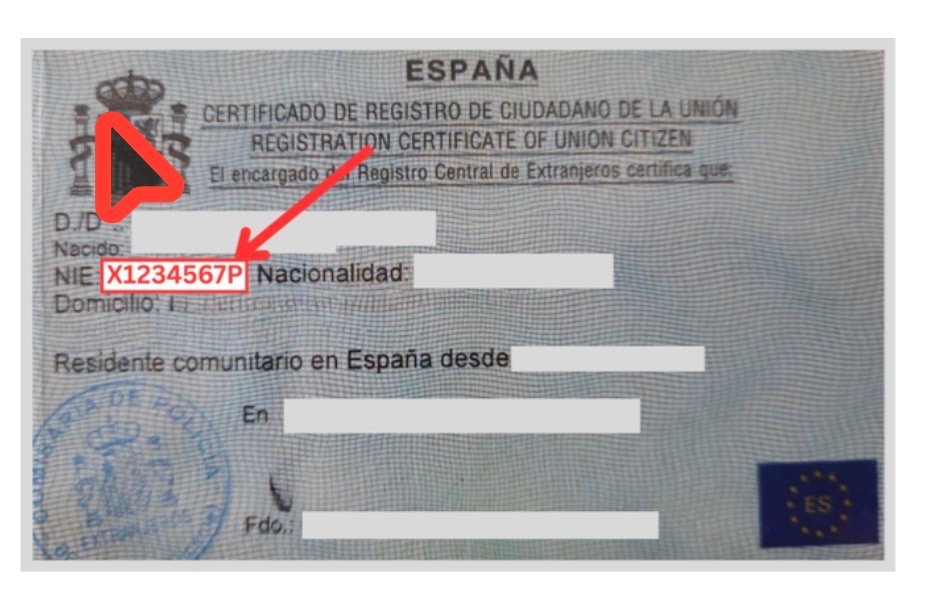
    مثال على وثيقة إسناد NIE (بيانات شخصيّة مُجَهَّلة)
    مثال على وثيقة إسناد NIE | المصدر: وثيقة حقيقيّة، بيانات شخصيّة مُجَهَّلة من قِبَل intercultural.info

    تصريح الإقامة (autorización de residencia): هو الإذن الإداريّ الذي يُخوِّل الإقامة في إسبانيا. يختلف عن NIE وعن TIE.

    مثال على قرار منح تصريح الإقامة (بيانات شخصيّة مُجَهَّلة)
    مثال على قرار منح تصريح الإقامة | المصدر: وثيقة حقيقيّة، بيانات شخصيّة مُجَهَّلة من قِبَل intercultural.info

    TIE (بطاقة هويّة الأجانب): هي تصريح الإقامة في صيغة بطاقة. تحمل NIE والصورة ونوع التصريح الممنوح.

    مثال على بطاقة هويّة الأجانب (TIE)
    مثال على TIE | المصدر: policia.es

    (más…)

  • درس عملي: كيف تحصل على شهادتك الرقميّة في إسبانيا                (Certificado Digital)

    درس عملي: كيف تحصل على شهادتك الرقميّة في إسبانيا (Certificado Digital)

    دليل تفصيليّ خطوة بخطوة

    هذا الدليل متوفّر أيضاً بلغات أخرى: العربية | Español | English | Français

    محدَّث في 25 مارس 2026 | intercultural.info

    لمن هذا الدليل

    هذا الدليل يرشدك خطوةً بخطوة للحصول على certificado digital (الشهادة الرقميّة) الصادرة عن FNMT (المؤسّسة الوطنيّة لسكّ العُملة والطوابع). الشهادة مجانيّة، وتسمح لك بإنجاز معاملات شؤون الأجانب وكثيرٍ من الإجراءات الرسميّة الأخرى مع الإدارة الإسبانيّة عبر الإنترنت.

    إن أردتَ أن تفهم بشكل أعمق ما هو certificado digital (الشهادة الرقميّة) وما الذي تُمكِّننا من القيام به وما علاقتها بالتسوية الاستثنائيّة 2026، ننصحك بقراءة مقالنا الشامل: certificado digital (الشهادة الرقميّة) للأجانب في إسبانيا.

    ⚠️ هل تنتظر التسوية الاستثنائيّة 2026؟

    إن تأكّدت القناة الإلكترونيّة في BOE (الجريدة الرسميّة)، فستحتاج إلى certificado digital (الشهادة الرقميّة) أو نظام توقيع إلكترونيّ لتقديم طلبك عبر منصّة Mercurio — أو أن يقوم بذلك شخصٌ آخر نيابةً عنك. نشرح هذه العلاقة في الفقرة: «والتسوية الاستثنائيّة 2026؟».

    إن كان لديك NIE (رقم تعريف الأجانب) — حتّى وإن لم يكن لديك تصريح إقامة سارٍ ولا TIE (بطاقة تعريف الأجانب) — يمكنك الحصول على هذه الشهادة. في الفقرات التالية نوضّح الوثائق التي تقبلها FNMT.

    وماذا إن لم يكن لديك NIE؟ هذا الدليل قد يهمّك أيضاً. إن كان لديك أحدٌ من عائلتك أو أصدقائك أو أيّ شخص موثوق به يمتلك تصريح إقامة أو الجنسيّة الإسبانيّة، يمكن لهذا الشخص الحصول على شهادته الرقميّة وتقديم بعض الطلبات نيابةً عنك بوصفه ممثّلاً، إن كان الإجراء يسمح بذلك. معرفة كيفيّة عمل هذا المسار ستساعدك في الاستعداد.

    يتّبع هذا الدليل نفس الخطوات الموضَّحة من قِبَل وكالة مصلحة الضرائب (AEAT / Hacienda) في الفيديو الرسميّ الخاصّ بكيفيّة الحصول على شهادة إلكترونيّة من FNMT. بعض المُقتطفات مأخوذة من ذلك الفيديو. وبما أنّ إجراءات الإدارة قابلة للتغيير في أيّ وقت، فقد تحقّقنا من أنّ هذا المسار هو الساريّ إلى تاريخ نشر الدليل.

    ما تحتاجه قبل البدء

    قبل الشروع في الإجراء، تأكّد من أنّ لديك:

    • NIE الخاصّ بك ووثيقة تُثبته (انظر أدناه الوثائق التي تقبلها FNMT)، إلى جانب جواز سفرك.
    • حاسوب (يعمل بنظام Windows أو Mac أو Linux). يجب إنجاز العمليّة كاملةً من الجهاز ذاته، بحساب المستخدم ذاته والمتصفّح (navegador / browser) ذاته.
    • عنوان بريد إلكترونيّ يمكنك الوصول إليه.
    • متصفّح محدَّث: Mozilla Firefox أو Google Chrome أو Microsoft Edge أو Opera أو Safari.
    مهمّ: لا تُعيد تهيئة الحاسوب ولا تُغيِّر المتصفّح أو حساب نظام التشغيل خلال الإجراء. يجب إنجاز كلّ شيء من الجهاز ذاته من البداية إلى النهاية.

    قد تختلف مظاهر بعض النوافذ عن لقطات الشاشة الواردة في هذا الدليل، تبعاً لنظام التشغيل (sistema operativo: Windows أو Mac أو Linux) المُثبَّت على جهازك.

    الخطوة 1 — تثبيت برنامج FNMT

    قبل تقديم طلب الشهادة، تحتاج إلى تثبيت برنامج صغير يُعرَف بـ Configurador FNMT-RCM (برنامج ضبط الشهادة الرقميّة). يُولِّد هذا البرنامج مفاتيح الأمان اللازمة لشهادتك. يعمل على Windows وMac وLinux.

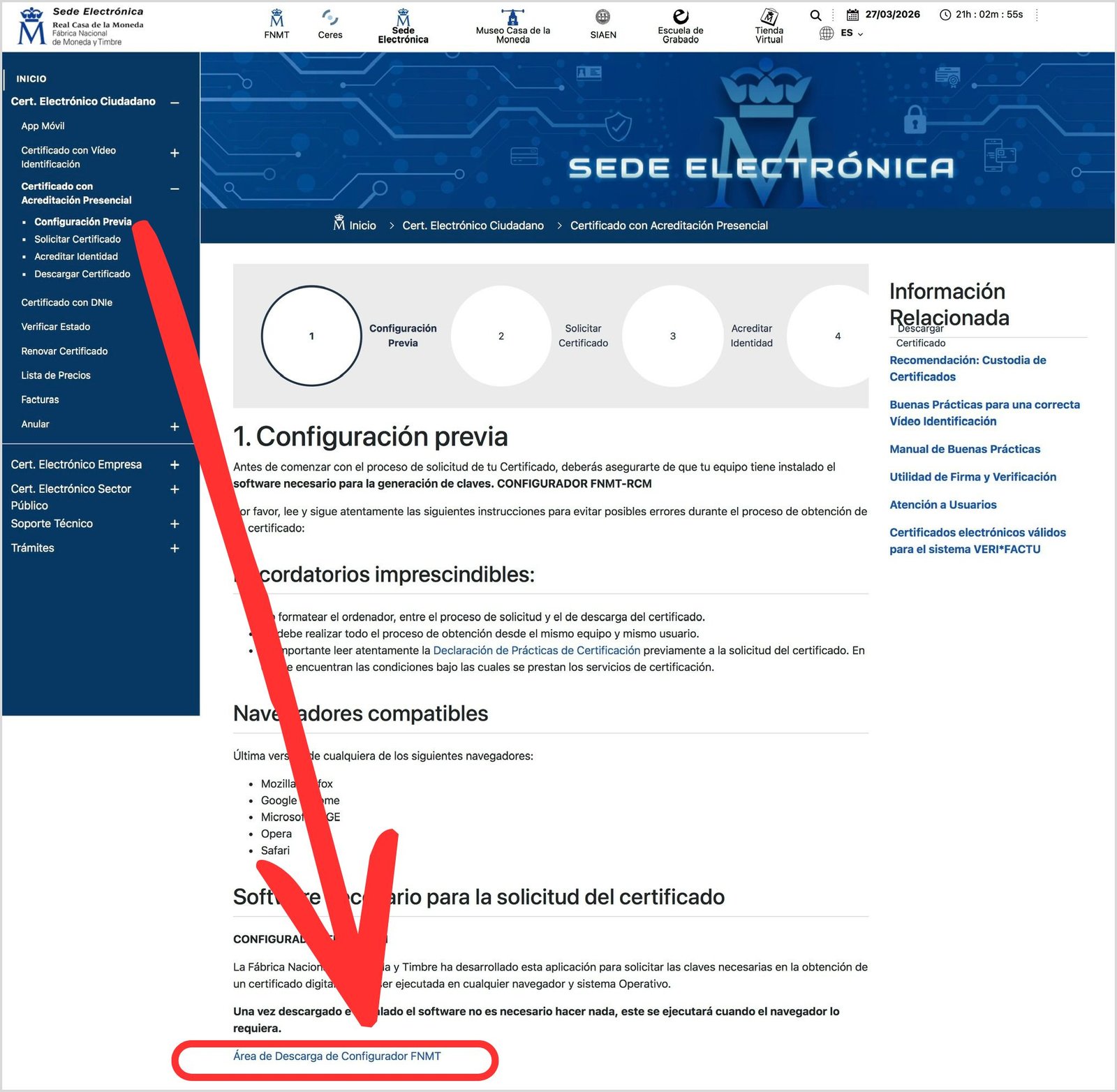
    نزِّله من البوّابة الإلكترونيّة لـFNMT: sede.fnmt.gob.es › Certificados › Persona Física › Obtener Certificado Software › Configuración previa.

    صفحة الضبط المسبق في البوّابة الإلكترونيّة لـFNMT
    صفحة الضبط المسبق لـFNMT | المصدر: sede.fnmt.gob.es

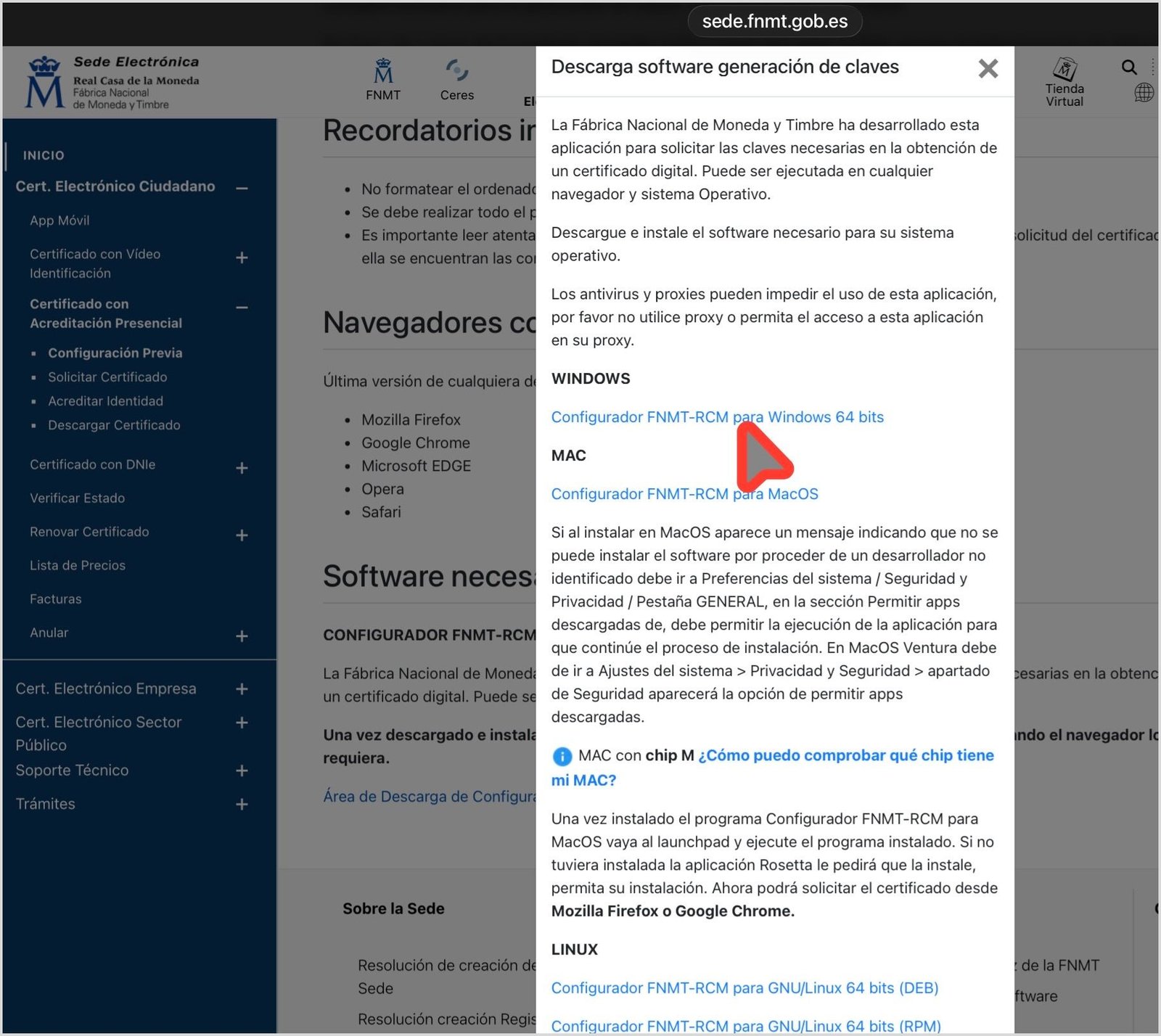
    اختر رابط التنزيل المناسب لنظام تشغيلك (Windows أو Mac أو Linux) واتّبع خطوات معالج التثبيت.

    شاشة اختيار نظام التشغيل لتنزيل Configurador FNMT-RCM
    اختيار نظام التشغيل لتنزيل Configurador FNMT-RCM | المصدر: sede.fnmt.gob.es

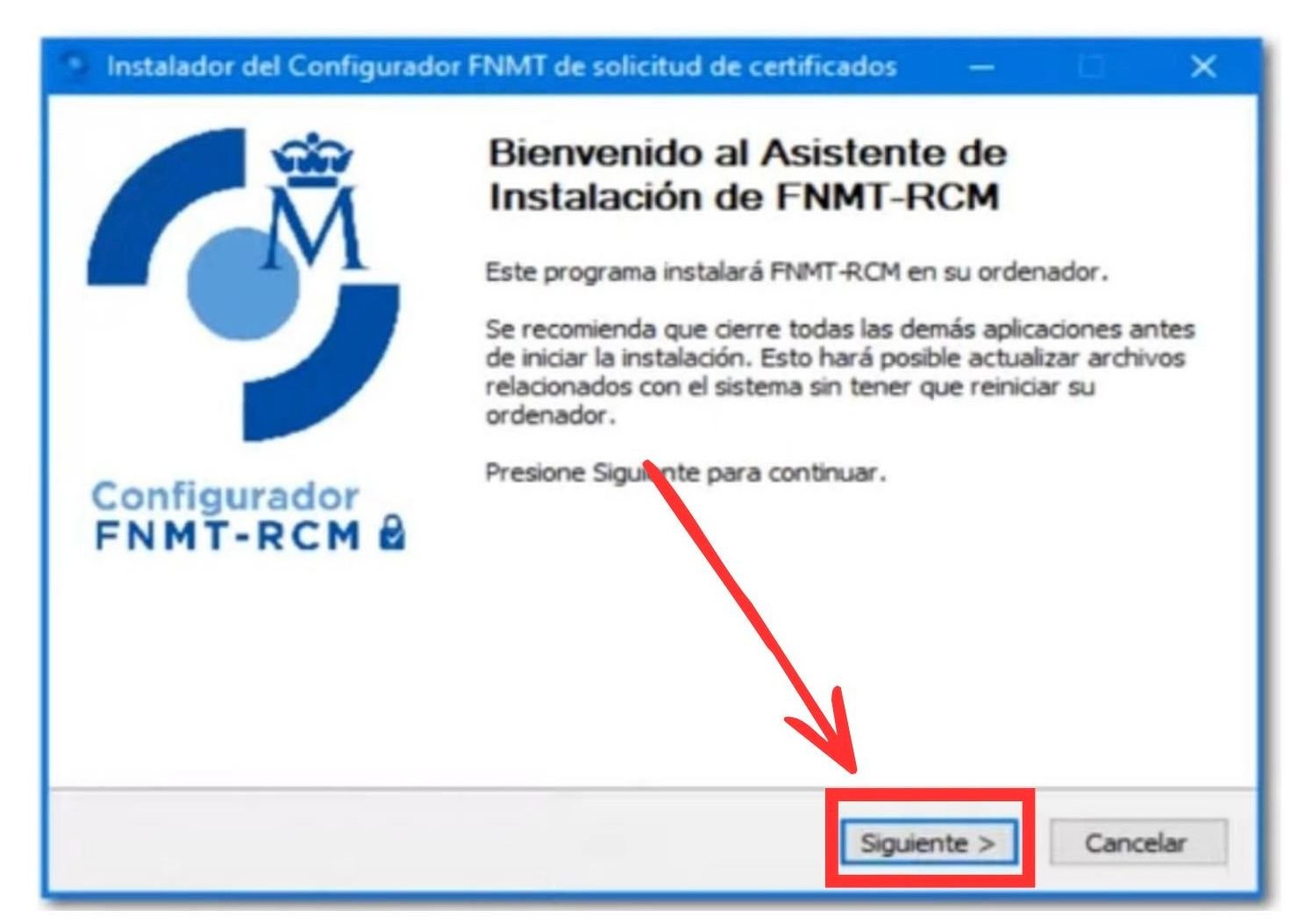
    على أجهزة Mac، قد تحتاج إلى الإذن بالتثبيت من: إعدادات النظام › الخصوصيّة والأمان. بعد التثبيت، لا حاجة لفتح البرنامج يدويّاً: سيعمل تلقائيّاً حين يحتاجه المتصفّح.

    معالج تثبيت Configurador FNMT-RCM على Windows
    معالج تثبيت Configurador FNMT-RCM (Windows) | المصدر: sede.fnmt.gob.es (لقطة من فيديو AEAT التعليميّ)

    ننصحك أيضاً بتثبيت برنامج AutoFirma (برنامج التوقيع الإلكترونيّ)، الذي تحتاجه كثيرٌ من صفحات الإدارة للعمل مع الشهادة الرقميّة، كمنصّة Mercurio المخصّصة لتقديم كثيرٍ من طلبات شؤون الأجانب إلكترونيّاً. يمكن تنزيله من firmaelectronica.gob.es.

    الخطوة 2 — تقديم الطلب عبر الموقع الإلكترونيّ

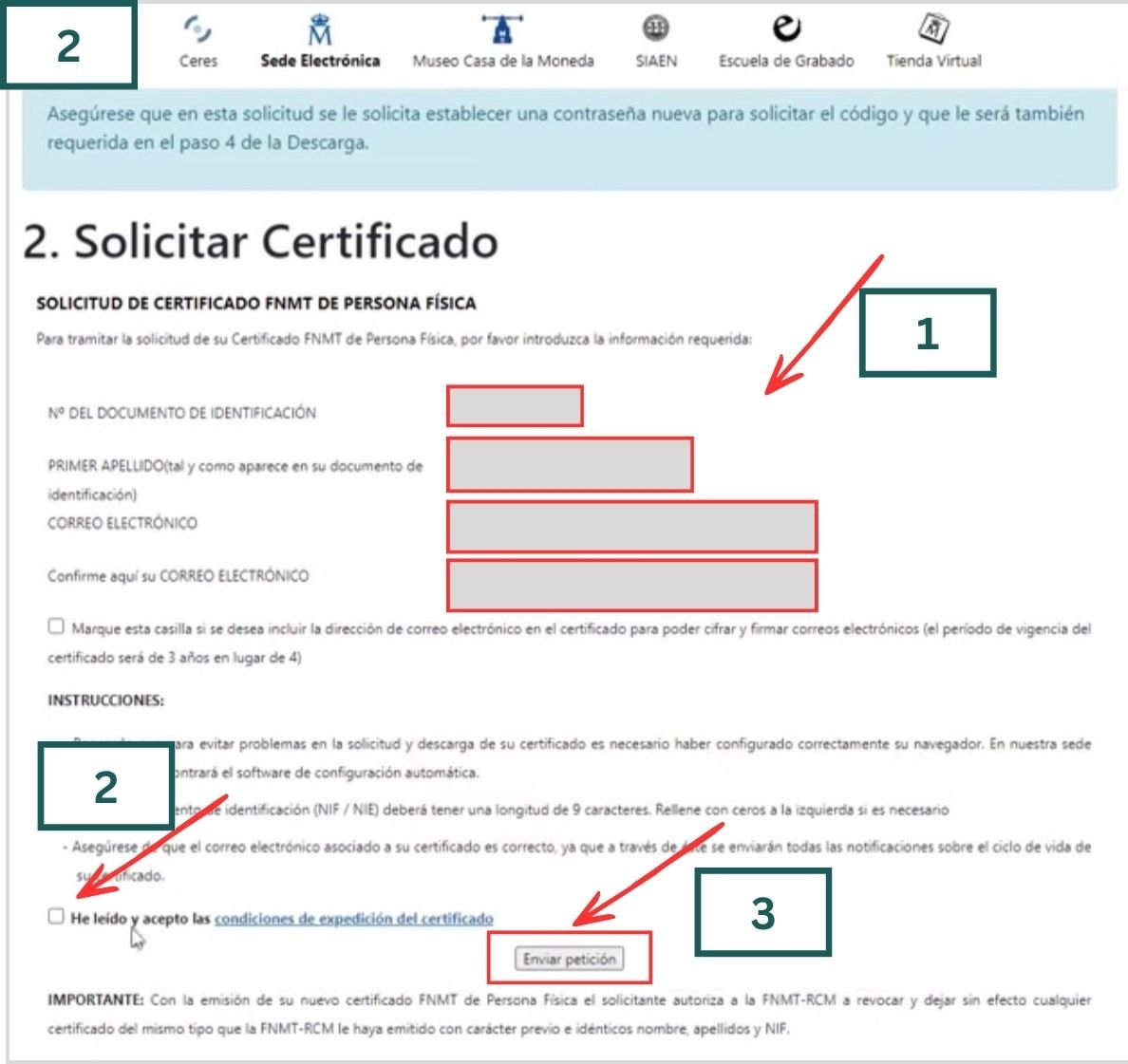
    اذهب إلى: sede.fnmt.gob.es › Certificados › Persona Física › Obtener Certificado Software › Solicitar Certificado.

    عبِّئ الاستمارة بما يلي:

    • رقم NIE الخاصّ بك (يبدأ بحرف وينتهي بحرف وبينهما سبعة أرقام).
    • اللقب الأوّل، مطابقاً تماماً لما هو مُدوَّن في وثيقة هويّتك.
    • عنوان بريدك الإلكترونيّ.
    استمارة طلب certificado digital (الشهادة الرقميّة) في البوّابة الإلكترونيّة لـFNMT
    استمارة طلب certificado digital (الشهادة الرقميّة) | المصدر: sede.fnmt.gob.es (لقطة من فيديو AEAT التعليميّ)

    في الاستمارة، عبِّئ الحقول الأربعة:

    • الحقل 1: رقم وثيقة التعريف (NIE في حالة الأجانب من غير حاملي الجنسيّة الإسبانيّة)
    • الحقل 2: اللقب الأوّل
    • الحقل 3: البريد الإلكترونيّ
    • الحقل 4: إعادة كتابة البريد الإلكترونيّ ذاته

    اقرأ شروط الاستخدام وافق عليها. عند الضغط على «إرسال الطلب»، سيطلب المتصفّح إذناً لفتح Configurador FNMT-RCM. في النافذة التي تظهر، انقر على «فتح». وإن عُرضت عليك إمكانيّة السماح بالوصول دائماً، فعِّلها.

    نافذة المتصفّح تطلب إذناً لفتح Configurador FNMT-RCM
    إذن المتصفّح لفتح Configurador FNMT-RCM | المصدر: sede.fnmt.gob.es (لقطة من فيديو AEAT التعليميّ)

    بعد ذلك، سيطلب منك النظام إنشاء كلمة مرور لحماية مفاتيح شهادتك. احتفظ بها في مكان آمن: ستحتاجها لتنزيل الشهادة ولا يمكن استرجاعها. ستُستخدَم كلمة المرور ذاتها للنسخة الاحتياطيّة أيضاً.

    نافذة إنشاء كلمة المرور لمفاتيح الشهادة
    نافذة إنشاء كلمة المرور | المصدر: sede.fnmt.gob.es (لقطة من فيديو AEAT التعليميّ)

    إن سارت الأمور على ما يرام، ستظهر لك رسالة تأكيد تتضمّن بياناتك.

    رسالة تأكيد استلام الطلب في بوّابة FNMT
    تأكيد استلام الطلب | المصدر: sede.fnmt.gob.es (لقطة من فيديو AEAT التعليميّ)

    ستصلك رسالة بريد إلكترونيّ تتضمّن رمز الطلب الخاصّ بك. دوِّنه أو اطبعه: ستحتاجه في المكتب وعند تنزيل الشهادة.

    رسالة البريد الإلكترونيّ من FNMT تتضمّن رمز الطلب
    رسالة FNMT تتضمّن رمز الطلب | المصدر: sede.fnmt.gob.es (لقطة من فيديو AEAT التعليميّ)

    الخطوة 3 — التحقّق من هويّتك في مكتب مختصّ

    الآن عليك التوجّه شخصيّاً إلى مكتب التحقّق من الهويّة للتثبّت أنّك صاحب الطلب. تتوفّر لـFNMT أكثر من 2.400 مكتب في جميع أنحاء إسبانيا: مكاتب الضمان الاجتماعيّ (Seguridad Social)، ومصلحة الضرائب (AEAT / Hacienda)، والبلديّات وغيرها من الجهات.

    صفحة إثبات الهويّة في البوّابة الإلكترونيّة لـFNMT
    صفحة «3. إثبات الهويّة» في بوّابة FNMT | المصدر: sede.fnmt.gob.es

    يمكنك البحث عن أقرب مكتب إلى مكان إقامتك عبر محدِّد المكاتب على الخريطة. أدخِل اسم بلديّتك في خانة البحث.

    محدِّد مكاتب التحقّق من الهويّة التابعة لـFNMT على الخريطة
    خريطة مكاتب التحقّق من الهويّة | المصدر: sede.fnmt.gob.es

    بعد اختيار البلديّة، ستظهر الخريطة مع المكاتب المتاحة. في مدينة ألباسيتي مثلاً، تظهر أربعة مكاتب تحقّق في مواقع مختلفة. بالنقر على كلٍّ منها تظهر الجهة المعنيّة وعنوانها الدقيق وطريقة الوصول إليها. ضع في اعتبارك أنّ مكاتب مصلحة الضرائب (AEAT / Hacienda) والضمان الاجتماعيّ (Seguridad Social) تشترط موعداً مسبقاً. استفسر من المكتب المعنيّ قبل التوجّه إليه.

    خريطة مكاتب التحقّق من الهويّة — مثال مدينة ألباسيتي
    خريطة مكاتب التحقّق — مثال مدينة ألباسيتي | المصدر: sede.fnmt.gob.es

    أحضر معك:

    • رمز الطلب (الذي وصلك بالبريد الإلكترونيّ).
    • جواز سفرك.

    وإحدى هذه الوثائق التي تتضمّن NIE:

    TIE (بطاقة تعريف الأجانب).

    مثال على TIE (بطاقة تعريف الأجانب)
    مثال على TIE | المصدر: policia.es

    شهادة مواطن الاتّحاد الأوروبيّ التي تتضمّن NIE (في حالة الرعايا البريطانيّين مثلاً).

    مثال على وثيقة إسناد NIE (بيانات شخصيّة مُجَهَّلة)
    مثال على وثيقة إسناد NIE | المصدر: وثيقة حقيقيّة، بيانات شخصيّة مُجَهَّلة من قِبَل intercultural.info

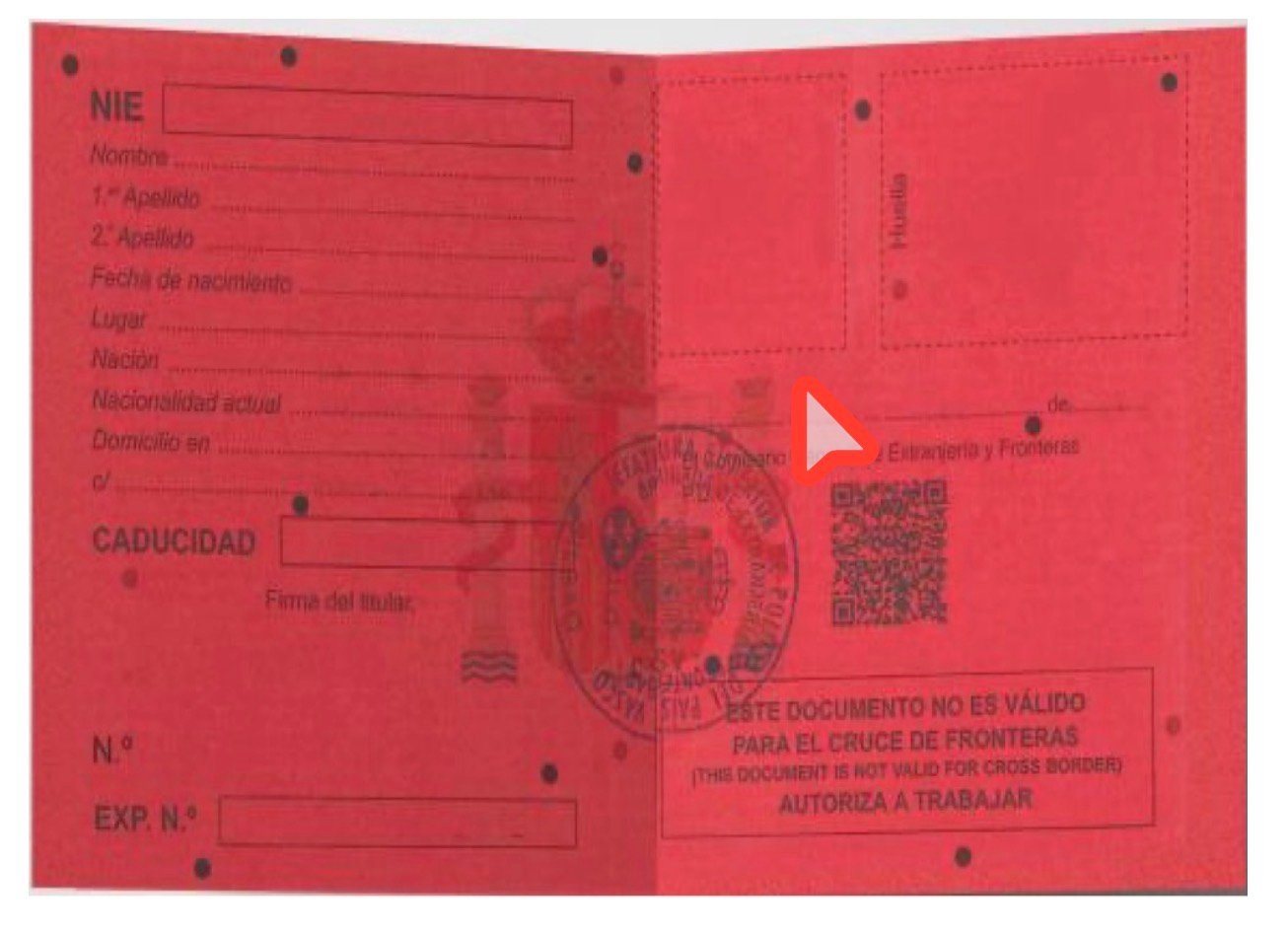
    البطاقة الحمراء أو الخضراء أو البيضاء لتعريف طالبي الحماية الدوليّة أو اللجوء.

    مثال على البطاقة الحمراء لتعريف طالبي الحماية الدوليّة
    مثال على البطاقة الحمراء | المصدر: Euskadi.eus (حكومة إقليم البلاد الباسكيّة)

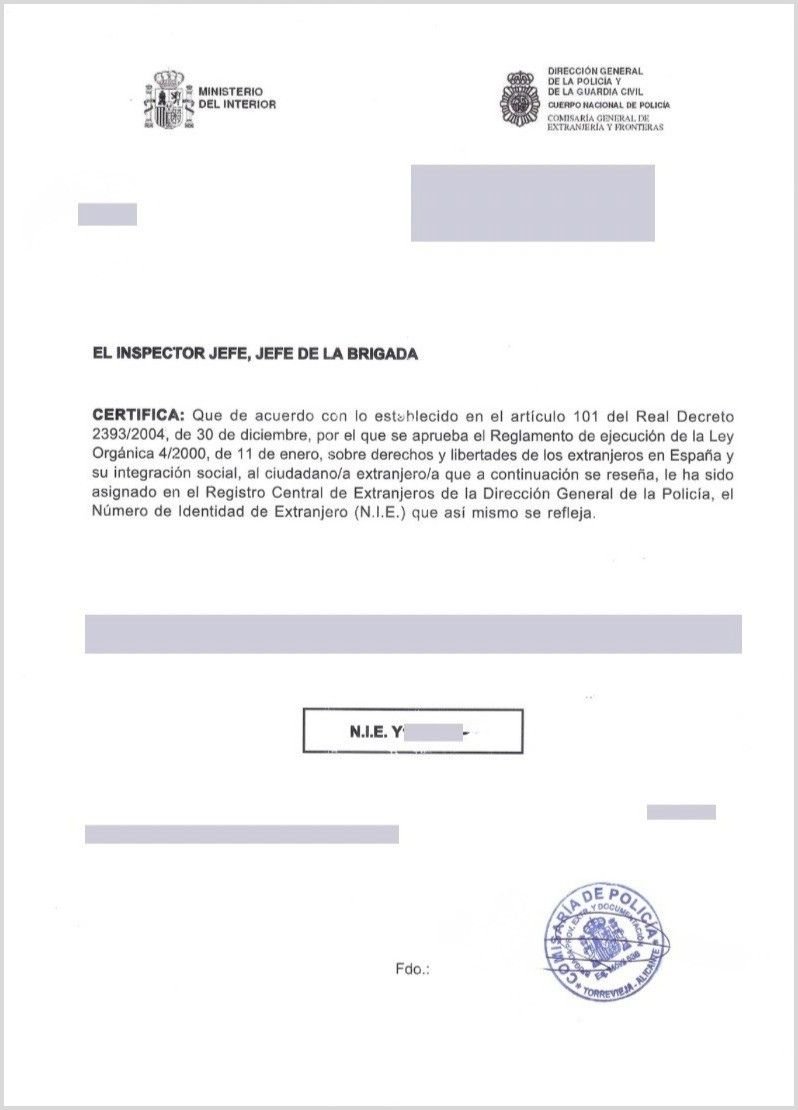
    الوثيقة الرسميّة لإسناد NIE (في غياب هذه الوثيقة أو أيٍّ ممّا سبق، يمكن المحاولة بوثيقة أخرى تتضمّن NIE، كقرار صادر عن إدارة الأجانب، موافقاً كان أم مرفوضاً).

    مثال على الوثيقة الرسميّة لإسناد NIE (بيانات شخصيّة مُجَهَّلة)
    مثال على الوثيقة الرسميّة لإسناد NIE | المصدر: وثيقة حقيقيّة، بيانات شخصيّة مُجَهَّلة من قِبَل intercultural.info
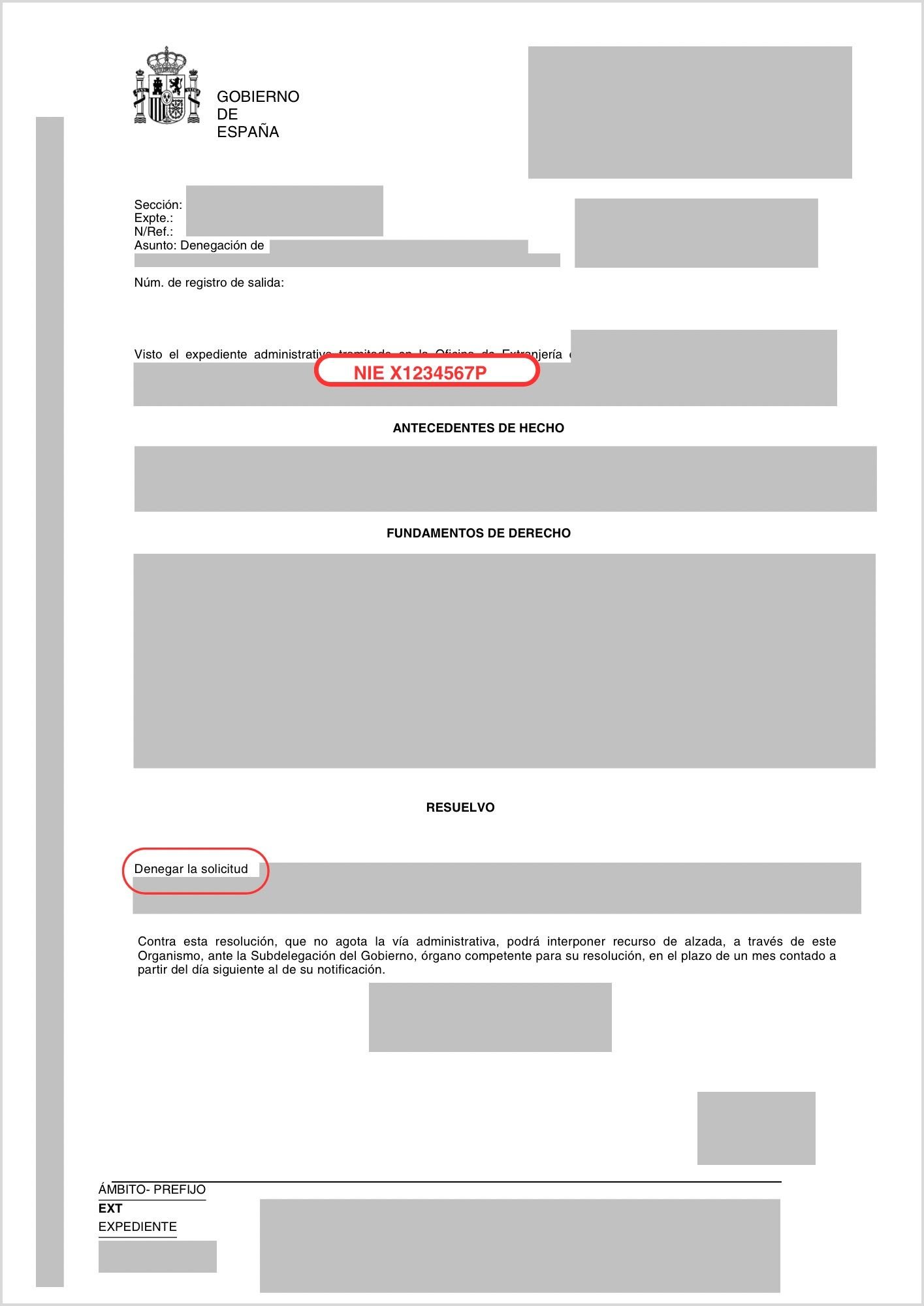
    مثال على قرار رفض من إدارة الأجانب يتضمّن NIE المُسنَد (بيانات شخصيّة مُجَهَّلة)
    مثال على قرار رفض يتضمّن NIE المُسنَد | المصدر: وثيقة حقيقيّة، بيانات شخصيّة مُجَهَّلة من قِبَل intercultural.info
    الوثائق المطلوبة حسب نوع المتقدّم — صفحة FNMT الإلكترونيّة
    الوثائق المطلوبة حسب نوع المتقدّم | المصدر: sede.fnmt.gob.es

    معلومة أساسيّة: تُحدّد FNMT في بوّابتها الإلكترونيّة أنّها تقبل «الوثيقة الرسميّة المُثبِتة لـNIF/NIE المُمكِّنة من التحقّق من حيازة NIE، بصرف النظر عن تاريخ صلاحيّة الوثيقة»، إلى جانب جواز السفر.

    ماذا إن لم تكن لديك هذه الوثيقة؟ في هذه الحالة يمكن المحاولة بأيّ وثيقة أخرى تتضمّن NIE — كقرار من إدارة الأجانب، موافقاً كان أم مرفوضاً. في الواقع العمليّ، قد تتباين التجربة من مكتبٍ لآخر: بعضها قد يقبل تلك الوثيقة؛ وبعضها قد يكون أكثر تشدّداً. ننصحك بالاستفسار من المكتب قبل التنقّل.

    التعريف المرئيّ عن بُعد عبر FNMT غير متاح لحاملي NIE. هو متاح فقط لحاملي بطاقة التعريف الوطنيّة الإلكترونيّة DNIe (بطاقة التعريف الإسبانيّة الإلكترونيّة). إن كنت حاملاً لـNIE، فلا بدّ أن يكون التحقّق حضوريّاً.

    الخطوة 4 — تنزيل الشهادة وتثبيتها وحفظ نسخة احتياطيّة

    بعد التحقّق من هويّتك في المكتب، ستكون شهادتك جاهزةً للتنزيل. قد تتفاوت مدّة الانتظار من مكتب تحقّق لآخر.

    اذهب إلى: sede.fnmt.gob.es › Certificados › Persona Física › Obtener Certificado Software › Descargar Certificado.

    أدخِل NIE الخاصّ بك ولقبك الأوّل ورمز الطلب. اقرأ شروط الاستخدام وافق عليها، ثمّ انقر «تنزيل الشهادة». تذكّر: يجب إجراء ذلك من الحاسوب ذاته والمتصفّح ذاته وحساب المستخدم ذاته الذي قدّمت منه الطلب.

    استمارة تنزيل الشهادة في البوّابة الإلكترونيّة لـFNMT
    استمارة تنزيل الشهادة | المصدر: sede.fnmt.gob.es

    عند التنزيل، سيُطلب منك إدخال كلمة المرور التي أنشأتها في الخطوة 2.

    نافذة كلمة المرور أثناء تنزيل الشهادة
    نافذة كلمة المرور أثناء التنزيل | المصدر: sede.fnmt.gob.es (لقطة من فيديو AEAT التعليميّ)

    أثناء التنزيل، سيعرض عليك النظام حفظ نسخة احتياطيّة من الشهادة. وافق على ذلك. هذه الخطوة مهمّة: إن أعدتَ تهيئة الحاسوب أو انتقلتَ إلى جهاز آخر أو فقدَ المتصفّح الشهادات إثر تحديث، فستضطرّ دون نسخة احتياطيّة إلى تكرار العمليّة من البداية.

    نافذة حفظ النسخة الاحتياطيّة لـcertificado digital (الشهادة الرقميّة)
    نافذة حفظ النسخة الاحتياطيّة | المصدر: sede.fnmt.gob.es (لقطة من فيديو AEAT التعليميّ)

    انقر «نعم» لإنشاء النسخة الاحتياطيّة. احتفظ بالملفّ في مكان آمن: ذاكرة USB أو قرص صلب خارجيّ أو خدمة تخزين سحابيّة محميّة بكلمة مرور.

    إن لم تظهر هذه النافذة، يمكنك تصدير الشهادة يدويّاً:

    • في Chrome أو Edge: اذهب إلى الإعدادات › الخصوصيّة والأمان › الأمان › إدارة الشهادات. اختر شهادتك وصدِّرها مع المفتاح الخاصّ.
    • في Firefox: اذهب إلى الإعدادات › الخصوصيّة والأمان › الشهادات › عرض الشهادات. في تبويب «شهاداتك»، اختر شهادتك وانقر «إنشاء نسخة احتياطيّة».

    بعد اكتمال العمليّة، ستظهر لك رسالة تُؤكّد تثبيت الشهادة بنجاح.

    رسالة تأكيد التثبيت الصحيح لـcertificado digital (الشهادة الرقميّة)
    تأكيد: «تمّ تثبيت الشهادة بنجاح» | المصدر: sede.fnmt.gob.es (لقطة من فيديو AEAT التعليميّ)

    الخطوة 5 — التحقّق من أنّ الشهادة تعمل

    للتأكّد من أنّ certificado digital (الشهادة الرقميّة) مُثبَّتة بشكل صحيح، ادخل إلى الملفّ الإلكترونيّ للمواطَنة (Carpeta ciudadana): sede.administracion.gob.es/carpeta/clave.htm. اختر خيار الدخول بالشهادة الإلكترونيّة. إن تمكّنت من الدخول ورأيت بياناتك، فالشهادة تعمل.

    والتسوية الاستثنائيّة 2026؟

    إن كنتَ في انتظار التسوية الاستثنائيّة 2026، فإنّ certificado digital (الشهادة الرقميّة) قد تكون ذات أهمّيّة بالغة. المسوّدات المتداولة تُشير إلى أنّ أحد قنوات تقديم الطلبات قد يكون إلكترونيّاً عبر منصّة Mercurio. وإن تأكّد ذلك، فإنّ توفّر certificado digital (الشهادة الرقميّة) أو نظام توقيع إلكترونيّ صالح قد يُحدث فارقاً عمليّاً حقيقيّاً.

    ⚠️ في انتظار التأكيد في BOE (الجريدة الرسميّة)

    حتّى 25 مارس 2026، لم يُنشَر بعد Real Decreto (المرسوم الملكيّ) الذي سيُنظّم التسوية الاستثنائيّة في BOE (الجريدة الرسميّة). التفاصيل المتعلّقة بقناة تقديم الطلبات ستُؤكَّد عند نشر النصّ النهائيّ.

    عند نشر Real Decreto (المرسوم الملكيّ)، سننشر دليلاً تفصيليّاً خاصّاً بكيفيّة تقديم الطلب عبر منصّة Mercurio. في الأثناء، الأحكم هو أن تكون شهادتك الرقميّة جاهزة.

    إن أردتَ معرفة المزيد عن التسوية الاستثنائيّة 2026 والوثائق اللازمة وموعد فتح باب التقديم، اقرأ مقالنا: التسوية الاستثنائيّة 2026 في إسبانيا: ما هو معروف، من يستطيع تقديم الطلب، وما الذي يجب فعله الآن.

    مشكلات شائعة

    «لا يسمح لي الموقع بتقديم طلب الشهادة.» تحقّق من أنّك ثبَّتَّ Configurador FNMT-RCM وأنّك تستخدم متصفّحاً متوافقاً ومحدَّثاً. بعض برامج مكافحة الفيروسات أو خوادم الوكيل (proxy) قد تحجب البرنامج: عطِّلها مؤقّتاً إن اقتضى الأمر.

    «يطلب منّي كلمة مرور لا أتذكّرها.» كلمة المرور تُنشأ عند تقديم الطلب (الخطوة 2) ولا يمكن استرجاعها. إن نسيتَها، ستضطرّ إلى تقديم طلب جديد من البداية.

    «المكتب لا يقبل وثيقتي.» قد تتباين التجربة من مكتبٍ لآخر. إن لم يقبل المكتب البديل عن الوثيقة الرسميّة لإسناد NIE، جرِّب مكتب تحقّق آخر (انظر البدائل في الخطوة 3). يمكنك أيضاً الاستفسار من بلديّتك، إذ تتعاون بعض البلديّات مع جهات إصدار شهادات يمكنها توجيهك.

    «نزَّلتُ الشهادة لكنّها لا تعمل.» تأكّد من أنّك استخدمتَ الحاسوب ذاته والمتصفّح ذاته وحساب المستخدم ذاته الذي قدَّمتَ منه الطلب. إن غيَّرتَ أيّاً من ذلك في المرحلة الوسيطة، فقد تحتاج إلى إعادة العمليّة من البداية.

    إن وصلتَ إلى هنا وأنجزتَ جميع الخطوات: مبروك. أصبح لديك الآن أداة تسمح لك بالوصول المباشر إلى الإدارة الإسبانيّة من المنزل، دون طوابير انتظار وبقدر أكبر من الاستقلاليّة. استخدمها. وإن كنتَ تعرف أحداً قد يحتاجها، شارك هذا الدليل معه.

    التنويه القانونيّ

  • Tutorial: Cómo obtener tu certificado digital en España: guía paso a paso

    Tutorial: Cómo obtener tu certificado digital en España: guía paso a paso

    Este tutorial también estará disponible en: Español | العربية English Français

    Actualizado el 25 de marzo de 2026 | intercultural.info

    Para quién es este tutorial

    Este tutorial te guía paso a paso para obtener el certificado digital de la FNMT (Fábrica Nacional de Moneda y Timbre). Es gratuito y te permite gestionar trámites de extranjería y otros muchos trámites con la administración española por internet.

    Si quieres entender mejor qué es el certificado digital, para qué sirve y qué relación tiene con la regularización extraordinaria 2026, te recomendamos leer nuestro artículo completo: Certificado digital para personas extranjeras en España.

    ⚠️ ¿Estás pendiente de la regularización extraordinaria 2026?

    Si la vía de presentación telemática se confirma en el BOE, necesitarás certificado digital o un sistema de firma electrónica para presentar tu solicitud a través de Mercurio — o que alguien lo haga en tu nombre. Más abajo explicamos la conexión (ver sección «¿Y la regularización extraordinaria 2026?»).

    Si tienes NIE (Número de Identificación de Extranjero/a) — aunque no tengas permiso de residencia en vigor ni TIE —, puedes obtener este certificado. Más abajo te explicamos qué documentos acepta la FNMT.

    ¿Y si no tienes NIE? Este tutorial también te interesa. Si tienes un familiar, una amiga, un amigo o cualquier persona de confianza con permiso de residencia o nacionalidad española, esa persona puede obtener su propio certificado digital y presentar algunas solicitudes en tu nombre como representante si el trámite lo permite. Saber cómo funciona el proceso te ayudará a prepararte.

    Este tutorial sigue los mismos pasos que explica la Agencia Tributaria (AEAT) en su vídeo oficial sobre cómo obtener un certificado electrónico de la FNMT. Algunas de nuestras capturas proceden de ese vídeo. Los procedimientos de la administración pueden cambiar con el tiempo; hemos verificado que este proceso es el vigente a fecha de publicación de este tutorial.

    Qué necesitas antes de empezar

    Antes de iniciar el proceso, asegúrate de tener:

    • Tu NIE y un documento que lo acredite (ver más abajo qué documentos acepta la FNMT), junto con tu pasaporte.
    • Un ordenador (PC, Mac o Linux). El proceso completo debe hacerse desde el mismo equipo, el mismo usuario y el mismo navegador.
    • Una dirección de correo electrónico a la que tengas acceso.
    • Un navegador actualizado: Mozilla Firefox, Google Chrome, Microsoft Edge, Opera o Safari.
    Importante: no formatees el ordenador ni cambies de navegador o de usuario del sistema operativo durante el proceso. Todo debe hacerse desde el mismo equipo de principio a fin.

    La apariencia de algunas ventanas puede ser diferente a las capturas de pantalla que mostramos en este tutorial, en función del sistema operativo que tengas en tu ordenador.

    Paso 1 — Instala el software de la FNMT

    Antes de solicitar el certificado, necesitas instalar un pequeño programa llamado Configurador FNMT-RCM. Este software genera las claves de seguridad necesarias para tu certificado. Funciona en Windows, Mac y Linux.

    Descárgalo desde la sede electrónica de la FNMT: sede.fnmt.gob.es › Certificados › Persona Física › Obtener Certificado Software › Configuración previa.

    Página de configuración previa de la FNMT en sede.fnmt.gob.es
    Página de configuración previa de la FNMT | Fuente: sede.fnmt.gob.es

    Selecciona el enlace de descarga correspondiente a tu sistema operativo (Windows, Mac o Linux) y sigue los pasos del asistente de instalación.

    Pantalla de selección del sistema operativo para la descarga del Configurador FNMT
    Selección del sistema operativo para la descarga del Configurador | Fuente: sede.fnmt.gob.es

    En Mac, es posible que necesites autorizar la instalación desde Ajustes del sistema › Privacidad y Seguridad. Una vez instalado, no tienes que abrirlo manualmente: se ejecutará solo cuando el navegador lo necesite.

    Asistente de instalación del Configurador FNMT-RCM en Windows
    Asistente de instalación del Configurador FNMT-RCM (Windows) | Fuente: sede.fnmt.gob.es (captura del vídeo tutorial AEAT)

    Te recomendamos instalar también la aplicación AutoFirma, que muchas páginas de la administración necesitan para funcionar con el certificado, como es el caso de la plataforma Mercurio, por donde se presentan muchas solicitudes telemáticas de extranjería. Puedes descargarla desde firmaelectronica.gob.es.

    Paso 2 — Solicita el certificado en la web

    Ve a: sede.fnmt.gob.es › Certificados › Persona Física › Obtener Certificado Software › Solicitar Certificado.

    Rellena el formulario con:

    • Tu NIE (9 caracteres, rellenando con ceros a la izquierda si es necesario).
    • Tu primer apellido, exactamente como aparece en tu documento de identidad.
    • Tu dirección de correo electrónico.
    Formulario de solicitud del certificado digital en la sede de la FNMT
    Formulario de solicitud del certificado digital | Fuente: sede.fnmt.gob.es (captura del vídeo tutorial AEAT)

    En el formulario, cumplimenta los cuatro campos:

    • Campo 1: número de documento de identificación (NIE en el caso de personas extranjeras sin la nacionalidad española)
    • Campo 2: primer apellido
    • Campo 3: correo electrónico
    • Campo 4: repetir el mismo correo electrónico

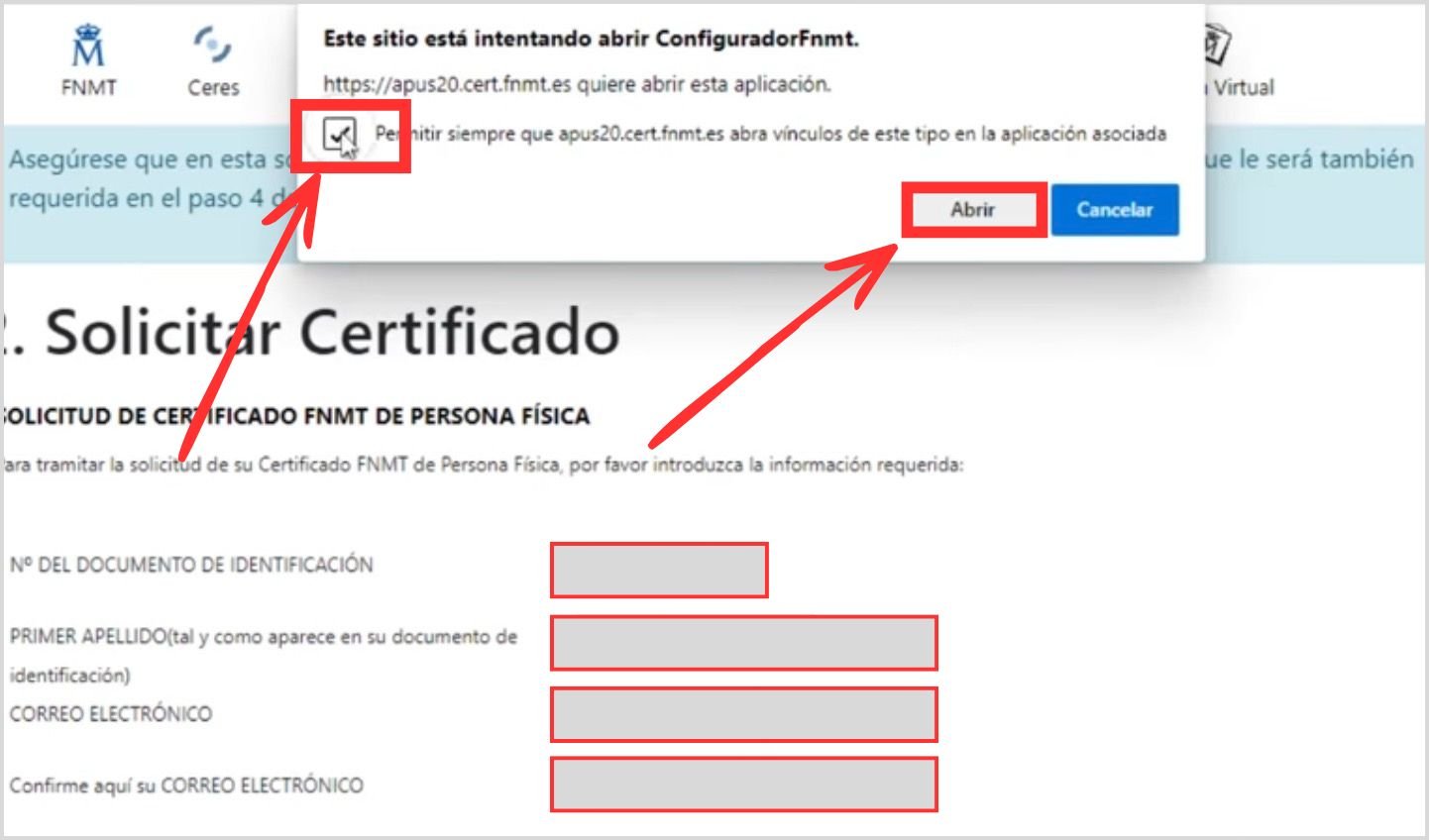
    Lee y acepta las condiciones de uso. Al hacer clic en «Enviar petición», el navegador te pedirá permiso para abrir el Configurador FNMT. En la ventana que aparezca, haz clic en «Abrir». Si te ofrece la opción de permitir siempre el acceso, márcala.

    Diálogo del navegador solicitando permiso para abrir el Configurador FNMT
    Permiso del navegador para abrir el Configurador FNMT | Fuente: sede.fnmt.gob.es (captura del vídeo tutorial AEAT)

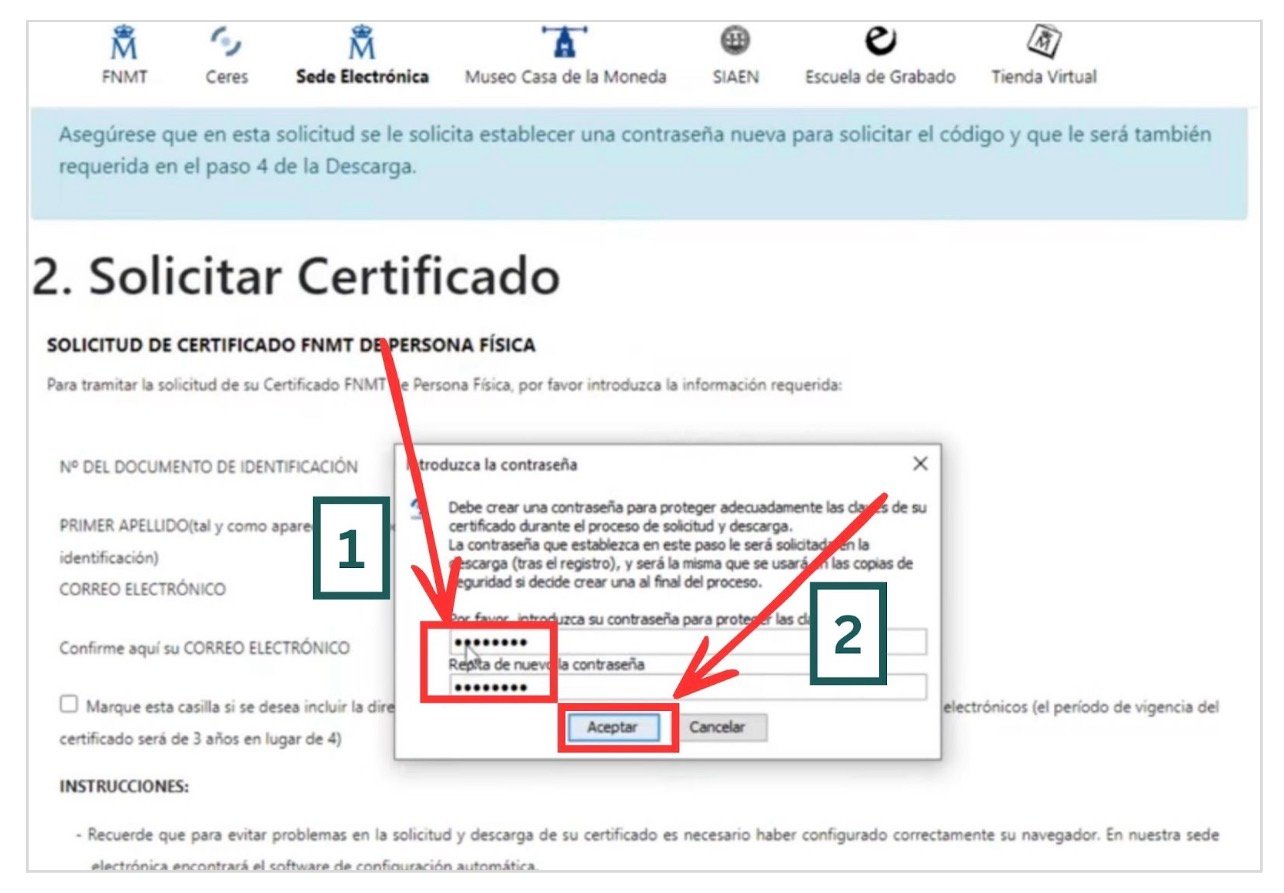
    A continuación, el sistema te pedirá crear una contraseña para proteger las claves de tu certificado. Guárdala bien: la necesitarás para descargar el certificado y no se puede recuperar. Esta misma contraseña se usará también para la copia de seguridad.

    Diálogo de creación de contraseña para las claves del certificado
    Diálogo de creación de contraseña | Fuente: sede.fnmt.gob.es (captura del vídeo tutorial AEAT)

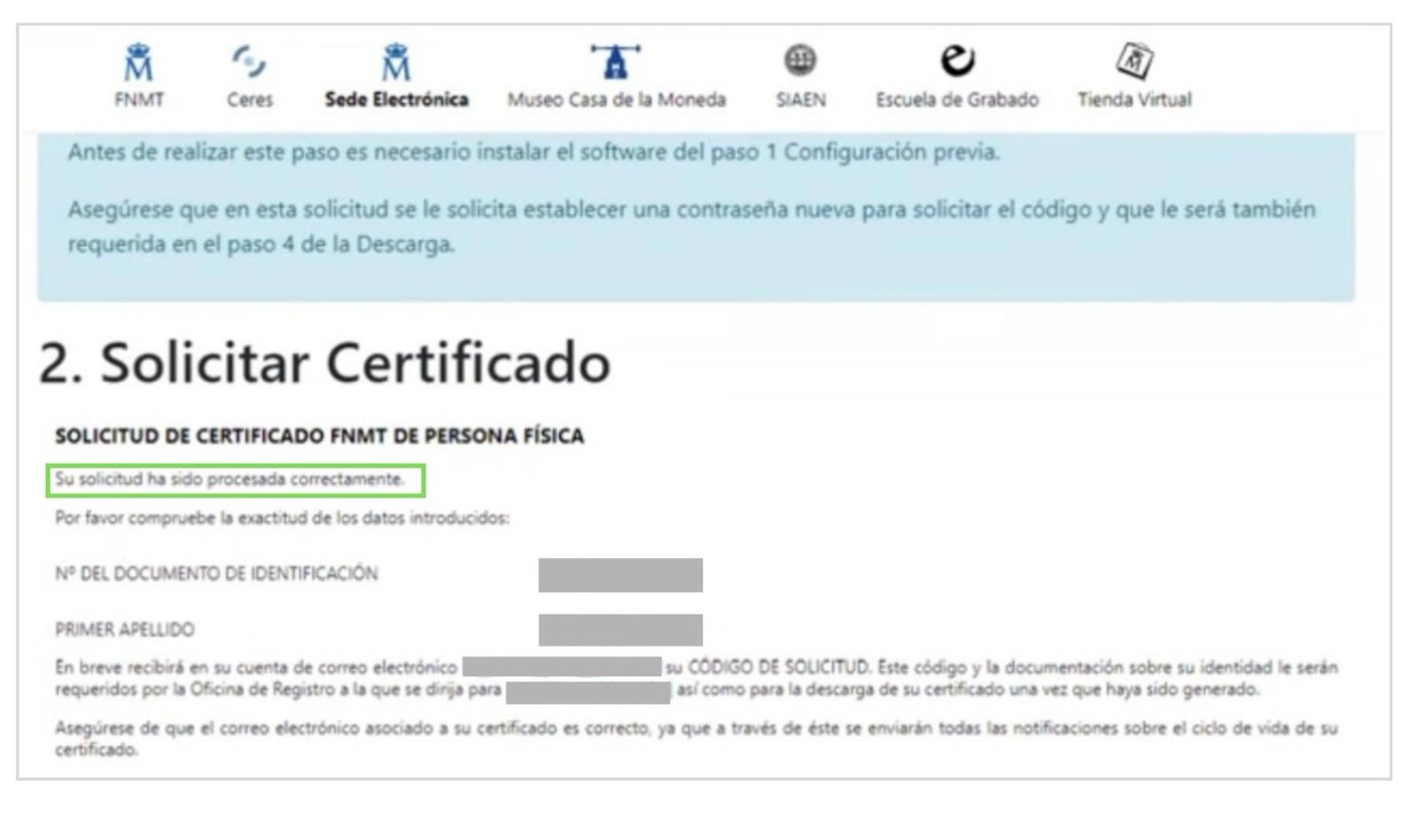
    Si todo ha ido bien, verás un mensaje de confirmación con tus datos.

    Mensaje de confirmación de solicitud procesada correctamente en la FNMT
    Confirmación de solicitud procesada correctamente | Fuente: sede.fnmt.gob.es (captura del vídeo tutorial AEAT)

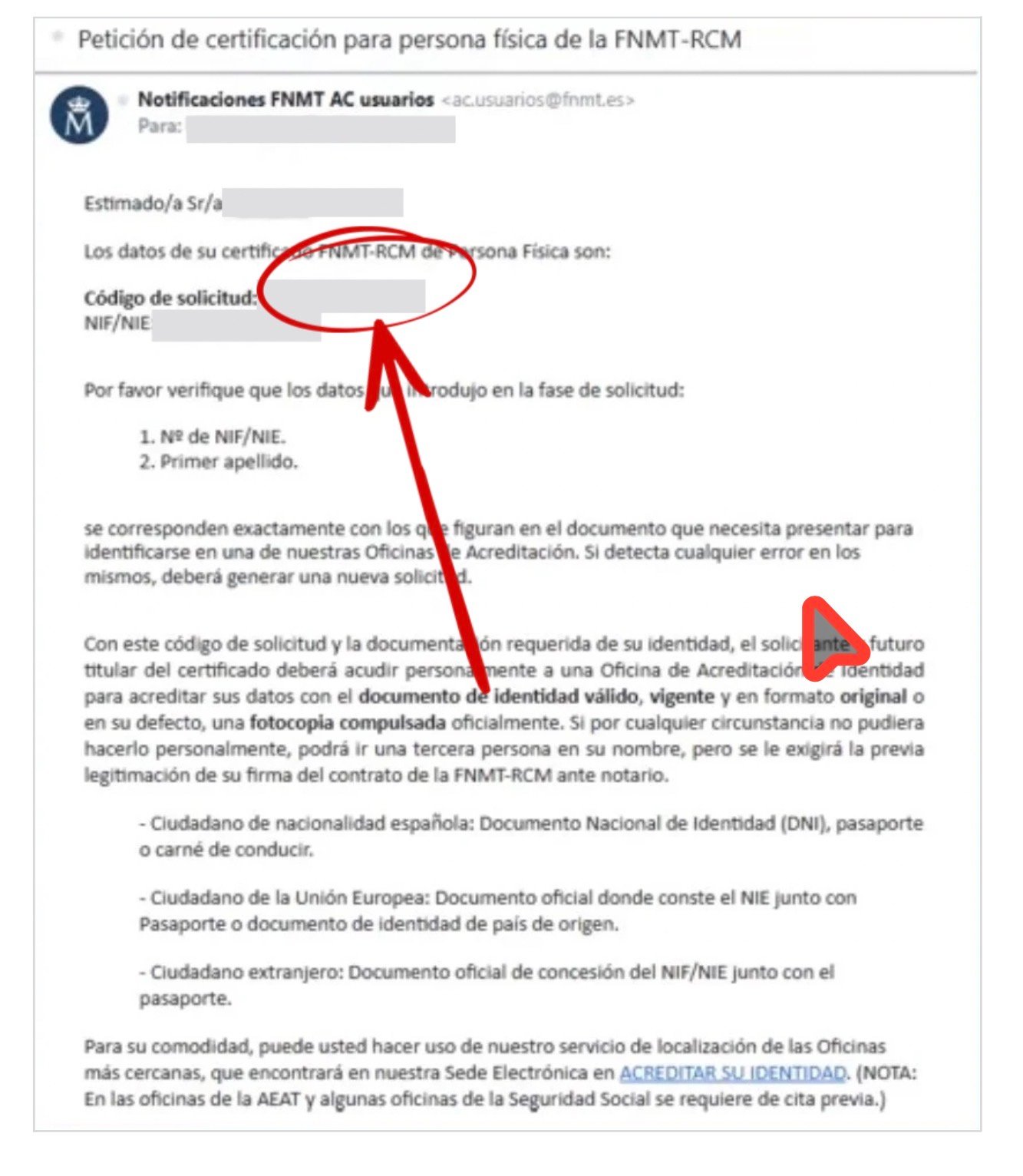
    Recibirás un correo electrónico con tu código de solicitud. Anótalo o imprímelo: lo necesitas en la oficina y para la descarga.

    Correo electrónico de la FNMT con el código de solicitud del certificado digital
    Correo electrónico de la FNMT con el código de solicitud | Fuente: sede.fnmt.gob.es (captura del vídeo tutorial AEAT)

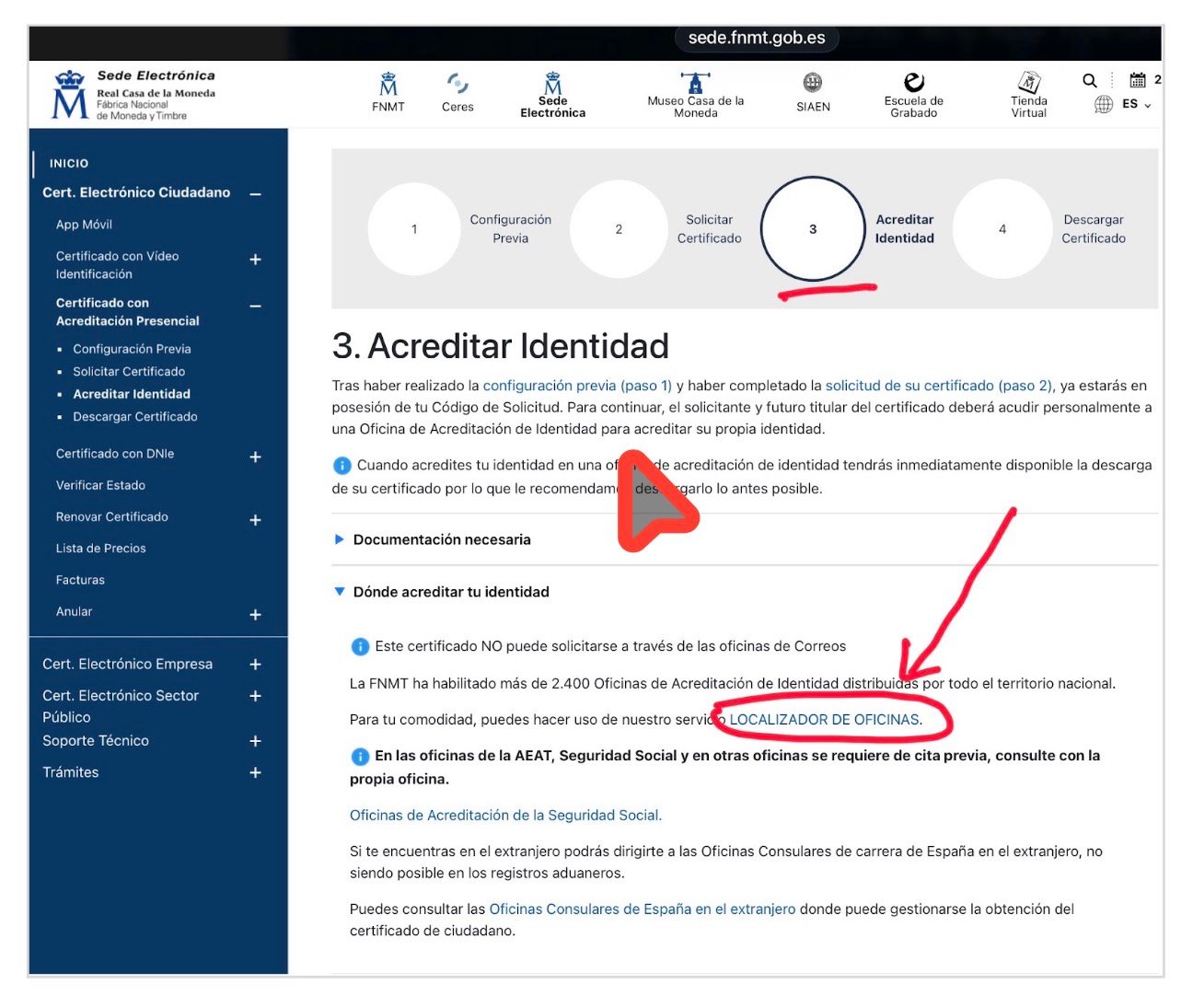
    Paso 3 — Acredita tu identidad en una oficina

    Ahora necesitas ir en persona a una Oficina de Acreditación de Identidad para verificar que eres tú quien ha solicitado el certificado. La FNMT tiene más de 2.400 oficinas en toda España: oficinas de la Seguridad Social, de la Agencia Tributaria (AEAT), ayuntamientos y otros organismos.

    Página 'Acreditar Identidad' de la sede electrónica de la FNMT
    Página «3. Acreditar Identidad» de la sede FNMT | Fuente: sede.fnmt.gob.es

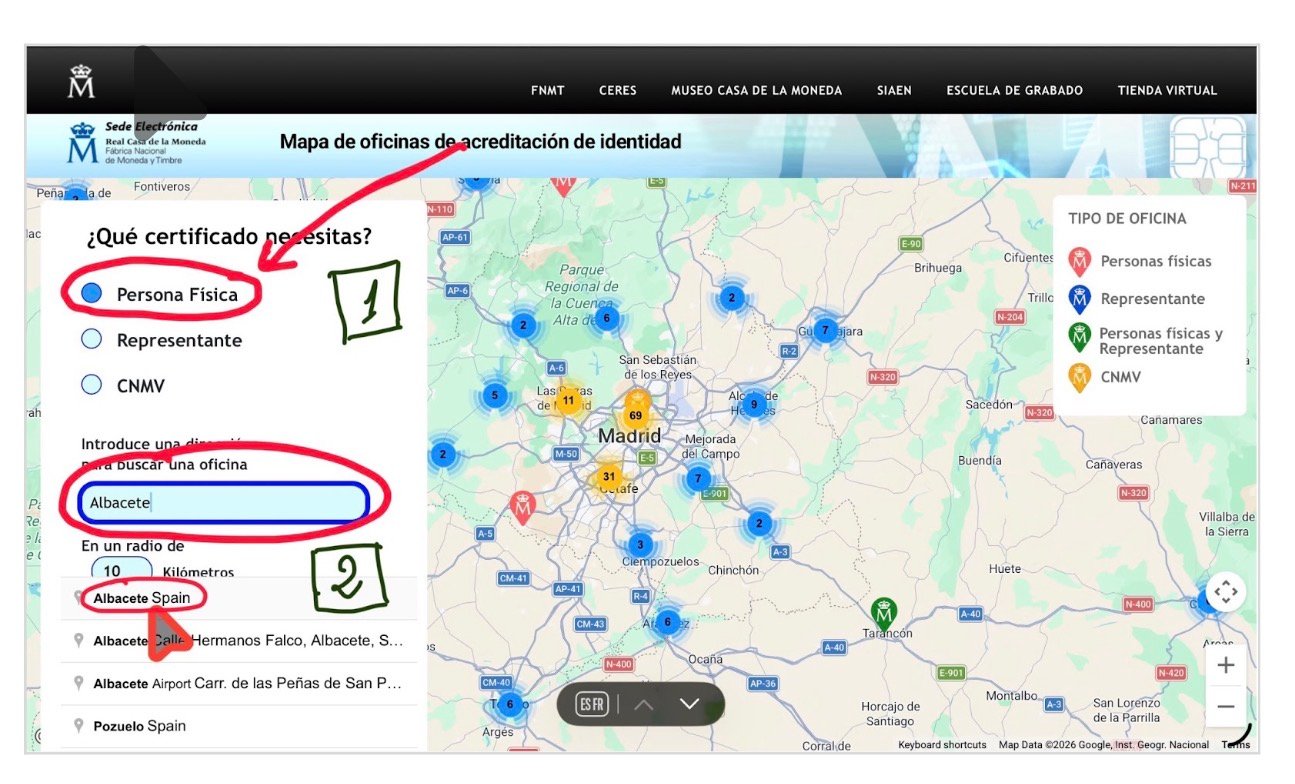
    Usando el localizador de oficinas puedes encontrar la más cercana a tu domicilio. Introduce tu localidad en el buscador.

    Localizador de oficinas de acreditación de identidad de la FNMT
    Mapa de oficinas de acreditación de identidad | Fuente: sede.fnmt.gob.es

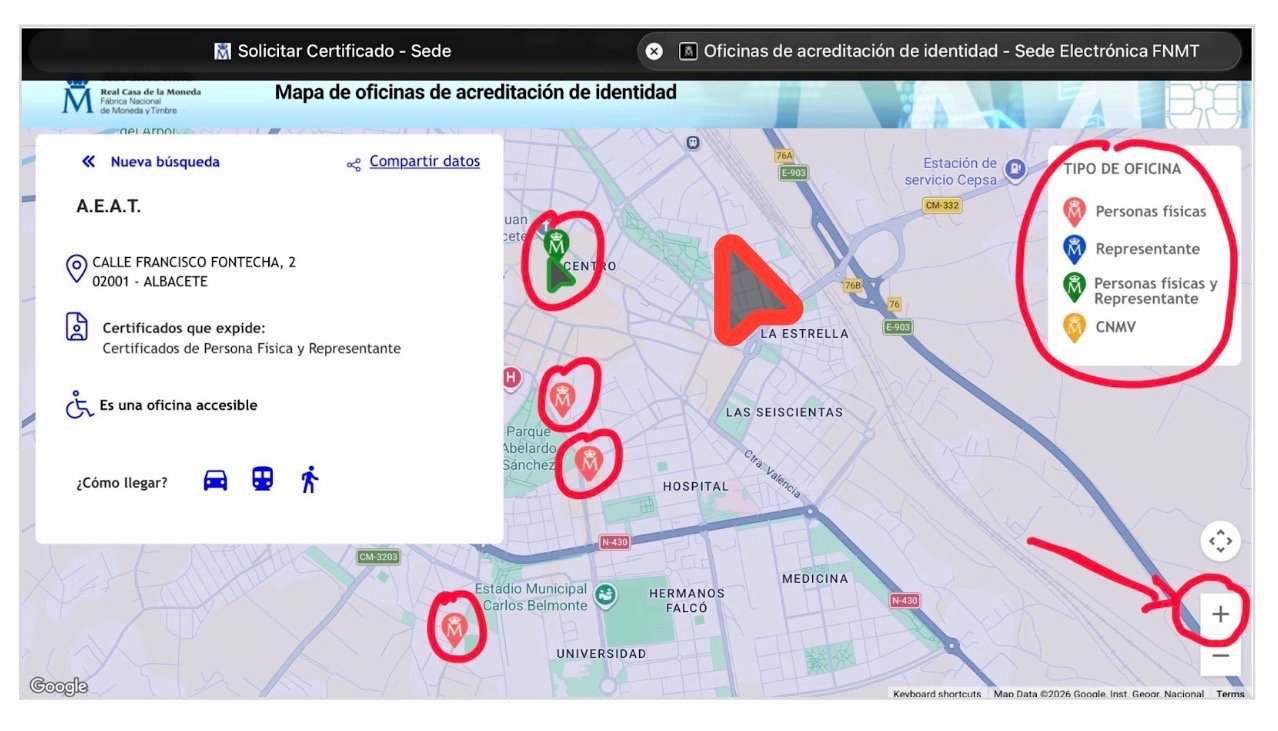
    Una vez la localidad seleccionada, aparecerá el mapa con las oficinas disponibles. En el caso de Albacete, por ejemplo, aparecen cuatro oficinas de acreditación en diferentes ubicaciones. Pinchando en cada una se muestra el organismo específico, su dirección exacta y cómo llegar. Ten en cuenta que en las oficinas de la AEAT y de la Seguridad Social se necesita cita previa. Consulta con la propia oficina antes de ir.

    Mapa de oficinas de acreditación de identidad en Albacete
    Mapa de oficinas de acreditación de identidad — ejemplo de Albacete | Fuente: sede.fnmt.gob.es

    Lleva contigo:

    • Tu código de solicitud (el que recibiste por correo).
    • Tu pasaporte.

    Y uno de estos documentos con tu NIE:

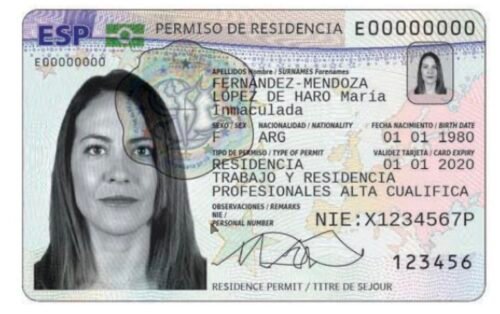
    TIE (Tarjeta de Identidad de Extranjero/a).

    Ejemplo de Tarjeta de Identidad de Extranjero/a (TIE)
    Ejemplo de TIE | Fuente: policia.es

    Certificado de Ciudadano de la Unión donde conste tu NIE (en el caso de la población británica, por ejemplo).

    Ejemplo del documento de concesión de NIE (datos anonimizados)
    Ejemplo del documento de concesión de NIE | Fuente: Documento real, datos personales anonimizados por intercultural.info

    Tarjeta Roja, Verde o Blanca de identificación de extranjeros.

    Ejemplo de Tarjeta Roja de identificación de extranjeros
    Ejemplo de Tarjeta Roja | Fuente: Euskadi.eus (Gobierno Vasco)

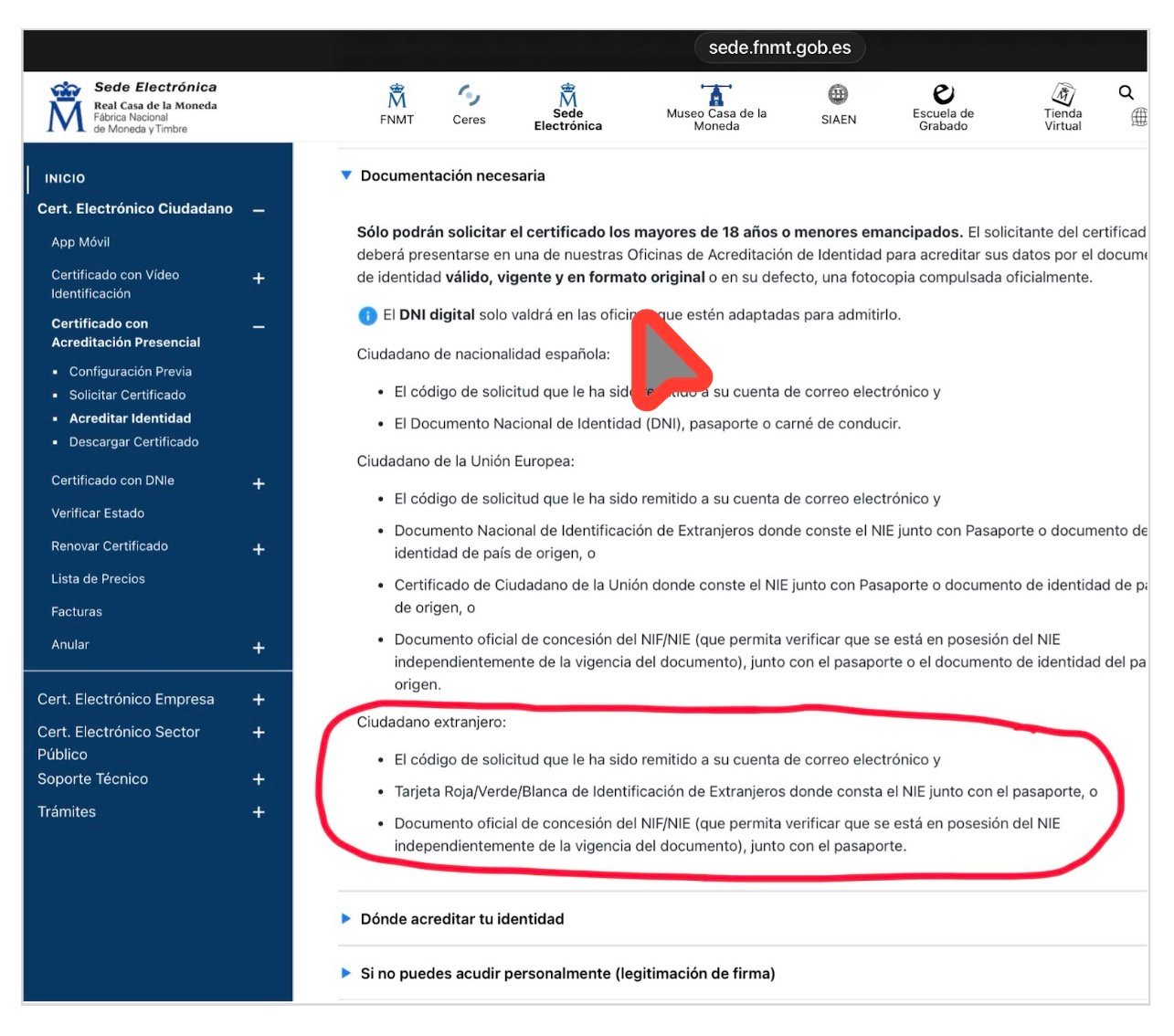
    Documento oficial de concesión del NIE (en ausencia de este documento o de cualquiera de los anteriores, se podría probar con otra alternativa que contenga el NIE, por ejemplo una resolución de Extranjería, sea favorable o denegatoria).

    Ejemplo del documento oficial de concesión de NIE (datos anonimizados)
    Ejemplo del documento oficial de concesión de NIE | Fuente: Documento real, datos personales anonimizados por intercultural.info
    Ejemplo de resolución denegatoria de Extranjería donde consta el NIE asignado (datos anonimizados)
    Ejemplo de resolución denegatoria con NIE asignado | Fuente: Documento real, datos personales anonimizados por intercultural.info
    Documentación requerida por tipo de ciudadano según la sede de la FNMT
    Documentación requerida por tipo de ciudadano (página FNMT) | Fuente: sede.fnmt.gob.es

    Dato clave: la FNMT especifica en su sede electrónica que acepta un «documento oficial de concesión del NIF/NIE que permita verificar que se está en posesión del NIE, independientemente de la vigencia del documento», junto con el pasaporte.

    ¿Qué pasa si no tienes ese documento de concesión del NIE? En ese caso se podría probar con algún otro documento que contenga el NIE — como una resolución de Extranjería, sea favorable o denegatoria. En la práctica, la experiencia puede variar según la Oficina de Acreditación. Algunas aceptarían ese documento; otras podrían ser más estrictas. Te recomendamos consultar con la oficina antes de desplazarte.

    La vídeoidenficación de la FNMT NO está disponible para personas con NIE. Solo se puede hacer con DNI electrónico (DNIe). Si tienes NIE, la acreditación tiene que ser presencial.

    Paso 4 — Descarga, instala y haz copia de seguridad

    Después de acreditar tu identidad en la oficina, tu certificado estará disponible para descargar. El tiempo de espera puede variar en función de la oficina de acreditación a la que acudas.

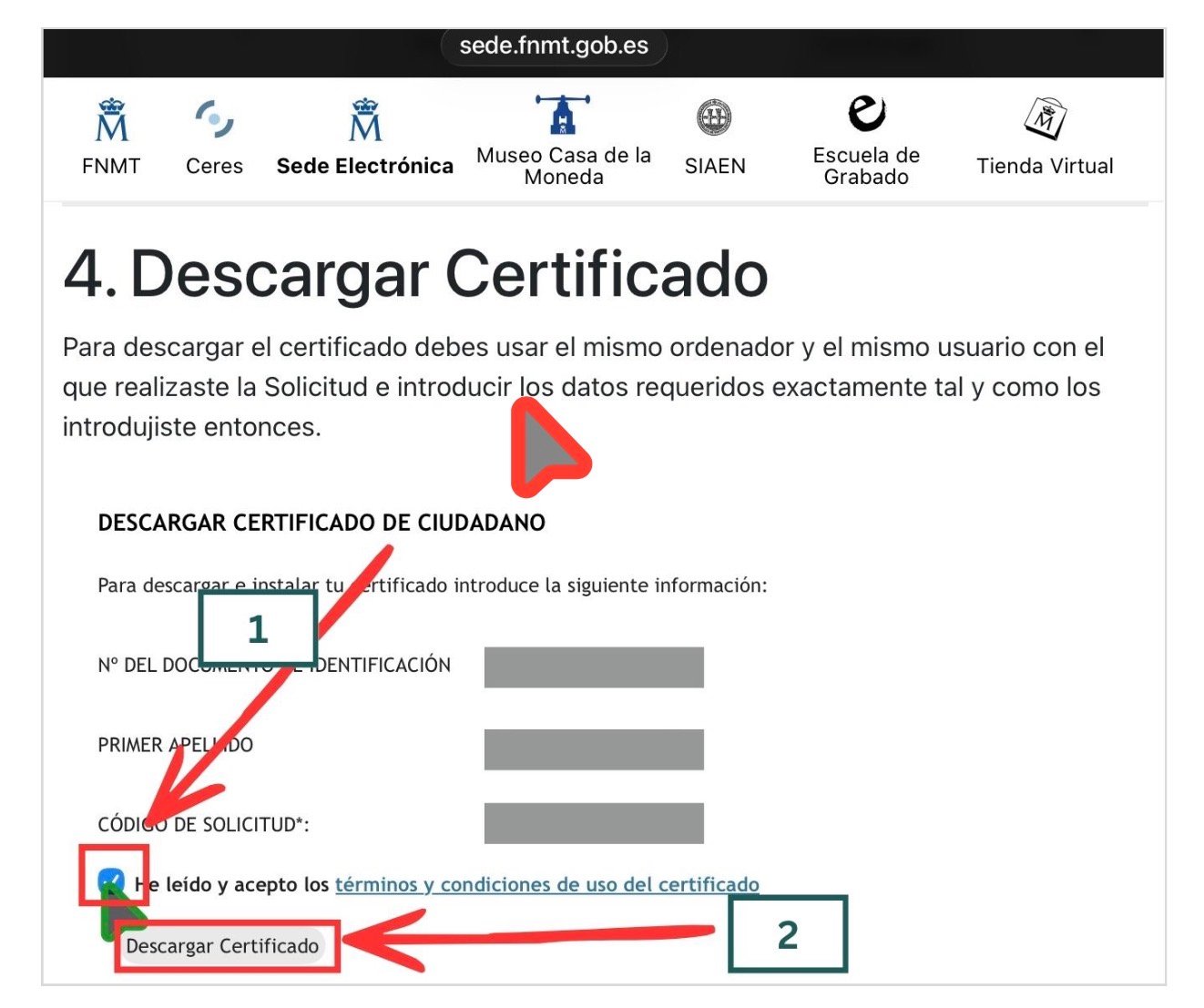
    Ve a: sede.fnmt.gob.es › Certificados › Persona Física › Obtener Certificado Software › Descargar Certificado.

    Introduce tu NIE, tu primer apellido y el código de solicitud. Lee y acepta las condiciones de uso, y pulsa «Descargar Certificado». Recuerda: tienes que hacerlo desde el mismo ordenador, el mismo navegador y el mismo usuario que usaste para solicitar.

    Formulario de descarga del certificado en la sede de la FNMT
    Formulario de descarga del certificado | Fuente: sede.fnmt.gob.es

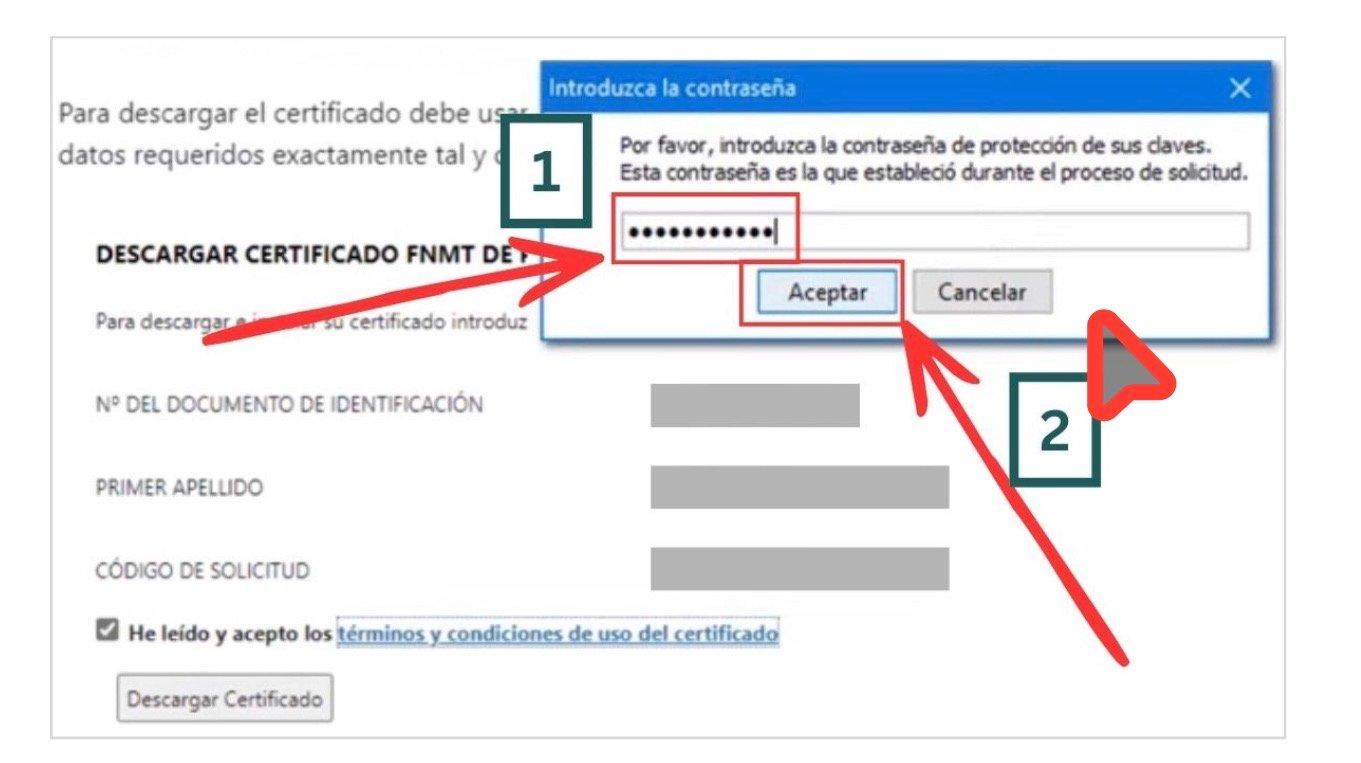
    Al descargar, se te pedirá la contraseña que creaste en el Paso 2.

    Diálogo de contraseña durante la descarga del certificado
    Diálogo de contraseña durante la descarga | Fuente: sede.fnmt.gob.es (captura del vídeo tutorial AEAT)

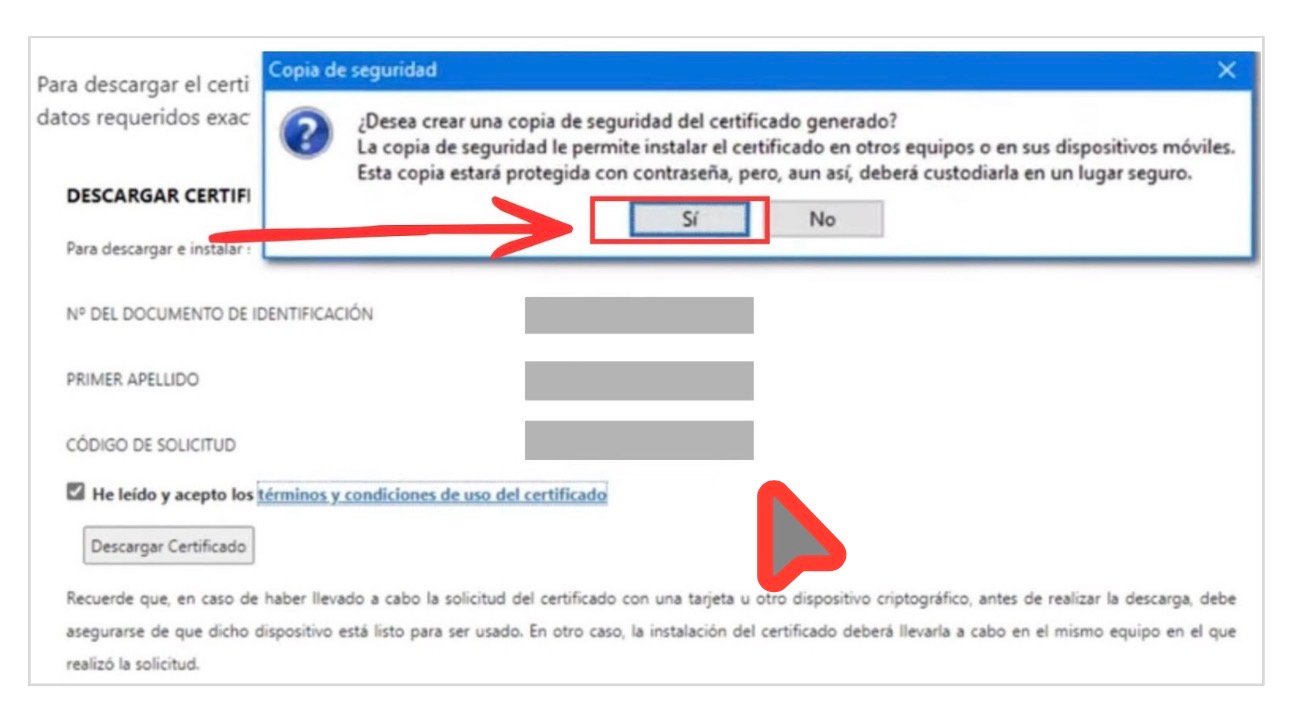
    Durante la descarga, el sistema te ofrecerá hacer una copia de seguridad del certificado. Acepta. Este paso es importante: si formateas el ordenador, cambias de equipo o el navegador se actualiza y pierde los certificados, sin copia de seguridad tendrías que repetir todo el proceso desde cero.

    Diálogo de copia de seguridad del certificado digital
    Diálogo de copia de seguridad del certificado | Fuente: sede.fnmt.gob.es (captura del vídeo tutorial AEAT)

    Haz clic en «Sí» para crear la copia de seguridad. Guarda el archivo en un lugar seguro: un USB, un disco externo o un servicio en la nube con contraseña.

    Si no te aparece ese diálogo, también puedes exportar el certificado manualmente:

    • En Chrome o Edge: ve a Configuración › Privacidad y seguridad › Seguridad › Gestionar certificados. Selecciona tu certificado y expórtalo con la clave privada.
    • En Firefox: ve a Configuración › Privacidad y seguridad › Certificados › Ver certificados. En la pestaña «Sus certificados», selecciona el tuyo y haz clic en «Hacer copia».

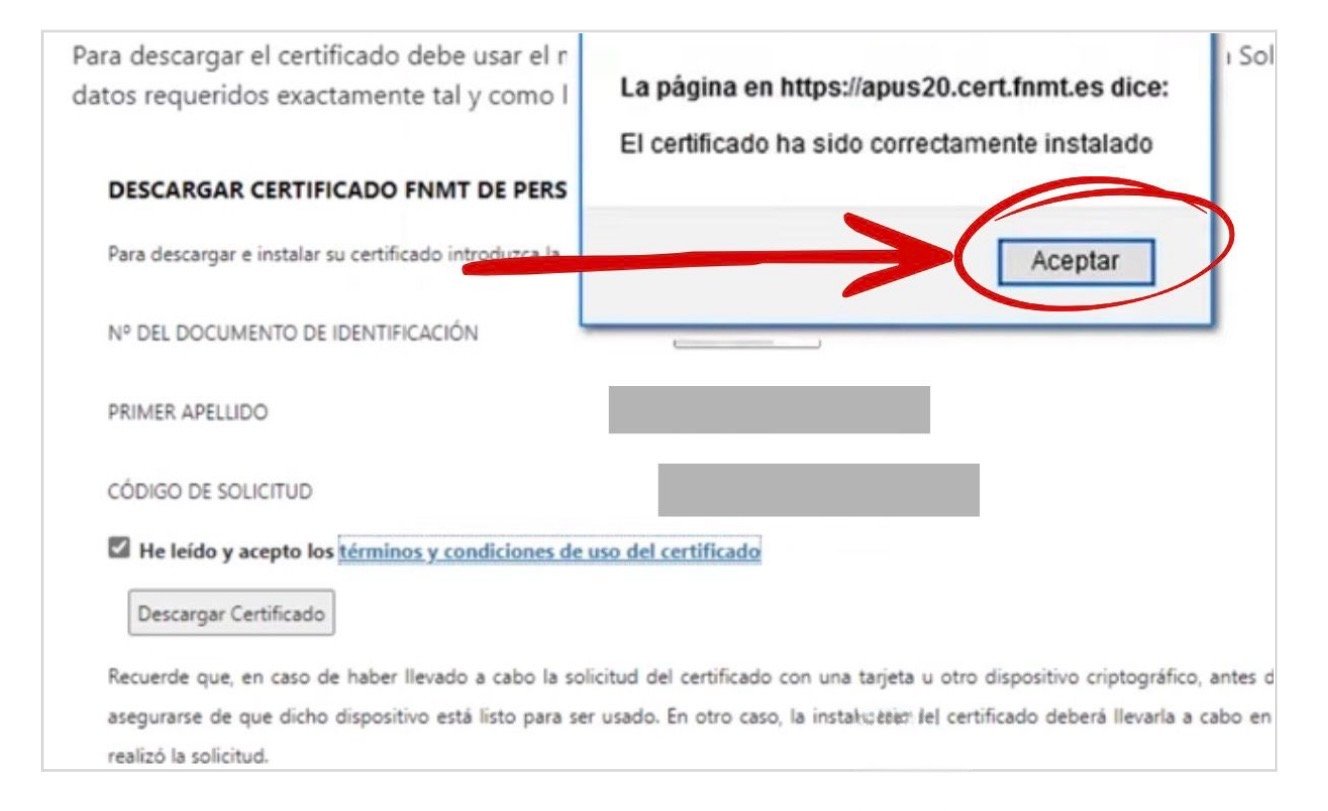
    Una vez completado el proceso, verás un mensaje confirmando la correcta instalación del certificado.

    Mensaje de confirmación de instalación correcta del certificado digital
    Confirmación: «El certificado ha sido correctamente instalado» | Fuente: sede.fnmt.gob.es (captura del vídeo tutorial AEAT)

    Paso 5 — Comprueba que funciona

    Para verificar que tu certificado está correctamente instalado, accede a Mi Carpeta Ciudadana: sede.administracion.gob.es/carpeta/clave.htm. Selecciona la opción de acceso con certificado electrónico. Si entras correctamente y ves tus datos, el certificado funciona.

    ¿Y la regularización extraordinaria 2026?

    Si estás pendiente de la regularización extraordinaria 2026, el certificado digital puede ser especialmente importante. Los borradores que han circulado apuntan a que una vía de presentación de solicitudes podría ser telemática, a través de la plataforma Mercurio. Si esa vía se confirma, disponer de certificado digital o de un sistema válido de firma electrónica podría marcar una diferencia práctica real.

    ⚠️ Pendiente de confirmación en el BOE

    A 25 de marzo de 2026, el Real Decreto que regulará la regularización extraordinaria aún no ha sido publicado en el BOE. Los detalles sobre el canal de presentación de solicitudes se confirmarán cuando el texto definitivo se publique.

    Cuando el Real Decreto se publique, generaremos un tutorial específico sobre cómo presentar la solicitud a través de Mercurio. Mientras tanto, lo más prudente es tener el certificado digital listo.

    Si quieres saber más sobre la regularización extraordinaria 2026, qué documentos preparar y cuándo se abrirá el plazo, visita nuestro artículo: Regularización extraordinaria 2026 en España: qué se sabe, quién puede solicitarla y qué debes hacer ya.

    Problemas frecuentes

    «No me deja solicitar el certificado en la web.» Comprueba que has instalado el Configurador FNMT-RCM y que estás usando un navegador compatible y actualizado. Algunos antivirus o proxies pueden bloquear la aplicación: desactívalos temporalmente si es necesario.

    «Me pide una contraseña y no la recuerdo.» La contraseña se crea durante la solicitud (Paso 2) y no se puede recuperar. Si la has olvidado, tendrás que iniciar una nueva solicitud desde el principio.

    «En la oficina no me aceptan mi documento.» La experiencia puede variar según la oficina. Si no te aceptan tu alternativa al documento oficial de concesión de NIE, prueba en otra Oficina de Acreditación de Identidad (ver alternativas en el Paso 3). También puedes consultar con tu ayuntamiento, ya que algunos colaboran con entidades certificadoras y pueden orientarte.

    «He descargado el certificado pero no funciona.» Asegúrate de que has usado el mismo ordenador, el mismo navegador y el mismo usuario que en la solicitud. Si cambiaste algo entre medias, es posible que necesites repetir el proceso.

    Si has llegado hasta aquí y has completado todos los pasos: enhorabuena. Ahora tienes una herramienta que te da acceso directo a la administración española desde tu casa, sin colas y con mucha más autonomía. Úsala. Y si conoces a alguien que pueda necesitarla, comparte este tutorial.

  • Certificado digital para personas extranjeras en España: la herramienta gratuita que puede cambiarlo todo, tengas o no tus papeles en regla

    Certificado digital para personas extranjeras en España: la herramienta gratuita que puede cambiarlo todo, tengas o no tus papeles en regla

    Este artículo también está disponible en: Español | العربية | English | Français

    Incluido por qué puede ser importante para la regularización extraordinaria 2026, si el canal telemático se confirma en el BOE

    Actualizado el 25 de marzo de 2026 | intercultural.info

    Existe una herramienta muy útil que muchas personas extranjeras en España pueden obtener de forma gratuita, que les permite gestionar sus trámites de extranjería entre otros muchos trámites, desde casa, sin colas, sin citas imposibles de conseguir y con mucha autonomía. Se llama certificado digital, y una gran parte de quienes más lo necesitan no saben que existe.

    En este artículo te explicamos qué es, qué problemas resuelve, por qué tan pocos profesionales hablan de él y qué tiene que ver con la regularización extraordinaria 2026.

    ▶ Tutorial paso a paso: Cómo obtener tu certificado digital

    Guía completa con capturas de pantalla.

    → Ir al tutorial

    El problema que tienes sin saberlo

    Piensa en la última vez que tuviste que hacer un trámite con la administración española (y si nunca lo has hecho, pregunta a cualquier persona inmigrada de tu entorno con esa experiencia). Quizás pediste cita y tardaste semanas en conseguirla. Quizás pagaste a alguien para que te lo hiciera. Quizás el asunto lleva meses sin resolverse porque no sabes cómo consultar el estado de tu expediente, ni cómo aportar un documento que te han pedido.

    Esto no debería ser así. La administración española lleva años digitalizando sus servicios. Hoy, gran parte de los trámites ya se pueden hacer por internet. El problema es que para hacerlos hace falta una cosa: identificarse digitalmente. Y sin ese paso, la persona queda atrapada en un sistema diseñado para quienes ya tienen sus papeles en regla.

    El certificado digital puede ser ese paso. Con él, una persona extranjera puede acceder a muchos servicios de la administración pública española sin desplazarse y con mucha más autonomía.

    Por qué casi nadie habla de esto

    Si buscas en YouTube información sobre trámites de extranjería, encontrarás decenas de canales explicando arraigos, renovaciones o la regularización extraordinaria. Pero muy pocos hablan del certificado digital para personas migradas. Y los que lo hacen, raramente mencionan que sirve para presentar solicitudes de extranjería en nombre propio o en representación de otras personas.

    Sin entrar en especulaciones sobre las intenciones de cada profesional, podemos decir que hay varias razones por las que este tema se explica poco. Una de ellas es que muchas guías se centran en el trámite final, pero no en la herramienta que permite hacerlo por internet. Otra es que la identificación electrónica sigue pareciendo compleja a muchas personas, cuando con una explicación clara suele ser bastante más manejable de lo que parece.

    intercultural.info existe precisamente para romper esa dinámica.

    ¿Para qué sirve el certificado digital en la vida real de una persona extranjera?

    Con un certificado digital, una persona extranjera puede, entre otras cosas:

    • Presentar solicitudes de extranjería (regularización, arraigo, reagrupación familiar, renovaciones, etc.) de forma telemática a través de Mercurio
    • Consultar el estado de su expediente de extranjería y descargar resoluciones y notificaciones
    • Aportar documentación a un expediente ya abierto, sin necesidad de acudir presencialmente
    • Solicitar el certificado de empadronamiento en aquellos ayuntamientos que lo permiten de forma telemática
    • Obtener el informe de vida laboral y otros documentos de la Seguridad Social
    • Realizar gestiones con la Agencia Tributaria (declaración de la renta, certificados tributarios)
    • Solicitar la nacionalidad española
    • Solicitar la homologación o reconocimiento de títulos obtenidos en el extranjero
    • Acceder a Mi Carpeta Ciudadana, el portal unificado de la administración española
    • Firmar documentos con plena validez legal, sin necesidad de notario

    En resumen: el certificado digital convierte a la persona en un sujeto activo frente a la administración, capaz de gestionar sus propios asuntos sin necesariamente depender de intermediarios ni de citas en muchas ocasiones muy difíciles de conseguir.

    ¿Qué es la identificación electrónica y cuáles son tus opciones?

    La identificación electrónica es la forma de demostrar ante la administración que eres tú, por internet, de manera segura. En España existen varios sistemas:

    • Certificado digital (FNMT): el más completo y el que recomendamos. Es gratuito, válido en toda la administración española y te permite no solo identificarte, sino también firmar documentos con plena validez legal. Lo emite la Fábrica Nacional de Moneda y Timbre (FNMT). Es el sistema más completo y, en la práctica, el más útil para muchos trámites telemáticos de extranjería, incluida la presentación de solicitudes en Mercurio cuando el procedimiento admite esa vía.
    • Cl@ve Permanente con Cl@ve Firma: una alternativa válida para identificarte y también para firmar. Requiere un proceso de registro presencial o con videoidentificación. Con Cl@ve Firma activada, puede utilizarse para firmar determinados trámites electrónicos y puede ser una alternativa válida según el procedimiento.
    • Cl@ve PIN: sistema básico de identificación. Sirve para consultar expedientes e identificarte ante la administración, pero no permite firmar solicitudes. Útil para consultas; sirve para identificarte en algunos servicios, pero por sí sola no suele bastar cuando el trámite exige firma electrónica.
    • Certificados de comunidades autónomas y otras entidades: además de la FNMT, existen otras entidades certificadoras reconocidas por el Estado español: ACCV (Comunitat Valenciana), Izenpe (País Vasco), CATCert (Catalunya) o las Cámaras de Comercio a través de Camerfirma, entre otras. Todos son válidos para trámites con la administración. En algunas zonas, obtenerlo a través del propio ayuntamiento o de estas entidades puede resultar más accesible que hacerlo vía FNMT.
    Pantalla de la Carpeta Ciudadana mostrando las formas de identificación electrónica disponibles
    Formas de identificarse ante la administración española: certificado digital, Cl@ve y DNI electrónico | Fuente: carpetaciudadana.gob.es (acceso mediante pasarela Cl@ve)

    En este artículo nos centramos en el certificado digital de la FNMT por ser el más universal, gratuito y accesible en todo el territorio nacional.

    NIE, autorización de residencia y TIE: tres cosas distintas — y por qué este artículo también te interesa aunque no tengas los papeles en regla

    Antes de hablar de quién puede obtener el certificado digital, conviene aclarar tres conceptos que generan mucha confusión:

    • NIE (Número de Identidad de Extranjero/a): es un número de identificación — no un documento ni un permiso. Lo asigna la Policía Nacional cuando una persona extranjera inicia cualquier trámite formal con la administración española, o cuando se solicita expresamente ante la misma acreditando un interés legítimo (hay condiciones para ello). Una persona puede tener NIE aunque no tenga permiso de residencia en vigor, ni lo haya tenido nunca.
    Ejemplo de documento de concesión de NIE (datos anonimizados)
    Ejemplo del documento de concesión de NIE | Fuente: Documento real, datos personales anonimizados por intercultural.info
    • Autorización (o permiso) de residencia: es el permiso administrativo que permite residir en España. Es distinto del NIE y de la TIE.
    Ejemplo de resolución de concesión de autorización de residencia (datos anonimizados)
    Ejemplo de resolución de concesión de la autorización de residencia | Fuente: Documento real, datos personales anonimizados por intercultural.info
    • TIE (Tarjeta de Identidad de Extranjero/a): es la expresión en formato de tarjeta de la autorización de residencia. Contiene el NIE, la foto y el tipo de permiso concedido.
    Ejemplo de Tarjeta de Identidad de Extranjero/a (TIE)
    Ejemplo de Tarjeta de Identidad de Extranjero/a (TIE) | Fuente: policia.es

    ¿Por qué importa esta distinción? Porque el certificado digital de la FNMT se puede obtener con NIE, aunque no tengas TIE ni permiso de residencia vigente. La propia FNMT especifica en su sede electrónica que es válido el «documento oficial de concesión del NIF/NIE que permita verificar que se está en posesión del NIE, independientemente de la vigencia del documento», junto con el pasaporte.

    Dicho esto, en la práctica la experiencia puede variar según la Oficina de Acreditación. Algunas aceptarían un documento que contenga tu NIE — como una resolución de Extranjería, sea favorable o denegatoria. Otras podrían ser más estrictas. Te recomendamos consultar con la oficina antes de desplazarte. Si la vía de la FNMT no funciona en tu caso, en algunas zonas los ayuntamientos colaboran con entidades certificadoras reconocidas y pueden orientarte sobre otras alternativas.

    ⚠ Importante: ¿y si crees que no tienes NIE?

    Muchas personas que presentaron solicitudes a Extranjería en el pasado — aunque hayan sido denegadas — tuvieron un NIE asignado. Ese número aparece en la resolución que les enviaron. Si guardas algún documento de Extranjería, búscalo: es posible que ya tengas NIE sin saberlo.

    Si nunca has tenido un NIE asignado, eso no significa que este artículo no te sirva: entender cómo funciona la identificación electrónica puede ser útil si finalmente la regularización permite presentar la solicitud mediante representación.

    Y si ahora mismo no tienes NIE, sigue leyendo igualmente: en un escenario de presentación telemática, puede ser importante saber no solo cómo funciona el certificado digital, sino también si el Real Decreto final permite que otra persona actúe en tu nombre con representación.

    Ejemplo de resolución denegatoria de Extranjería donde consta el NIE asignado (datos anonimizados)
    Ejemplo de resolución denegatoria con NIE asignado | Fuente: Documento real, datos personales anonimizados por intercultural.info

    La regularización extraordinaria 2026 y el certificado digital

    Si estás pendiente de la regularización extraordinaria 2026, el certificado digital adquiere una relevancia especial. A fecha de hoy (25 de marzo de 2026), el Real Decreto aún no ha sido publicado en el BOE, pero los borradores que han circulado apuntan a que una vía principal de presentación de solicitudes será telemática, a través de la plataforma Mercurio. Si el canal principal de presentación acaba siendo telemático, disponer de certificado digital o de un sistema válido de firma puede marcar una diferencia práctica importante — a menos que se recurra a un profesional, a una organización colaboradora registrada, o — y esto es importante aunque casi nadie lo explica — a una persona de confianza que pueda actuar como representante, si así lo confirma el Real Decreto definitivo (ver más adelante).

    ⚠ Información pendiente de confirmación en el BOE

    Todo lo relativo al canal de presentación de solicitudes es provisional. Los detalles exactos — si será posible presentar directamente en Mercurio y de qué manera, qué documentos se admitirán, si el pasaporte caducado será válido, si se habilitarán otras vías — se confirmarán cuando el texto definitivo del Real Decreto se publique en el BOE.

    Respecto de la vía presencial, todo apunta a que podría ser menos ágil que la telemática, pero los detalles concretos — oficinas, horarios, capacidad y procedimiento — siguen pendientes de confirmación oficial. Varias fuentes no oficiales apuntan en este sentido a que las oficinas habilitadas funcionarían en horario de tarde con disponibilidad limitada y un volumen de solicitudes muy alto.

    La clave, en cualquier caso, es prepararse ahora. Quien llegue con el certificado digital listo el día que abra el plazo tendrá una ventaja real frente a quien no.

    ¿Puede otra persona presentar la solicitud telemática por ti?

    Esta es quizás una de las informaciones más importantes que nadie explica. Y la respuesta es: probablemente sí, si esa persona tiene certificado digital y actúa como tu representante.

    La Ley 39/2015, en su artículo 5, establece que cualquier persona puede actuar como representante de otra ante la administración pública española — no hace falta ser profesional registrado/a y habilitado/a para estos trámites. Basta con cumplimentar y presentar el documento de «designación de representante» (disponible en nuestra sección de Recursos) junto al resto de documentos, y con que la persona representante cuente con los medios electrónicos necesarios, es decir, con certificado digital.

    → Descarga el formulario de designación de representante en: intercultural.info/recursos/

    (Fuente: Ministerio de Inclusión, Seguridad Social y Migraciones — inclusion.gob.es. Verifica que esta sea la versión vigente antes de usarla.)

    Un ejemplo concreto:

    Entre 2020 y 2022, miles de personas nacionales del Reino Unido en España necesitaban regularizar su situación tras el Brexit, en plena pandemia. Una proporción significativa de solicitudes se presentó telemáticamente a través de Mercurio en representación de estas personas — sin que dicha representación correspondiera a un/a profesional registrado/a, simplemente mediante el documento de designación de representante correspondiente. Esta experiencia demuestra que el mecanismo existe, funciona y ha sido utilizado a gran escala.

    Formulario de designación de representante del Ministerio de Inclusión
    Formulario de designación de representante | Fuente: Ministerio de Inclusión, Seguridad Social y Migraciones — inclusion.gob.es

    Si tienes un familiar, una amiga, un amigo o cualquier persona de confianza con permiso de residencia en España o nacionalidad española y que tiene (o puede obtener) un certificado digital, puede valer la pena que se prepare para poder ayudarte cuando llegue el momento. Pendiente de que el BOE lo confirme para la regularización extraordinaria, esta vía podría ser clave para muchas personas que no tienen identificación electrónica propia.

    Qué hacer ahora mismo

    • Si tienes NIE: obtén tu certificado digital cuanto antes. Nuestro tutorial te explica cómo hacerlo paso a paso.
    • Si no sabes si tienes NIE: busca entre tus documentos cualquier resolución de Extranjería. Tu NIE puede estar ahí.
    • Si no tienes NIE: puedes solicitar la asignación directa de NIE ante la Policía Nacional o una Oficina de Extranjería, mediante el formulario EX-15 y abonando la tasa correspondiente. Ten en cuenta que este trámite exige cumplir ciertos requisitos, y que en situación irregular puede ser difícil obtenerlo. El plazo legal de resolución es de cinco días hábiles, aunque como en cualquier gestión administrativa los tiempos reales pueden variar. Si te lo deniegan, no es el fin del camino: las opciones siguientes aplican igualmente a ti.
    • Si tienes familiares o personas de confianza con documentación en regla: anímales a que obtengan su certificado digital. Si el BOE lo confirma, podrían presentar solicitudes en tu nombre como representantes.
    • Si no tienes NIE ni representante personal, hay otras vías: organizaciones de apoyo a personas migrantes registradas como entidades colaboradoras (ONGs y sindicatos inscritos en el Registro publicado en el BOE el 5 de marzo de 2026) pueden orientarte y ayudarte gratuitamente. Si decides recurrir a despachos profesionales, asegúrate de que estén colegiados y habilitados para estos trámites. La vía presencial también está disponible sin certificado digital.
    • Si ya tienes el certificado digital: úsalo para preparar documentación que necesites para la regularización, como un certificado de empadronamiento histórico que demuestre tu llegada y permanencia en España desde antes de enero de 2026, o bien el certificado de convivencia para demostrar lazos familiares directos, una de las situaciones de la segunda vía de regularización según los borradores que están circulando, tal como explicamos en nuestro artículo Regularización extraordinaria 2026 en España: qué se sabe, quién puede solicitarla y qué debes hacer ya.

    ▶ Tutorial paso a paso: Cómo obtener tu certificado digital

    Pasos detallados, capturas de pantalla y explicaciones.

    → Ir al tutorial

  • Certificat numérique pour les personnes étrangères en Espagne : l’outil gratuit qui peut tout changer, que vos papiers soient en règle ou non

    Certificat numérique pour les personnes étrangères en Espagne : l’outil gratuit qui peut tout changer, que vos papiers soient en règle ou non

    Cet article est également disponible en : Français | Español | العربية | English

    Y compris pourquoi cela peut être important pour la régularisation extraordinaire 2026, si la voie télématique est confirmée au BOE

    Mis à jour le 25 mars 2026 | intercultural.info

    Il existe un outil très utile que de nombreuses personnes étrangères en Espagne peuvent obtenir gratuitement, et qui leur permet de gérer leurs démarches d’immigration, parmi beaucoup d’autres démarches, depuis chez elles, sans files d’attente, sans rendez-vous impossibles à obtenir et avec beaucoup plus d’autonomie. Cet outil s’appelle le certificat numérique, et une grande partie des personnes qui en ont le plus besoin ne savent même pas qu’il existe.

    Dans cet article, nous vous expliquons ce que c’est, quels problèmes il résout, pourquoi si peu de professionnels en parlent et quel lien il a avec la régularisation extraordinaire 2026.

    ▶ Tutoriel pas à pas : Comment obtenir votre certificat numérique

    Guide complet avec captures d’écran.

    → Accéder au tutoriel

    Le problème que vous avez sans le savoir

    Pensez à la dernière fois où vous avez dû faire une démarche auprès de l’administration espagnole, et si vous ne l’avez jamais fait, demandez à une personne immigrée de votre entourage qui a déjà vécu cette expérience. Peut-être avez-vous demandé un rendez-vous et attendu des semaines avant de l’obtenir. Peut-être avez-vous payé quelqu’un pour le faire à votre place. Peut-être que votre dossier n’est toujours pas résolu depuis des mois parce que vous ne savez pas comment consulter son état ni comment transmettre un document qui vous a été demandé.

    Cela ne devrait pas se passer ainsi. L’administration espagnole numérise ses services depuis des années. Aujourd’hui, une grande partie des démarches peut déjà être effectuée en ligne. Le problème est que, pour le faire, il faut une chose : pouvoir s’identifier électroniquement. Et sans cette étape, la personne reste piégée dans un système pensé pour celles et ceux qui ont déjà leurs papiers en règle.

    Le certificat numérique peut être cette étape. Grâce à lui, une personne étrangère peut accéder à de nombreux services de l’administration publique espagnole sans se déplacer et avec beaucoup plus d’autonomie.

    Pourquoi presque personne n’en parle

    Si vous cherchez sur YouTube des informations sur les démarches d’immigration, vous trouverez des dizaines de chaînes qui expliquent les procédures d’arraigo, les renouvellements ou la régularisation extraordinaire. Mais très peu parlent du certificat numérique pour les personnes migrantes. Et celles qui en parlent mentionnent rarement qu’il permet de présenter des demandes d’immigration en son nom propre ou au nom d’autres personnes.

    Sans entrer dans des spéculations sur les intentions de chaque professionnel, on peut dire qu’il existe plusieurs raisons pour lesquelles ce sujet est si peu expliqué. L’une d’elles est que beaucoup de guides se concentrent sur la démarche finale, mais pas sur l’outil qui permet de la réaliser en ligne. Une autre est que l’identification électronique paraît encore complexe à beaucoup de personnes, alors qu’avec une explication claire elle est souvent bien plus abordable qu’il n’y paraît. intercultural.info existe précisément pour rompre cette dynamique.

    À quoi sert le certificat numérique dans la vie réelle d’une personne étrangère ?

    Avec un certificat numérique, une personne étrangère peut notamment :

    • Présenter des demandes d’immigration en ligne par l’intermédiaire de Mercurio, y compris pour la régularisation, l’arraigo, le regroupement familial, les renouvellements et d’autres procédures
    • Consulter l’état de son dossier d’immigration et télécharger des décisions et notifications
    • Transmettre des documents à un dossier déjà ouvert, sans devoir se présenter en personne
    • Demander le certificat d’empadronamiento dans les municipalités qui le permettent en ligne
    • Obtenir le relevé de vie professionnelle et d’autres documents de la Sécurité sociale
    • Effectuer des démarches auprès de l’Agence fiscale (Hacienda / AEAT), y compris la déclaration de revenus et les certificats fiscaux
    • Demander la nationalité espagnole
    • Demander l’homologation ou la reconnaissance de diplômes obtenus à l’étranger
    • Accéder à Mi Carpeta Ciudadana, le portail unifié de l’administration espagnole
    • Signer des documents avec pleine validité juridique dans les procédures qui admettent la signature électronique

    En résumé, le certificat numérique transforme la personne en sujet actif face à l’administration, capable de gérer ses propres démarches sans dépendre d’intermédiaires ni de rendez-vous souvent très difficiles à obtenir.

    Qu’est-ce que l’identification électronique et quelles sont vos options ?

    L’identification électronique est la manière de démontrer à l’administration que c’est bien vous, sur internet, de manière sécurisée. En Espagne, il existe plusieurs systèmes.

    Certificat numérique (FNMT) : c’est le plus complet et celui que nous recommandons. Il est gratuit, valable dans toute l’administration espagnole et vous permet non seulement de vous identifier, mais aussi de signer des documents avec pleine validité juridique. Il est délivré par la Fábrica Nacional de Moneda y Timbre (FNMT). En pratique, c’est le système le plus utile pour de nombreuses démarches d’immigration en ligne, y compris la présentation de demandes dans Mercurio lorsque la procédure admet cette voie.

    Cl@ve Permanente avec Cl@ve Firma : c’est une alternative valable pour vous identifier et aussi pour signer. Elle exige une procédure d’inscription en personne ou par vidéo-identification. Une fois Cl@ve Firma activée, elle peut être utilisée pour signer certaines démarches électroniques et peut constituer une alternative valable selon la procédure.

    Cl@ve PIN : il s’agit d’un système d’identification de base. Il permet de consulter des dossiers et de s’identifier auprès de l’administration, mais ne permet pas de signer des demandes. Il est utile pour les consultations et permet de vous identifier dans certains services, mais à lui seul il ne suffit généralement pas lorsque la procédure exige une signature électronique.

    Certificats des communautés autonomes et d’autres entités : en plus de la FNMT, il existe d’autres entités de certification reconnues par l’État espagnol, notamment ACCV (Communauté valencienne), Izenpe (Pays basque), CATCert (Catalogne) ou les Chambres de commerce via Camerfirma, entre autres. Tous sont valables pour les démarches auprès de l’administration. Dans certaines zones, il peut être plus accessible de l’obtenir par l’intermédiaire de la mairie elle-même ou de l’une de ces entités que par la voie de la FNMT.

    Modes d'identification auprès de l'administration espagnole : certificat numérique, Cl@ve et DNI électronique
    Modes d’identification auprès de l’administration espagnole : certificat numérique, Cl@ve et DNI électronique | Source : carpetaciudadana.gob.es (accès via la passerelle Cl@ve)

    Dans cet article, nous nous concentrons sur le certificat numérique de la FNMT, car c’est le plus universel, le plus gratuit et le plus accessible sur l’ensemble du territoire national.

    NIE, autorisation de séjour et TIE : trois choses différentes — et pourquoi cet article vous concerne aussi même si vos papiers ne sont pas en règle

    Avant de parler de qui peut obtenir le certificat numérique, il convient de clarifier trois notions qui génèrent beaucoup de confusion.

    NIE (Número de Identidad de Extranjero/a) : c’est un numéro d’identification, et non un document ni une autorisation. Il est attribué par la Police nationale lorsqu’une personne étrangère entame une démarche formelle auprès de l’administration espagnole, ou lorsqu’il est demandé expressément auprès de celle-ci en justifiant d’un intérêt légitime, sous certaines conditions. Une personne peut avoir un NIE même si elle n’a pas de titre de séjour en cours de validité, et même si elle n’en a jamais eu.

    Exemple de document d'attribution du NIE (données personnelles anonymisées)
    Exemple de document d’attribution du NIE | Source : Document réel, données personnelles anonymisées par intercultural.info

    Autorisation de séjour : il s’agit de l’autorisation administrative qui permet de résider en Espagne. Elle est différente du NIE et de la TIE.

    Exemple de décision accordant une autorisation de séjour (données personnelles anonymisées)
    Exemple de décision accordant une autorisation de séjour | Source : Document réel, données personnelles anonymisées par intercultural.info

    TIE (Tarjeta de Identidad de Extranjero/a) : c’est la matérialisation, sous forme de carte, de l’autorisation de séjour. Elle contient le NIE, la photographie et le type d’autorisation accordée.

    Exemple de Tarjeta de Identidad de Extranjero/a (TIE)
    Exemple de Tarjeta de Identidad de Extranjero/a (TIE) | Source : policia.es

    Pourquoi cette distinction est-elle importante ? Parce que le certificat numérique de la FNMT peut être obtenu avec un NIE, même si vous n’avez pas de TIE ni de titre de séjour en cours de validité. La FNMT elle-même précise sur son siège électronique que le « document officiel d’attribution du NIF/NIE permettant de vérifier que la personne est en possession du NIE, indépendamment de la validité du document » est valable, accompagné du passeport.

    Cela étant dit, en pratique, l’expérience peut varier selon le bureau d’accréditation. Certains peuvent accepter un document contenant votre NIE, comme une décision de l’Oficina de Extranjería, qu’elle soit favorable ou de refus. D’autres peuvent être plus stricts. Nous vous recommandons de consulter le bureau avant de vous déplacer. Si la voie FNMT ne fonctionne pas dans votre cas, dans certaines zones les mairies collaborent avec des entités de certification reconnues et peuvent vous orienter vers d’autres alternatives.

    ⚠ Important : et si vous pensez ne pas avoir de NIE ?

    De nombreuses personnes qui ont présenté des demandes à l’Oficina de Extranjería par le passé — même si elles ont été refusées — ont reçu un NIE. Ce numéro figure sur la décision qui leur a été envoyée. Si vous conservez un document de l’Oficina de Extranjería, recherchez-le : il est possible que vous ayez déjà un NIE sans le savoir.

    Si aucun NIE ne vous a jamais été attribué, cela ne signifie pas que cet article ne vous sera pas utile : comprendre le fonctionnement de l’identification électronique peut être utile si, au final, la régularisation permet de présenter la demande par représentation.

    Et si vous n’avez pas de NIE à l’heure actuelle, continuez malgré tout votre lecture. Dans un scénario de dépôt en ligne, il peut être important de savoir non seulement comment fonctionne le certificat numérique, mais aussi si le Real Decreto définitif permettra à une autre personne d’agir en votre nom à titre de représentante.

    Exemple de décision de refus avec NIE attribué (données personnelles anonymisées)
    Exemple de décision de refus avec NIE attribué | Source : Document réel, données personnelles anonymisées par intercultural.info

    La régularisation extraordinaire 2026 et le certificat numérique

    Si vous attendez la régularisation extraordinaire 2026, le certificat numérique prend une importance particulière. À ce jour, le 25 mars 2026, le Real Decreto n’a pas encore été publié au BOE, mais les avant-projets qui ont circulé indiquent qu’une voie principale de dépôt des demandes pourrait être télématique, via la plateforme Mercurio. Si la principale voie de dépôt s’avère finalement être en ligne, disposer d’un certificat numérique ou d’un système de signature valable pourrait faire une différence pratique importante, sauf si l’on a recours à un professionnel, à une organisation collaboratrice enregistrée ou — et c’est important même si presque personne ne l’explique — à une personne de confiance pouvant agir comme représentante, si le Real Decreto définitif le confirme.

    ⚠ Informations en attente de confirmation au BOE

    Tout ce qui concerne le canal de dépôt des demandes est provisoire. Les détails exacts — s’il sera possible de déposer directement dans Mercurio et de quelle manière, quels documents seront admis, si un passeport expiré sera valable, si d’autres voies seront ouvertes — seront confirmés lorsque le texte définitif du Real Decreto sera publié au BOE.

    En ce qui concerne la voie présentielle, tout indique qu’elle pourrait être moins souple que la voie télématique, mais les détails concrets — bureaux, horaires, capacité et procédure — restent en attente de confirmation officielle. Plusieurs sources non officielles indiquent en ce sens que les bureaux habilités fonctionneraient l’après-midi, avec une disponibilité limitée et un volume de demandes très élevé.

    L’essentiel, en tout état de cause, est de se préparer dès maintenant. La personne qui disposera déjà de son certificat numérique le jour de l’ouverture du délai aura un avantage réel sur celle qui ne l’aura pas.

    Une autre personne peut-elle présenter la demande télématique à votre place ?

    C’est peut-être l’une des informations les plus importantes que personne n’explique. Et la réponse est : probablement oui, si cette personne dispose d’un certificat numérique et agit comme votre représentante.

    La loi 39/2015, dans son article 5, établit que toute personne peut agir comme représentante d’une autre devant l’administration publique espagnole ; il n’est pas nécessaire d’être un professionnel enregistré et habilité pour ces démarches. Il suffit de remplir et de présenter le document de « designación de representante », disponible dans notre section Ressources, avec le reste des documents, et que la personne représentante dispose des moyens électroniques nécessaires, c’est-à-dire d’un certificat numérique.

    Téléchargez le formulaire de designación de representante sur : intercultural.info/fr/recursos/

    (Source : ministère de l’Inclusion, de la Sécurité sociale et des Migrations — inclusion.gob.es. Vérifiez qu’il s’agit bien de la version en vigueur avant de l’utiliser.)

    Exemple concret :

    Entre 2020 et 2022, des milliers de ressortissants du Royaume-Uni en Espagne ont dû régulariser leur situation après le Brexit, en pleine pandémie. Une proportion significative des demandes a été présentée en ligne via Mercurio au nom de ces personnes, sans que cette représentation soit exercée par un professionnel enregistré — simplement au moyen du document correspondant de designación de representante. Cette expérience montre que le mécanisme existe, qu’il fonctionne et qu’il a déjà été utilisé à grande échelle.

    Formulaire de designación de representante — ministère de l'Inclusion, de la Sécurité sociale et des Migrations
    Formulaire de designación de representante | Source : ministère de l’Inclusion, de la Sécurité sociale et des Migrations — inclusion.gob.es

    Si vous avez un membre de votre famille, une amie, un ami ou toute autre personne de confiance résidant légalement en Espagne ou ayant la nationalité espagnole, et qui possède déjà un certificat numérique ou peut l’obtenir, il peut être utile que cette personne se prépare afin de pouvoir vous aider le moment venu. Dans l’attente de la confirmation du BOE pour la régularisation extraordinaire, cette voie pourrait être essentielle pour de nombreuses personnes qui ne disposent pas d’une identification électronique propre.

    Que faire dès maintenant

    • Si vous avez un NIE : obtenez votre certificat numérique dès que possible. Notre tutoriel vous explique comment le faire pas à pas.
    • Si vous ne savez pas si vous avez un NIE : recherchez parmi vos documents toute décision de l’Oficina de Extranjería. Votre NIE peut s’y trouver.
    • Si vous n’avez pas de NIE : vous pouvez demander l’attribution directe d’un NIE auprès de la Police nationale ou d’une Oficina de Extranjería, au moyen du formulaire EX-15 et en payant la taxe correspondante. Gardez à l’esprit que cette démarche exige de remplir certaines conditions et qu’en situation irrégulière il peut être difficile de l’obtenir. Le délai légal de décision est de cinq jours ouvrables, bien que, comme dans toute démarche administrative, les délais réels puissent varier. Si la demande est refusée, ce n’est pas la fin du chemin : les options suivantes vous concernent également.
    • Si vous avez des proches ou des personnes de confiance dont la documentation est en règle : encouragez-les à obtenir leur certificat numérique. Si le BOE le confirme, ils pourraient présenter des demandes en votre nom comme représentantes.
    • Si vous n’avez ni NIE ni représentante personnelle, il existe d’autres voies : des organisations de soutien aux personnes migrantes enregistrées comme entités collaboratrices — notamment des ONG et des syndicats inscrits au registre publié au BOE le 5 mars 2026 — peuvent vous orienter et vous aider gratuitement. Si vous décidez de vous adresser à des cabinets professionnels, assurez-vous qu’ils soient inscrits à leur ordre professionnel et habilités pour ces démarches. La voie présentielle reste également disponible sans certificat numérique.
    • Si vous avez déjà le certificat numérique : utilisez-le pour préparer les documents dont vous pourriez avoir besoin pour la régularisation, par exemple un certificat d’empadronamiento histórico prouvant votre arrivée et votre présence en Espagne depuis avant janvier 2026, ou un certificado de convivencia afin de démontrer des liens familiaux directs — l’une des situations de la seconde voie de régularisation selon les avant-projets qui circulent actuellement, comme nous l’expliquons dans notre article Régularisation extraordinaire 2026 en Espagne : ce que l’on sait, qui peut en bénéficier et ce que vous devez faire dès maintenant.

    ▶ Tutoriel pas à pas : Comment obtenir votre certificat numérique

    Étapes détaillées, captures d’écran et explications.

    → Accéder au tutoriel

  • Tutorial: How to obtain your digital certificate in Spain: a step-by-step guide

    Tutorial: How to obtain your digital certificate in Spain: a step-by-step guide

    This tutorial is also available in: English | Español | العربية | Français

    Updated on 25 March 2026 | intercultural.info

    For whom this tutorial is intended

    This tutorial guides you step by step in order to obtain the FNMT digital certificate, issued by the Fábrica Nacional de Moneda y Timbre (FNMT, the Spanish National Mint and Stamp Factory). It is free of charge and enables you to manage immigration procedures and many other procedures with the Spanish administration online.

    If you wish to understand better what the digital certificate is, what it is for, and what relation it has with the extraordinary regularisation 2026, we recommend that you read our full article: Digital certificate for foreign nationals in Spain.

    ⚠️ Are you awaiting the extraordinary regularisation 2026?

    If the online submission route is confirmed in the BOE, you will need a digital certificate or an electronic signature system in order to submit your application through Mercurio — or for somebody to do so in your name. We explain the connection further below, in the section «And the extraordinary regularisation 2026?«.

    If you have an NIE (Número de Identidad de Extranjero/a, Foreigner Identification Number) — even if you do not have a valid residence permit or a TIE — you may obtain this certificate. Further below we explain which documents the FNMT accepts.

    And if you do not have an NIE? This tutorial also matters to you. If you have a family member, a close friend, or any trusted person with a residence permit or Spanish nationality, that person may obtain their own digital certificate and submit certain applications in your name as representative if the procedure permits it. Knowing how the process functions will help you to prepare.

    This tutorial follows the same steps explained by the Tax Agency (AEAT / Hacienda) in its official video on how to obtain an FNMT electronic certificate. Some of our screenshots are taken from that video. Administrative procedures may change over time; we have verified that this is the procedure in force on the publication date of this tutorial.

    What you need before you begin

    Before beginning the process, make sure that you have:

    • Your NIE and a document proving it (see further below the documents accepted by the FNMT), together with your passport.
    • A computer, whether PC, Mac or Linux. The complete process must be conducted from the same device, the same user account, and the same browser.
    • An email address to which you have access.
    • An updated browser: Mozilla Firefox, Google Chrome, Microsoft Edge, Opera or Safari.
    Important: do not format the computer and do not change browser or operating system user during the process. Everything must be done from the same device from beginning to end.

    The appearance of some windows may differ from the screenshots shown in this tutorial, depending on the operating system installed on your computer.

    Step 1 — Install the FNMT software

    Before applying for the certificate, you need to install a small program called Configurador FNMT-RCM. This software generates the security keys necessary for your certificate. It functions on Windows, Mac and Linux.

    Download it from the FNMT electronic office: sede.fnmt.gob.es › Certificados › Persona Física › Obtener Certificado Software › Configuración previa.

    FNMT preliminary configuration page on sede.fnmt.gob.es
    FNMT preliminary configuration page | Source: sede.fnmt.gob.es

    Select the download link corresponding to your operating system — Windows, Mac or Linux — and follow the steps of the installation assistant.

    Screen for selecting the operating system to download the Configurador FNMT-RCM
    Selection of operating system for downloading the Configurador FNMT-RCM | Source: sede.fnmt.gob.es

    On Mac, you may need to authorise the installation from System Settings › Privacy and Security. Once installed, you do not need to open it manually: it will run automatically when the browser requires it.

    Installation assistant for the Configurador FNMT-RCM on Windows
    Installation assistant for the Configurador FNMT-RCM (Windows) | Source: sede.fnmt.gob.es (screenshot from the AEAT tutorial video)

    We also recommend that you install the AutoFirma application, which many administration websites require in order to function with the certificate, as is the case with the Mercurio platform through which many online immigration applications are submitted. You may download it from firmaelectronica.gob.es.

    Step 2 — Apply for the certificate on the website

    Go to: sede.fnmt.gob.es › Certificados › Persona Física › Obtener Certificado Software › Solicitar Certificado.

    Complete the form with:

    • Your NIE, with 9 characters, adding zeros on the left if necessary.
    • Your first surname, exactly as it appears on your identity document.
    • Your email address.
    Digital certificate application form on the FNMT electronic office
    Digital certificate application form | Source: sede.fnmt.gob.es (screenshot from the AEAT tutorial video)

    Complete the four fields in the form:

    • Field 1: identification document number — the NIE in the case of foreign nationals without Spanish nationality
    • Field 2: first surname
    • Field 3: email address
    • Field 4: repeat the same email address

    Read and accept the conditions of use. When you click on «Enviar petición», the browser will request permission to open the Configurador FNMT-RCM. In the window that appears, click on «Abrir». If it offers you the option of always permitting access, select it.

    Browser permission dialogue to open the Configurador FNMT-RCM
    Browser permission to open the Configurador FNMT-RCM | Source: sede.fnmt.gob.es (screenshot from the AEAT tutorial video)

    Next, the system will ask you to create a password in order to protect the keys of your certificate. Keep it carefully: you will need it to download the certificate and it cannot be recovered. The same password will also be used for the backup copy.

    Password creation dialogue for the certificate keys
    Password creation dialogue | Source: sede.fnmt.gob.es (screenshot from the AEAT tutorial video)

    If everything has gone well, you will see a confirmation message with your details.

    Confirmation that the application has been processed correctly
    Confirmation that the application has been processed correctly | Source: sede.fnmt.gob.es (screenshot from the AEAT tutorial video)

    You will receive an email with your application code. Note it or print it: you need it at the office and for the download.

    FNMT email containing the application code
    FNMT email containing the application code | Source: sede.fnmt.gob.es (screenshot from the AEAT tutorial video)

    Step 3 — Verify your identity at an office

    You must now go in person to an Oficina de Acreditación de Identidad (Identity Accreditation Office) in order to verify that you are the person who submitted the application. The FNMT has more than 2,400 offices throughout Spain, including Social Security offices, Tax Agency (AEAT / Hacienda) offices, municipalities and other bodies.

    Page 3. Acreditar Identidad on the FNMT electronic office
    Page «3. Acreditar Identidad» of the FNMT electronic office | Source: sede.fnmt.gob.es

    Using the office locator, you may locate the nearest office. Enter your locality in the search field.

    FNMT identity accreditation office locator map
    Map of identity accreditation offices | Source: sede.fnmt.gob.es

    Once the locality has been selected, the map will show the available offices. In the case of Albacete, for example, four accreditation offices appear in different locations. By clicking on each one, the specific body, its exact address, and directions are shown. Bear in mind that a prior appointment is required at AEAT and Social Security offices. Consult the office before going.

    Map of identity accreditation offices — example of the city of Albacete
    Map of identity accreditation offices — example of the city of Albacete | Source: sede.fnmt.gob.es

    Present the following at the office:

    • Your application code (the one received by email).
    • Your passport.

    And one of these documents containing your NIE:

    TIE (Tarjeta de Identidad de Extranjero/a, Foreigner Identity Card).

    Example of a Tarjeta de Identidad de Extranjero/a (TIE)
    Example of TIE | Source: policia.es

    Certificado de Ciudadano de la Unión in which your NIE appears (in the case of the British population, for example).

    Example of the NIE grant document (personal data anonymised)
    Example of the NIE grant document | Source: Real document, personal data anonymised by intercultural.info

    Red, Green or White foreign-national identification card.

    Example of Red Card
    Example of Red Card | Source: Euskadi.eus (Basque Government)

    Official document granting the NIE — and in the absence of that document or any of the previous ones, it may be possible to try another alternative containing the NIE, for example an Immigration Office decision, whether favourable or a refusal.

    Example of the official NIE grant document (personal data anonymised)
    Example of the official NIE grant document | Source: Real document, personal data anonymised by intercultural.info
    Example of a refusal decision with an NIE assigned (personal data anonymised)
    Example of a refusal decision with an NIE assigned | Source: Real document, personal data anonymised by intercultural.info
    Documentation required by type of applicant — FNMT page
    Documentation required by type of applicant | Source: sede.fnmt.gob.es

    Key point: the FNMT specifies on its electronic office that it accepts an «official document granting the NIF/NIE which makes it possible to verify that the person is in possession of the NIE, irrespective of the validity of the document», together with the passport.

    What happens if you do not have that NIE grant document? In that case, it may be possible to try another document containing the NIE — such as an Immigration Office decision, whether favourable or a refusal. In practice, the experience may vary depending on the Accreditation Office. Some may accept that document; others may be more strict. We recommend that you consult the office before travelling there.

    FNMT video identification is NOT available for persons with NIE. It may only be conducted with the electronic DNI (DNIe). If you have an NIE, identity accreditation must be in person.

    Step 4 — Download, install and create a backup copy

    After verifying your identity at the office, your certificate will be available for download. The waiting time may vary depending on the accreditation office you attend.

    Go to: sede.fnmt.gob.es › Certificados › Persona Física › Obtener Certificado Software › Descargar Certificado.

    Enter your NIE, your first surname and the application code. Read and accept the conditions of use, then click on «Descargar Certificado». Remember: you must do this from the same computer, the same browser and the same user account that you used for the application.

    Certificate download form on the FNMT electronic office
    Certificate download form | Source: sede.fnmt.gob.es

    When downloading, you will be asked for the password that you created in Step 2.

    Password dialogue during the certificate download
    Password dialogue during download | Source: sede.fnmt.gob.es (screenshot from the AEAT tutorial video)

    During the download, the system will offer you the possibility of creating a backup copy of the certificate. Accept. This step is important: if you format the computer, change device, or the browser updates and loses the certificates, without a backup copy you would have to repeat the entire process from the beginning.

    Certificate backup dialogue
    Certificate backup dialogue | Source: sede.fnmt.gob.es (screenshot from the AEAT tutorial video)

    Click «Sí» to create the backup copy. Save the file in a secure place: a USB device, an external disk, or a password-protected cloud service.

    If that dialogue does not appear, you may also export the certificate manually:

    • In Chrome or Edge: go to Settings › Privacy and security › Security › Manage certificates. Select your certificate and export it with the private key.
    • In Firefox: go to Settings › Privacy and security › Certificates › View certificates. In the «Your Certificates» tab, select yours and click on «Back Up».

    Once the process has been completed, you will see a message confirming the correct installation of the certificate.

    Confirmation: the certificate has been correctly installed
    Confirmation: «The certificate has been correctly installed» | Source: sede.fnmt.gob.es (screenshot from the AEAT tutorial video)

    Step 5 — Check that it works

    To verify that your certificate has been correctly installed, access Mi Carpeta Ciudadana at sede.administracion.gob.es/carpeta/clave.htm. Select the access option with electronic certificate. If you enter correctly and see your data, the certificate is functioning.

    And the extraordinary regularisation 2026?

    If you are awaiting the extraordinary regularisation 2026, the digital certificate may be especially important. The drafts that have circulated indicate that one route for submitting applications may be online, through the Mercurio platform. If that route is confirmed, having a digital certificate or a valid electronic signature system could make a real practical difference.

    ⚠️ Pending confirmation in the BOE

    As of 25 March 2026, the Real Decreto that will regulate the extraordinary regularisation has still not been published in the BOE. The details concerning the submission channel for applications will be confirmed when the definitive text is published.

    When the Real Decreto is published, we shall generate a specific tutorial on how to submit the application through Mercurio. In the meantime, the most prudent course is to have the digital certificate ready.

    If you wish to know more about the extraordinary regularisation 2026, which documents to prepare and when the period will open, read our article: Extraordinary regularisation 2026 in Spain: what is known, who is eligible, and what you should do now.

    Frequent problems

    «It does not allow me to apply for the certificate on the website.» Check that you have installed the Configurador FNMT-RCM and that you are using a compatible and updated browser. Some antivirus programs or proxies may block the application: deactivate them temporarily if necessary.

    «It asks me for a password and I do not remember it.» The password is created during the application stage in Step 2 and cannot be recovered. If you have forgotten it, you will have to begin a new application from the start.

    «At the office they do not accept my document.» The experience may vary depending on the office. If they do not accept your alternative to the official NIE grant document, try another Accreditation Office (see alternatives in Step 3). You may also consult your municipality, since some collaborate with certification entities and may orient you.

    «I have downloaded the certificate but it does not function.» Make sure that you have used the same computer, the same browser and the same user account as in the application stage. If you changed something in the meantime, it is possible that you may need to repeat the process.

    If you have reached this point and completed all the steps: congratulations. You now have a tool that gives you direct access to the Spanish administration from your home, without queues and with much greater autonomy. Use it. And if you know somebody who may need it, share this tutorial.

  • Digital certificate for foreign nationals in Spain: the free tool that could change everything, whether or not your papers are in order

    Digital certificate for foreign nationals in Spain: the free tool that could change everything, whether or not your papers are in order

    This article is also available in: English | Español | العربية | Français

    Including why it may be important for the extraordinary regularisation 2026, if the online submission channel is confirmed in the BOE

    Updated on 25 March 2026 | intercultural.info

    There is a very useful tool that many foreign nationals in Spain can obtain free of charge, which enables them to manage their immigration procedures, among many other procedures, from home, without queues, without appointments that are impossible to obtain, and with much greater autonomy. It is called a digital certificate, and a large proportion of those who need it most do not know that it exists.

    In this article, we explain what it is, what problems it resolves, why so few professionals speak about it, and what it has to do with the extraordinary regularisation 2026.

    ▶ Step-by-step tutorial: How to obtain your digital certificate

    Complete guide with screenshots.

    → Go to the tutorial

    The problem you have without realising it

    Think of the last time you had to complete a procedure with the Spanish administration — and if you have never done so, ask any migrant person around you who has had that experience. Perhaps you requested an appointment and it took weeks to obtain one. Perhaps you paid somebody to do it for you. Perhaps the matter has remained unresolved for months because you do not know how to check the status of your file, nor how to provide a document that has been requested from you.

    This should not be the case. The Spanish administration has been digitalising its services for years. Today, a large part of procedures can already be completed online. The problem is that, in order to do so, one thing is necessary: to identify yourself digitally. And without that step, the person remains trapped in a system designed for those whose papers are already in order.

    The digital certificate may be that step. With it, a foreign national may access many services of the Spanish public administration without travelling and with much greater autonomy.

    Why almost nobody speaks about this

    If you search on YouTube for information about immigration procedures, you will find dozens of channels explaining arraigo procedures — arraigo social is a Spanish residence regularisation pathway based on social ties, with no direct English equivalent — renewals, or the extraordinary regularisation. But very few speak about the digital certificate for migrant persons. And those who do so rarely mention that it serves to submit immigration applications in one’s own name or on behalf of other persons.

    Without entering into speculation about the intentions of each professional, we may say that there are several reasons why this subject is explained so little. One of them is that many guides focus on the final procedure, but not on the tool that enables it to be completed online. Another is that electronic identification still appears complex to many persons, when with a clear explanation it is usually much more manageable than it seems. intercultural.info exists precisely to break that dynamic.

    What is the digital certificate for in the real life of a foreign national?

    With a digital certificate, a foreign national may, among other things:

      • Submit immigration applications online through Mercurio, including regularisation, arraigo social, family reunification, renewals, and others

      • Consult the status of their immigration file and download decisions and notifications

      • Provide documentation to an already opened file, without the need to attend in person

      • Request the empadronamiento certificate (certificate of municipal registration) in those municipalities that permit it online

      • Obtain the employment record report and other Social Security documents

      • Conduct tax procedures with the Tax Agency (Agencia Tributaria / Hacienda), including the income tax return and tax certificates

      • Apply for Spanish nationality

      • Request the homologation or recognition of qualifications obtained abroad

      • Access Mi Carpeta Ciudadana, the unified portal of the Spanish administration

      • Sign documents with full legal validity, without the need for a notary

    In summary, the digital certificate converts the person into an active subject before the administration, capable of managing their own affairs without dependence on intermediaries and without appointments that are in many cases very difficult to obtain.

    What is electronic identification and what are your options?

    Electronic identification is the way of demonstrating to the administration that it is you, online, in a secure manner. In Spain, several systems exist.

    Digital certificate (FNMT): the most complete one, and the one we recommend. It is free of charge, valid throughout the Spanish administration, and enables you not only to identify yourself, but also to sign documents with full legal validity. It is issued by the Fábrica Nacional de Moneda y Timbre (FNMT, the Spanish National Mint and Stamp Factory). In practice, it is the most useful system for many online immigration procedures, including the submission of applications in Mercurio when the procedure permits that route.

    Cl@ve Permanente with Cl@ve Firma: a valid alternative for identification and also for signing. It requires a registration procedure in person or through video identification. With Cl@ve Firma activated, it may be used to sign certain electronic procedures and may be a valid alternative depending on the procedure.

    Cl@ve PIN: a basic identification system. It permits consultation of files and identification before the administration, but does not permit the signing of applications. It is useful for consultations and serves to identify yourself in some services, but by itself it does not usually suffice when the procedure requires an electronic signature.

    Certificates from autonomous communities and other entities: in addition to the FNMT, other certification entities recognised by the Spanish State exist, including ACCV (Comunitat Valenciana), Izenpe (Basque Country), CATCert (Catalonia), or the Chambers of Commerce through Camerfirma, among others. All are valid for procedures with the administration. In some areas, obtaining one through the municipality itself or through these entities may be more accessible than doing so via the FNMT.

    Ways of identifying yourself before the Spanish administration: digital certificate, Cl@ve and electronic DNI
    Ways of identifying yourself before the Spanish administration: digital certificate, Cl@ve and electronic DNI | Source: carpetaciudadana.gob.es (access via the Cl@ve gateway)

    In this article, we focus on the FNMT digital certificate because it is the most universal, free of charge, and accessible throughout the national territory.

    NIE, residence authorisation and TIE: three different things — and why this article also matters to you even if your papers are not in order

    Before speaking about who may obtain the digital certificate, it is useful to clarify three concepts that generate much confusion.

    NIE (Número de Identidad de Extranjero/a, Foreigner Identification Number): it is an identification number, not a document and not a permit. It is assigned by the National Police when a foreign national initiates any formal procedure with the Spanish administration, or when it is expressly requested before that administration while demonstrating a legitimate interest, subject to certain conditions. A person may have an NIE even if they do not have a valid residence permit, and even if they have never had one.

    Example of the NIE grant document (personal data anonymised)
    Example of the NIE grant document | Source: Real document, personal data anonymised by intercultural.info

    Residence authorisation (or residence permit): this is the administrative authorisation that permits residence in Spain. It is different from the NIE and from the TIE.

    Example of a decision granting residence authorisation (personal data anonymised)
    Example of a decision granting residence authorisation | Source: Real document, personal data anonymised by intercultural.info

    TIE (Tarjeta de Identidad de Extranjero/a, Foreigner Identity Card): this is the card-format expression of the residence authorisation. It contains the NIE, the photograph, and the type of permit granted.

    Example of a Tarjeta de Identidad de Extranjero/a (TIE)
    Example of a Tarjeta de Identidad de Extranjero/a (TIE) | Source: policia.es

    Why does this distinction matter? Because the FNMT digital certificate may be obtained with an NIE, even if you do not have a TIE or a valid residence permit. The FNMT itself specifies on its electronic office that the «official document granting the NIF/NIE which makes it possible to verify that the person is in possession of the NIE, irrespective of the validity of the document«, is valid, together with the passport.

    That said, in practice the experience may vary depending on the Accreditation Office. Some may accept a document containing your NIE — such as an Immigration Office decision, whether favourable or a refusal. Others may be more strict. We recommend that you consult the office before travelling there. If the FNMT route does not function in your case, in some areas municipalities collaborate with recognised certification entities and may orient you towards other alternatives.

    ⚠ Important: what if you think you do not have an NIE?

    Many persons who submitted applications to the Immigration Office in the past — even if they were refused — were assigned an NIE. That number appears on the decision they were sent. If you keep any Immigration document, look for it: it is possible that you already have an NIE without realising it.

    If you have never been assigned an NIE, that does not mean this article is of no use to you: understanding how electronic identification functions may be useful if the regularisation ultimately permits submission by representation.

    And if at this moment you do not have an NIE, continue reading all the same. In a scenario of online submission, it may be important to know not only how the digital certificate functions, but also whether the final Real Decreto permits another person to act in your name by way of representation.

    Example of a refusal decision with an NIE assigned (personal data anonymised)
    Example of a refusal decision with an NIE assigned | Source: Real document, personal data anonymised by intercultural.info

    The extraordinary regularisation 2026 and the digital certificate

    If you are awaiting the extraordinary regularisation 2026, the digital certificate acquires particular relevance. As of today, 25 March 2026, the Real Decreto has still not been published in the BOE (Boletín Oficial del Estado, Official State Gazette), but the drafts that have circulated indicate that one principal route for submitting applications will be online, through the Mercurio platform. If the principal submission channel ultimately proves to be online, having a digital certificate or a valid electronic signature system may make an important practical difference — unless one has recourse to a professional, to a registered collaborating organisation, or — and this is important although almost nobody explains it — to a trusted person who may act as representative, if the definitive Real Decreto confirms this, as we explain further below.

    ⚠ Information pending confirmation in the BOE

    Everything relating to the submission channel is provisional. The exact details — whether direct submission in Mercurio will be possible and in what manner, which documents will be admitted, whether an expired passport will be valid, whether other routes will be enabled — will be confirmed when the definitive text of the Real Decreto is published in the BOE.

    As regards the in-person route, everything indicates that it may be less agile than the online route, but the concrete details — offices, timetables, capacity and procedure — remain pending official confirmation. Several unofficial sources indicate that the offices enabled would function in the afternoon, with limited availability and a very high volume of applications.

    The key point, in any case, is to prepare now. Whoever arrives with the digital certificate ready on the day the period opens will have a real advantage over whoever does not.

    Can another person submit the online application on your behalf?

    This is perhaps one of the most important pieces of information that nobody explains. And the answer is: probably yes, if that person has a digital certificate and acts as your representative.

    Law 39/2015, in its Article 5, establishes that any person may act as representative of another before the Spanish public administration — it is not necessary to be a registered and authorised professional for these procedures. It is sufficient to complete and submit the document of «designación de representante» (appointment of representative), available in our Resources section, together with the remaining documents, and for the representative to possess the necessary electronic means, that is to say, a digital certificate.

    Download the designación de representante form at: intercultural.info/en/recursos/

    (Source: Ministry of Inclusion, Social Security and Migration — inclusion.gob.es. Verify that this is the current version before using it.)

    A concrete example:

    Between 2020 and 2022, thousands of UK nationals in Spain needed to regularise their situation after Brexit, in the middle of the pandemic. A significant proportion of applications were submitted online through Mercurio on behalf of those persons, without that representation being exercised by a registered professional — simply by means of the corresponding designación de representante document. This experience demonstrates that the mechanism exists, functions, and has been used on a large scale.

    Designación de representante form — Ministry of Inclusion, Social Security and Migration
    Designación de representante form | Source: Ministry of Inclusion, Social Security and Migration — inclusion.gob.es

    If you have a family member, a close friend, or any trusted person with a residence permit in Spain or Spanish nationality, and who has or may obtain a digital certificate, it may be worthwhile for that person to prepare in order to assist you when the time comes. Pending confirmation by the BOE for the extraordinary regularisation, this route could be key for many persons who do not have electronic identification of their own.

    What to do right now

      • If you do not know whether you have an NIE: search among your documents for any Immigration Office decision. Your NIE may be there.

      • If you do not have an NIE: you may request the direct assignment of an NIE before the National Police or an Immigration Office, by means of form EX-15 and payment of the corresponding fee. Bear in mind that this procedure requires compliance with certain conditions, and that in an irregular administrative situation it may be difficult to obtain it. The legal period for a decision is five working days, although, as in any administrative matter, the real timeframes may vary. If the application is refused, that is not the end of the road: the following options also apply to you.

      • If you have family members or trusted persons whose documentation is in order: encourage them to obtain their digital certificate. If the BOE confirms it, they may be able to submit applications in your name as representatives.

      • If you have neither an NIE nor a personal representative, other routes exist: support organisations for migrant persons registered as collaborating entities — NGOs and trade unions entered in the Register published in the BOE on 5 March 2026 — may orient you and assist you free of charge. If you decide to consult professional firms, ensure that they are registered with the relevant professional body and authorised for these procedures. The in-person route is also available without a digital certificate.

      • If you already have the digital certificate: use it to prepare documentation that you may need for the regularisation, such as a historical empadronamiento certificate proving your arrival and presence in Spain since before January 2026, or the certificate of cohabitation (certificado de convivencia) proving direct family ties — one of the situations in the second regularisation pathway according to the drafts currently circulating, as we explain in our article Extraordinary regularisation 2026 in Spain: what is known, who is eligible, and what you should do now.

    ▶ Step-by-step tutorial: How to obtain your digital certificate

    Detailed steps, screenshots and explanations.

    → Go to the tutorial

  • Régularisation extraordinaire 2026 en Espagne : ce que l’on sait, qui peut en bénéficier et ce que vous devez faire dès maintenant

    Régularisation extraordinaire 2026 en Espagne : ce que l’on sait, qui peut en bénéficier et ce que vous devez faire dès maintenant

    Cet article est également disponible en : Español العربية English Français

    Mis à jour le 15 avril 2026 | intercultural.info

    Le Décret royal 316/2026 relatif à la régularisation extraordinaire a été publié aujourd’hui au Journal officiel espagnol (Boletín Oficial del Estado). Il entre en vigueur demain, le 16 avril. Ce qui n’était pendant des mois qu’un projet est désormais une norme officielle : les personnes étrangères résidant en Espagne en situation irrégulière, ou ayant déposé une demande d’asile avant le 1er janvier 2026, peuvent demander un titre de séjour et de travail.

    Dans cet article, nous vous expliquons les conditions confirmées, les dates clés et ce que vous devez faire pour déposer votre demande.

    ✅ Publié au Journal officiel : Le Décret royal 316/2026, en date du 14 avril, a été publié au BOE le 15 avril 2026 (référence BOE-A-2026-8284). Il entre en vigueur le 16 avril. Les informations contenues dans cet article reflètent le texte officiel publié.

    Qu’est-ce que cette régularisation ?

    Il s’agit d’un processus exceptionnel et temporaire qui permet aux personnes étrangères en situation irrégulière d’obtenir un titre de séjour et de travail en Espagne. Le Gouvernement estime qu’environ 500 000 personnes pourraient en bénéficier. La mesure a été adoptée par Décret royal — sans nécessité d’approbation parlementaire — et modifie le Règlement sur l’immigration (Décret royal 1155/2024) en y ajoutant deux nouvelles dispositions additionnelles.

    Qui peut en bénéficier ?

    Le Décret royal établit deux voies d’accès :

    Voie 1 : Si vous avez demandé l’asile avant le 1er janvier 2026

    Vous pouvez bénéficier de cette régularisation même si votre demande d’asile a été rejetée ou est encore en cours d’examen. Il n’est pas nécessaire de renoncer à la procédure d’asile pour déposer votre demande : vous ne devrez vous désister de votre demande d’asile ou de votre recours que si vous obtenez une décision favorable au titre de la régularisation. Vous êtes considéré(e) comme demandeur de protection internationale dès le moment où vous avez exprimé votre volonté de la solliciter.

    Voie 2 : Si vous êtes en situation irrégulière et n’avez pas demandé l’asile

    En plus des conditions générales (voir ci-dessous), vous devez justifier d’au moins l’une des trois situations suivantes :

    • Emploi : avoir exercé une activité salariée ou indépendante durant votre séjour en Espagne, ou démontrer votre intention de travailler en présentant une offre d’emploi (un contrat ou une somme de contrats dépassant 90 jours sur un an) ou une déclaration responsable d’activité indépendante.
    • Liens familiaux : résider en Espagne avec vos enfants mineurs, vos enfants majeurs en situation de handicap nécessitant un soutien, ou vos ascendants directs au premier degré.
    • Vulnérabilité : situation attestée par un certificat — téléchargeable depuis le portail de la régularisation — validé par les services sociaux ou par une entité inscrite au Registre des entités collaboratrices en matière d’immigration (RECEX). Le texte reconnaît que la situation administrative irrégulière, ainsi que les circonstances personnelles, économiques ou sociales qui en découlent, peut en elle-même constituer une situation de vulnérabilité.

    Les personnes qui disposent déjà d’un titre de séjour ou d’une autorisation de séjour en cours de validité — ou dont une demande d’autorisation est en cours d’instruction — ne peuvent pas bénéficier de cette régularisation. Il en va de même pour les bénéficiaires de la protection temporaire en provenance d’Ukraine, qui relèvent d’une procédure distincte.

    Conditions principales

    Elles sont cumulatives — vous devez toutes les remplir :

    • Avoir été présent(e) en Espagne avant le 1er janvier 2026. Cette présence peut être attestée par tout document portant votre nom et une date : passeport avec cachet d’entrée, contrat de location, factures, rapports médicaux, inscription municipale (empadronamiento), justificatifs d’envois d’argent, etc.
    • Justifier d’au moins 5 mois de présence ininterrompue en Espagne au moment du dépôt de la demande. Le terme « ininterrompue » est maintenu dans le texte définitif.
    • Ne pas avoir de casier judiciaire en Espagne ni dans les pays où vous avez résidé au cours des cinq années précédant votre entrée en Espagne. Vous devez fournir le certificat de casier judiciaire de votre pays d’origine. Si vous en avez fait la demande et ne l’avez pas reçu dans un délai d’un mois, vous pouvez présenter une déclaration responsable l’indiquant et autoriser les autorités espagnoles à l’obtenir par voie diplomatique. Les antécédents susceptibles d’annulation en Espagne ne sont pas pris en compte.
    • Ne pas représenter une menace pour l’ordre public ni faire l’objet d’une interdiction d’entrée en Espagne.
    • Acquitter les frais de traitement : 38,28 euros.

    Qu’obtiendrez-vous ?

    Un titre de séjour et de travail d’une durée d’un an, valable pour tout secteur d’activité et sur l’ensemble du territoire espagnol. Dès que l’Administration vous notifiera le début du traitement de votre demande, vous serez provisoirement autorisé(e) à travailler, aussi bien comme salarié(e) que comme indépendant(e). Vous recevrez également un numéro d’affiliation à la Sécurité sociale et une carte de santé. Pour vos enfants mineurs, l’autorisation de séjour est de cinq ans.

    À l’issue de la première année, vous devrez solliciter une modification par les voies ordinaires prévues dans le Règlement sur l’immigration. Si vous ne parvenez pas à obtenir une modification, il est possible de demander une prolongation en justifiant d’une recherche active d’emploi.

    Le délai maximal de décision est de trois mois. Si l’Administration ne se prononce pas dans ce délai, la demande est considérée comme rejetée par silence administratif. Après une décision favorable, vous disposez d’un mois pour demander votre carte d’identité d’étranger (Tarjeta de Identidad de Extranjero — TIE) auprès de la Police nationale.

    Quand et où ?

    ⚠️ Délai non prorogeable : Les demandes doivent être déposées avant le 30 juin 2026. Aucune prolongation ne sera accordée.

    Voici les dates clés :

    • 16 avril : ouverture du canal de dépôt en ligne (24 heures sur 24, 7 jours sur 7) et du système de prise de rendez-vous pour l’accueil en personne.
    • 20 avril : début de l’accueil en personne dans les bureaux, sur rendez-vous uniquement.
    • 30 juin : clôture des demandes. Délai non prorogeable.

    La demande peut être déposée en ligne (avec un certificat électronique personnel, par le biais du Registre des pouvoirs, par l’intermédiaire d’un avocat, d’un diplômé en affaires sociales ou d’un gestionnaire administratif, ou par une entité inscrite au Registre des entités collaboratrices en matière d’immigration) ou en personne, toujours sur rendez-vous, dans les bureaux désignés de la Sécurité sociale, de Correos (service postal) et de certains bureaux d’immigration. Les informations seront disponibles sur le portail inclusion.gob.es/regularización à partir du 16 avril.

    Les rendez-vous peuvent être pris via le portail de la régularisation (avec ou sans Cl@ve) ou par téléphone au 060 (service en espagnol, du lundi au vendredi de 09h30 à 14h00 et de 16h30 à 19h30).

    Qui peut vous aider ?

    Le Registre des entités collaboratrices en matière d’immigration (RECEX — publié au Journal officiel le 5 mars 2026) permet aux syndicats et ONG enregistrés de vous conseiller gratuitement et de déposer des demandes en votre nom. Des professionnels habilités peuvent également vous assister : avocats et avocates, diplômé(e)s en affaires sociales et gestionnaires administratifs.

    Attention : des cas de fraude et d’abus sont signalés. Personne ne peut vous « réserver une place ou un rendez-vous » avant que le système ne soit opérationnel demain, 16 avril. Ne payez personne pour des démarches qui sont gratuites par l’intermédiaire des entités collaboratrices. En cas de doute, consultez uniquement les sources officielles ou les organismes reconnus.

    Que faire maintenant ?

    1. Rassemblez vos documents : tout ce qui atteste de votre présence en Espagne avant le 1er janvier 2026 et au cours des 5 derniers mois. Classez-les par date.
    2. Assurez-vous d’être inscrit(e) au registre municipal (empadronamiento). L’inscription n’est pas obligatoire pour la demande, mais c’est un document très utile pour attester de votre présence. Elle est gratuite et ne dépend pas de votre situation administrative.
    3. Demandez votre certificat de casier judiciaire auprès de votre pays d’origine si vous ne l’avez pas encore. Si vous en avez déjà fait la demande et ne l’avez pas reçu dans un délai d’un mois, le texte prévoit un mécanisme permettant aux autorités espagnoles de l’obtenir par voie diplomatique.
    4. Ne quittez pas l’Espagne avant d’avoir déposé votre demande. La présence doit être ininterrompue pendant les 5 mois précédant la demande.
    5. Si vous avez une demande d’arraigo en cours d’instruction, aucune démarche supplémentaire n’est nécessaire. Le Décret royal prévoit que les demandes d’arraigo déposées depuis mai 2025 seront examinées selon les conditions de cette régularisation.
    6. Si vous comptez déposer votre demande en ligne, vous aurez besoin d’un certificat électronique. Nous vous expliquons comment l’obtenir ici : Certificat numérique pour les personnes étrangères en Espagne. Si vous ne disposez pas de certificat électronique, vous pouvez déposer votre demande en personne ou par l’intermédiaire d’un représentant.
    7. Informez-vous uniquement auprès de sources fiables : le portail inclusion.gob.es, La Moncloa, et des organisations telles que CEAR, la Croix-Rouge (Cruz Roja), Accem ou Red Acoge.

    En attente : le formulaire de demande

    Le formulaire de demande et le questionnaire socioprofessionnel qui doit l’accompagner seront disponibles en téléchargement sur le portail de la régularisation (inclusion.gob.es) à partir du 16 avril. Dès leur publication, nous mettrons à jour cet article avec les liens directs.

    En résumé

    La régularisation est désormais officielle. La période de dépôt s’ouvre demain, le 16 avril, et se clôture le 30 juin — soit un peu plus de deux mois. Il ne s’agit pas d’un processus automatique : il faut rassembler les documents, remplir les conditions et déposer la demande dans les délais. Mais c’est une opportunité réelle pour des centaines de milliers de personnes. Sur intercultural.info, nous suivrons le processus de près et vous expliquerons chaque étape.